




What You'll Need

FAQ for Hulu Video Downloader
Q1: How to Register Hulu Video Downloader?
Select Register by clicking the Key or Menu icons (located in the upper right corner). You can copy and paste the license code and registration email in the registration popup dialog.
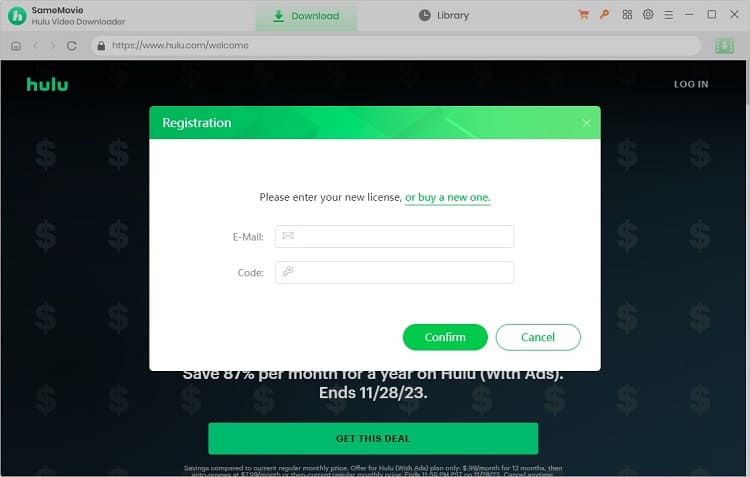
Usually, the license key is emailed immediately after purchase. If not received, check Spam or Promotion folders. Contact us if there are delays or issues with the registration email.
Q2: How can I fix an "Invalid Code" error?
If you receive an "Invalid Code" message, please try the following:
- Please make sure that the installed program matches the product and version you purchased. If you are using the wrong version or platform, the registration code may not work.
- Please check that the registration code exactly matches the code in your purchase confirmation email. Make sure there are no extra spaces or incorrect characters.
- One registration code can only be used on one device at a time. If the code has already been activated on another device, please log out of or deactivate the previous device before trying to activate it on your current device.
- If the issue persists, please contact our customer support team via [email protected] for further assistance.
Q3: Can I Get a Free License?
Just use the trial version of our program, and share your own experience on certain sites. If your review meets the requirements, you can get a MONTH / YEAR license for free! For more details, click here.
Q4: What Kind of Video Does SameMovie Support Downloading? Is It Possible to Use Hulu With Ads?
SameMovie Hulu Video Downloader only supports downloading Hulu videos that are playable within your Hulu subscription. To check if the video is downloadable, you can play it on the official website, or in the built-in player of SameMovie.
If you are wondering if it is able to download videos with Hulu With Ads subscription, the answer is yes. SameMovie supports downloading videos with the ad-supported plan, and the downloaded videos are ad-free.
Q5: What If I Keep Trying to Update and It Fails and Crashes?
If updating the program is unsuccessful, download the latest version using the links below.
- Click here if your computer is a Windows PC (for Windows 10, 11).
- Click here if you're using a Mac (for macOS 11 or higher).
Q6: What Should I Do If I Ordered the Wrong Program/Program Twice?
If you accidentally purchase the wrong program, you can purchase the correct product you want, then contact us within the applicable refund date, and send us both order IDs. We will refund you as soon as possible.
If you order a program twice, please get in touch with our support team with the order IDs. We will give you a refund as soon as we can.
Q6: Why Can't the Program Download a Subtitle/Audio Track for a Specific Language Even Though I Have Set It Up?
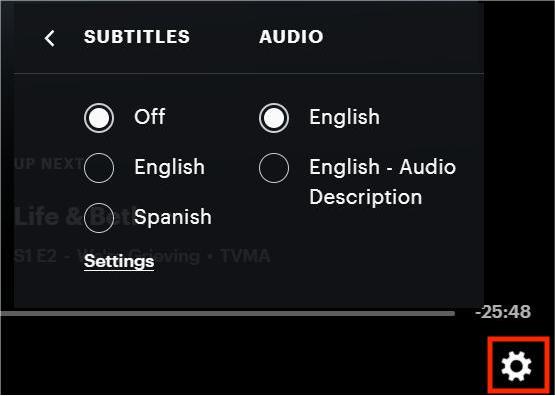
Please be aware that SameMovie can only provide subtitle and audio tracks that are accessible on Hulu's official website. To check if the desired subtitle or audio track is available, please play the video on the official site and click on the gear icon located in the lower right corner. This will allow you to verify the presence of the specific subtitle or audio track you require.
Q7: How to Accelerate the Download Process?
SameMovie supports hardware acceleration with Intel/NVIDIA/AMD graphics cards, which will enable you to run the program more smoothly and speed up the download process. To fully leverage this feature, ensure your computer is equipped with the latest graphics card drivers. Here's a simple guide:
1. Right-click the Windows Start menu, choose "Device Manager" > "Display adapters" > "Update driver".
2. If encountering issues with driver upgrades, consider installing the latest graphics driver directly from your graphics card manufacturer's website Intel / NVIDIA / AMD (select the exact one according to your computer). After upgrading your graphics driver, please reboot your computer to activate it.
Q8: What's the Difference Between External, Internal or Hardcode Subtitles?
SameMovie offers three kinds of subtitles encoding ways to cater to users' needs for playing video on different media players or devices.
- External subtitles: You can store subtitles as independent files (SRT format) with this feature.
- Internal subtitles: Embed subtitles within the output video, allowing language switching during playback in players like VLC Media Player.
- Hardcode subtitles: This mode burns subtitles directly onto your video, but note that you can save subtitles in only one language at a time.
Q9: Solution to other error codes or what if the problem persists?
If you encounter error codes not listed above or if the issue persists despite following the provided solutions, please share the following information with our support team at [email protected] for further analysis:
- Your computer OS and the region of your account.
- A detailed description of the issue, including what happened, what troubleshooting steps you have already tried, and the results.
- Screenshots or a video showing the issue, if available.
- The URL of the video you were trying to download or process.
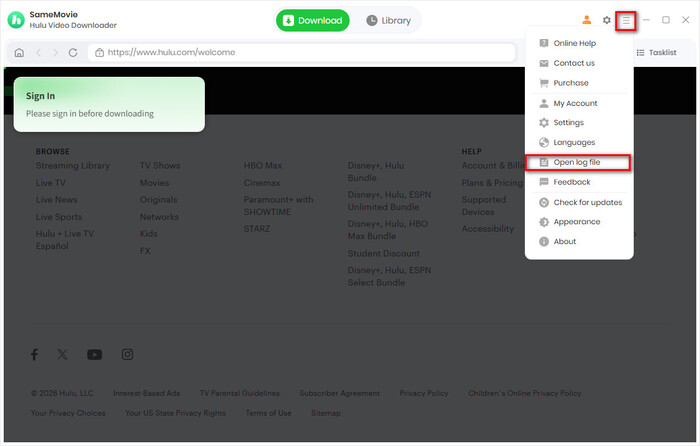
- Log files, which you can find by clicking the Menu icon in the upper right corner > Open Log File.
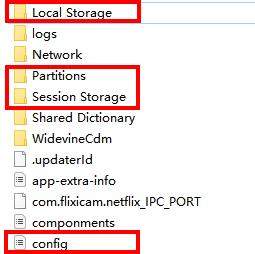
- Login cache files. Please send the relevant files located in the same folder as the log files. As these files may be large, we recommend compressing them into a ZIP file and sharing them through a file transfer service. You can use Buzzheavier to upload and share the ZIP file with us.
Haven't found the answer? We can help.
Contact UsContact us and we'll get back to you as soon as possible.
