




SameMovie Instagram Video Downloader (Free)
Download Instagram Reels, Stories, Feed, and Live videos for free in HD without watermarks. Save them as MP4/MKV files and enjoy offline viewing, anytime, anywhere.
*Note: It's for personal use only.
Download Instagram Videos for Free, Without Watermarks!
A powerful free Instagram video downloader for Reels, Stories, Feed, and Live videos — save and enjoy content anytime, anywhere
Download Any Instagram Video for Free
Instagram doesn’t offer a built-in download feature, and most content on the platform is temporary: Stories disappear after 24 hours, and Reels or posts can be deleted or removed at any time. That’s why you need SameMovie Instagram Video Downloader. It’s a reliable tool that helps you download any Instagram videos on Windows and Mac for free and save them forever.
- Save Instagram Reels without a watermark
- Download Stories before they disappear in 24 hours
- Keep Feed videos from your favorite creators for offline viewing
- Download Instagram Live videos to replay anytime
Whether you want to keep Instagram Reels, Stories, Feed, or Live videos, SameMovie Instagram Video Downloader allows you to download them easily and completely free.
Download Instagram Videos as MP4/MKV for Other Social Media
SameMovie Instagram Video Downloader allows you to download Instagram Reels, Stories, Feed, and Live videos in widely supported MP4 or MKV format — without watermarks.
After downloading, you can edit the downloaded MP4/MKV videos with your favorite editing software, and then repost them on TikTok, YouTube Shorts, and more.

No Watermark

Editable

Repost Anywhere
Check out Top 8 Instagram to MP3 Converter [PC/Mac/Android/iPhone]
Download Instagram Videos in Original HD Quality Easily
Many Instagram downloaders claim to support 1080P downloads, but the saved videos are often compressed, blurry, or lower in quality than the original.
SameMovie Instagram Video Downloader is designed to preserve the original quality of Instagram videos as much as possible. Whether you're downloading Instagram Reels, Stories, Feed videos, or Live streams, videos can be saved in high quality up to 1080P.
With SameMovie, you can easily edit downloaded Instagram Videos in high quality. Or, seamlessly enjoy clear videos on big screens like laptops, tablets, TVs, and more.
Batch Download Instagram Videos at 10X Faster Speed Automatically
Tired of downloading Instagram videos one by one? SameMovie Instagram Video Downloader makes the process much faster and easier.
Whether you want to:
- Save videos from multiple Instagram accounts
- Download multiple Instagram Reels at once
- Preserve Instagram content in bulk for later viewing or editing
SameMovie Instagram Video Downloader helps you batch download videos up to 10X faster. Simply add the videos to the download list, and the program will automatically download them for you.
After that, you can even minimize the program and continue with other tasks while the downloads run in the background.
Discover More Perfect Functions

Ad-Free & Watermark-Free
Download Instagram Reels, Stories, Feed, or Live videos without ads or watermarks.

Preserve Audio & Subtitles
Keep original audio tracks and subtitles when downloading Instagram videos.

Download Process Control
Pause and resume downloads anytime without losing progress.

Built-in Browser
Easily browse, play, and download Instagram videos directly in the program.

Unlimited Free Use
Download Instagram videos freely with no time or quantity limits.

Multi-Language Support
Multi-language and a clean user interface make it easy for every user from around the globe.
Free 🆚 Paid Featuer on SameMovie
Enjoy a wide range of features with the free version, and unlock even more powerful tools by upgrading to the lifetime version.
| Feature |
Unlimited Free
Free
|
Lifetime Plan $110 OFF
$149.9
|
|---|---|---|
| Download Instagram Reels/Stories/Feed/Live Videos | ✅ | ✅ |
| Support Output Format | MP4|MKV | MP4|MKV|MP3|M4A |
| Download Multiple Instagram Videos | ✅ | ✅ |
| Keep Instagram Caption/Subtitle File | ✅ (SRT, VTT) |
✅ (SRT, VTT) |
| Max Download Quality | 1080P | 8K (for YouTube) |
| Download from other 1000+ sites | ✅ (TikTok, FaceBook, Twitter, Instagram, etc.) |
✅ (Netflix, Amazon, Disney+, HBOMax, etc.) |
Why You Need Instagram Video Downloader?
Keep every Instagram moment before it disappears. Watch them anytime, anywhere.
Enjoy Instagram Videos Anywhere, Without Internet Access
Want to browse Instagram while travelling or commuting, but no internet available? Download Instagram videos first with SameMovie, enjoy your media at any time, and never worry about mobile data usage.
Keep Your Favorite Instagram Forever, Never Lose Important Moments
Have your favorite Instagram Reels been deleted, or did Stories disappear before you had a chance to view them? Download Instagram videos with SameMovie, save them forever, and you’ll never miss any memorable moment.
Get Rid of Instagram Restrictions, Download Instagram Freely
Instagram does not have a download feature, and its content often disappears quickly. SameMovie Instagram Video Downloader can break these Instagram limitations and lets you download any Instagram videos permanently.

Why Choose SameMovie

98% Success Rate

Multi-Language

Clean UI

Customizable

Clean Experience

24/7 Support

What people say about us
I use Instagram a lot for collecting inspiration videos, and SameMovie makes it super easy to save Reels and Stories before they disappear. The download speed is fast, and the video quality is surprisingly good.
What I like most is the batch download feature. I can save multiple Instagram videos at once and let the program run in the background while I work. Very convenient and beginner-friendly.
I’ve tried several Instagram downloaders before, but most of them added watermarks or annoying ads. SameMovie is clean, simple, and lets me download videos in HD for offline viewing and editing.
How to Download Instagram Videos with SameMovie?
Step 1: Run SameMovie Video One, select Instagram as the website, and log in to your account.
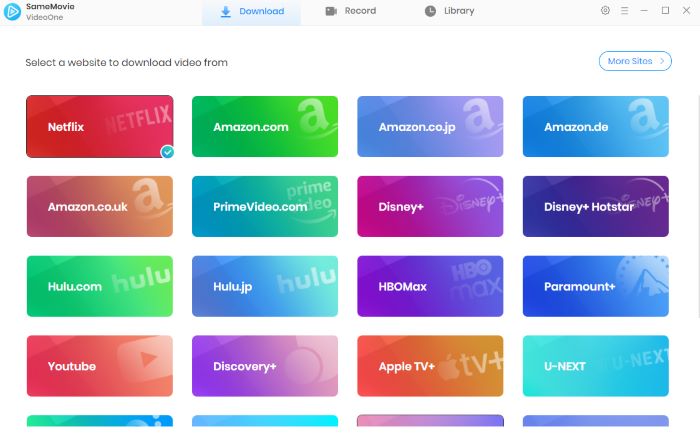
Step 2: Find the Instagram content you want within the built-in browser. Or simply paste the video link into the search bar.
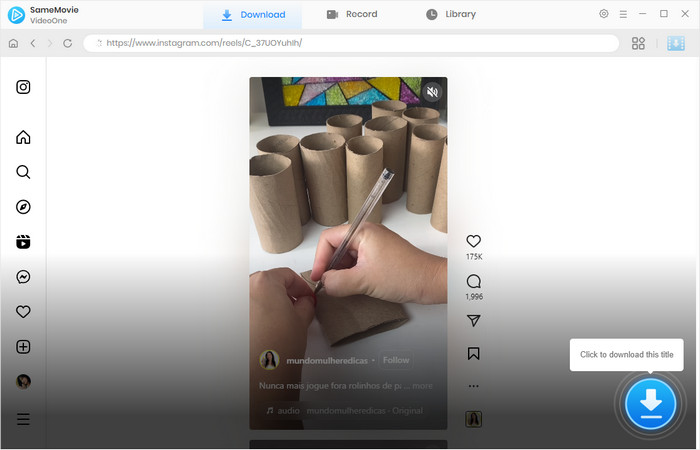
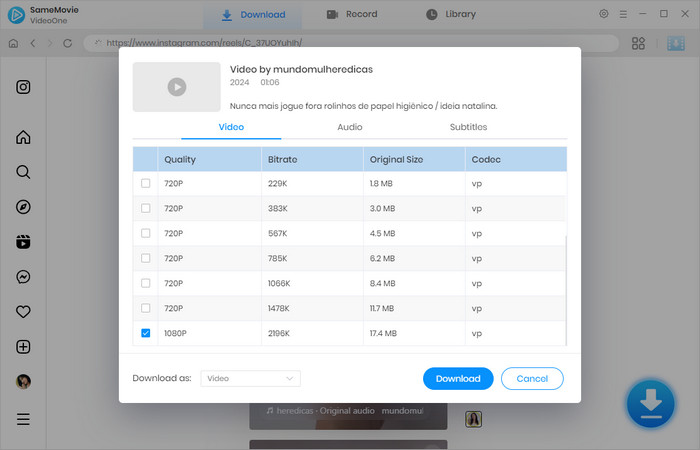
Step 3: Click the Download button in the bottom-right corner. Then choose your preferred video quality, audio language/format, and subtitle language/format, and click Download again.
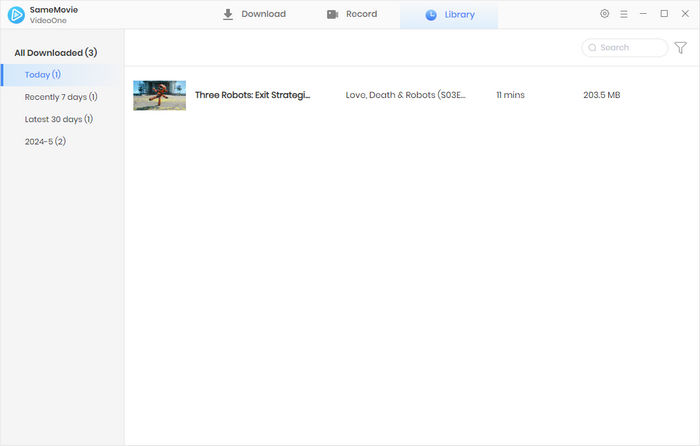
Step 4: Once the download is complete, go to the Library tab to find all your downloaded videos.
(For more detailed tutorial, please refer to Online Help.)
