


SameMovie Video One
- Download movies, TV shows and more from 1000+ video sites;
- Download videos in HD quality, including 720p, 1080p, and 8K
- Preserve multilingual audio tracks and subtitles;
- 8X speed recording for any sites: YouTube, Amazon, TikTok & more
How to Stream Crunchyroll on Discord in 2026 (PC, Mac, Mobile, Firefox & Opera GX)

Clark Clinton March 16, 2026 Category: Topics
Streaming Crunchyroll on Discord is not easy actually. Many users run into black screens, lag, or compatibility issues. In this guide, we'll walk you through how to stream Crunchyroll on Discord across different devices and browsers(PC, Mac, mobile, Firefox, and Opera GX), and introduce a reliable method to eliminate black screens entirely using offline playback.
- Part 1: Can You Stream Crunchyroll on Discord? (What You Need to Know)
- Part 2: How to Stream Crunchyroll on Discord on Different Devices and Browsers
- How to Stream Crunchyroll on Discord with Firefox
- How to Stream Crunchyroll on Discord on Mobile
- How to Stream Crunchyroll on Discord on Mac
- How to Stream Crunchyroll on Discord with Opera GX
- Part 3: How to Stream Crunchyroll on Discord Without Black Screen — 100% Working Offline Method
- Part 4: FAQs about Streaming Crunchyroll on Discord
Part 1: Can You Stream Crunchyroll on Discord? (What You Need to Know)
Can you stream Crunchyroll on Discord? Yes — but it's not as simple as sharing your screen. You might have encountered black screens many times when streaming Crunchyroll with your friends. This doesn't mean you did anything wrong. Actually, the black screen often happens. This is because Crunchyroll uses DRM technology to protect its content from unauthorized recording or sharing.
To start a successful streaming experience, you may need to prepare these staff first:
- A Crunchyroll account — capable of smooth video playback. Some content may require a paid subscription after December 21, 2026. (Check out how to get Crunchyroll free trial >>)
- Use Crunchyroll on web — open Crunchyroll in a browser (crunchyroll.com) rather than the desktop or mobile app.
- Make sure you have Discord client — use either the desktop app (Windows or Mac) or the web version.
- Use a stable browser — Mozilla Firefox is preferred for better compatibility.
With these preparations done, you can move forward. In next section, we'll walk you through how to stream Crunchyroll on Discord on various devices and browsers, and how to fix the black screen issue.
Part 2: How to Stream Crunchyroll on Discord on Different Devices and Browsers
Streaming Crunchyroll on Discord can be tricky because many users have encountered a black screen when sharing their screen. In this section, we'll show you how to stream Crunchyroll on Discord on mobile, Mac, Firefox, and Opera GX — so you can enjoy smooth, high-quality anime streaming with your friends, no matter which device you're using.
How to Stream Crunchyroll on Discord with Firefox
In 2026, Mozilla Firefox is the best choice for streaming Crunchyroll on Discord. Many Reddit users and recent tutorials confirm that Firefox offers the best compatibility with streaming Crunchyroll on Discord. It not only has almost no black screen issues, but also performs much better than Chrome, Edge, or Opera GX.
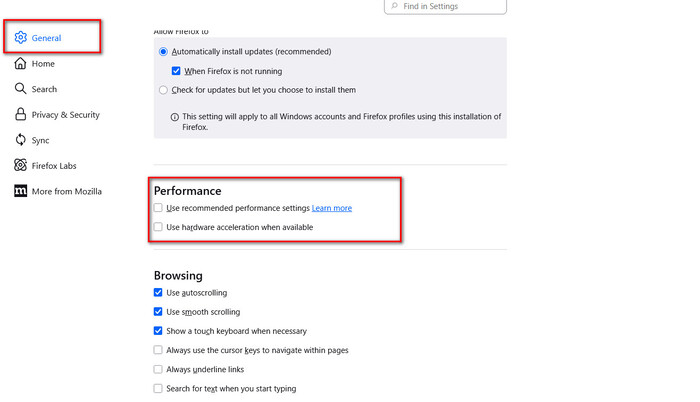
By simply disabling hardware acceleration, you can enjoy stable, black-screen-free sharing. This method works on Windows, Mac, and Linux. Make sure you have a Crunchyroll account and the latest versions of Discord and Firefox before getting started.
Steps to stream Crunchyroll on Discord with Firefox
- Download and install the latest version of Firefox.
- Open Firefox, click the menu icon (☰) at the top right, then go to Settings > General > Performance. Uncheck "Use recommended performance settings" and "Use hardware acceleration when available", then Restart Firefox.
- Go to crunchyroll.com in Firefox and play the anime you want to watch.
- Open the Discord desktop app and click the Screen icon at the bottom.
- Choose Application Window, select the Firefox window, and click Go Live.
How to Stream Crunchyroll on Discord on Mobile
Unfortunately, many Reddit users and recent tutorials indicate that streaming Crunchyroll content Streaming Crunchyroll content directly through the Discord mobile app (Android or iOS) is extremely difficult, as black screen issues are almost impossible to avoid, according to many Reddit users and recent tutorials.
⚠️Can't resolve black screen when streaming Crunchyroll on mobile? Try downloading Crunchyroll with SameMovie and sharing it to Discord!!
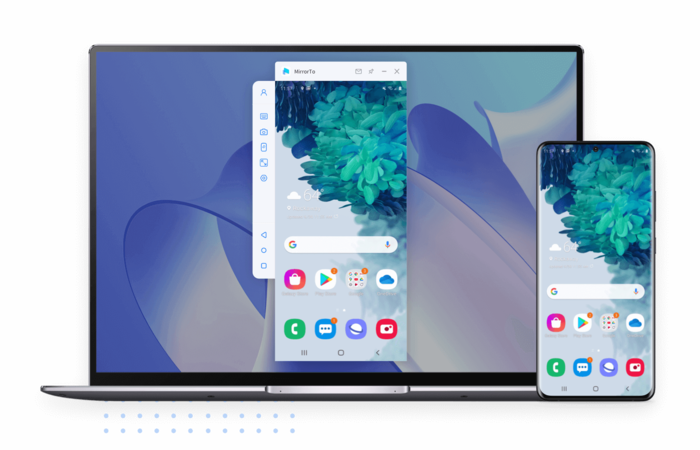
Steps to stream Crunchyroll on Discord Mobile using mirror tools
- Install and launch the screen mirroring tool(iMyFone MirrorTo, AnyMiro) to mirror your phone screen to your computer. This way, anything you do on your phone will appear in real time on your computer.
- Open the Crunchyroll app on your phone and select the anime you want to watch.
- Open Discord on your computer and share the mirrored window. Your phone screen will now be visible to others on Discord, allowing you to stream Crunchyroll successfully.
How to Stream Crunchyroll on Discord on Mac
Streaming Crunchyroll to Discord on a Mac is significantly more stable than on mobile devices. The most basic method remains using the browser-based web version (crunchyroll.com) combined with screen sharing via the Discord desktop client.
However, be aware of two common pain points: black screen issues and screen recording permissions (macOS privacy settings). Recommended browsers include Safari, Chrome, and Firefox.
Steps to stream Crunchyroll on Discord on Mac
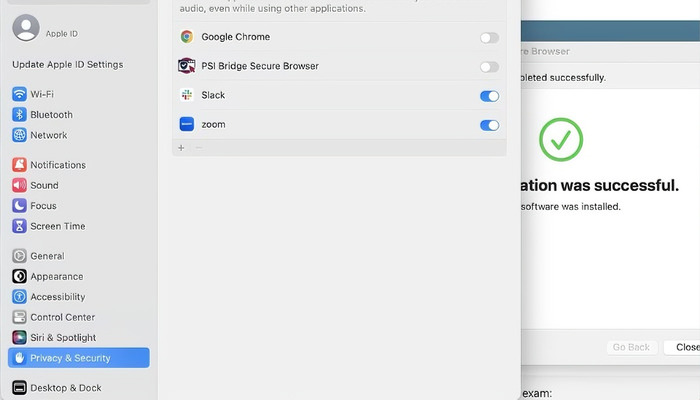
- Grant screen recording permission (required for macOS Ventura and later):
- Go to System Settings > Privacy & Security > Screen & System Audio Recording.
- Find your browser (Firefox, Chrome, or Safari) and enable it.
- Open Crunchyroll in Firefox (recommended) and select the anime you want to play.
- Adjust Firefox settings for smooth streaming:
- Go to Preferences > General > Performance.
- Uncheck "Use recommended performance settings" and "Use hardware acceleration when available".
- Open Discord, start a screen share, and select the browser window playing Crunchyroll.
⚠️Tired of complicated steps? Just use SameMovie to download Crunchyroll and share to Discord in one go!
How to Stream Crunchyroll on Discord with Opera GX
Opera GX is a browser designed for gamers. It features gaming-style themes, RGB lighting, CPU/RAM/network limiters, and built-in sidebar integrations for Discord and Twitch. Many Reddit users report that Opera GX's built-in limiters sometimes perform better than Chrome for smooth streaming. Streaming Crunchyroll on Discord using Opera GX is therefore a solid choice.
Steps to stream Crunchyroll on Discord using Opera GX
- Download the latest version of Opera GX from opera.com/gx
- Open Opera GX and go to Settings.
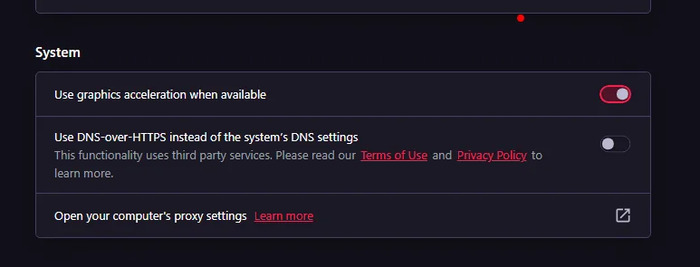
- Search for "hardware" or scroll to Features > System.
- Turn off Use hardware acceleration when available and click Relaunch.
- Visit crunchyroll.com in Opera GX, log in, and select the anime you want to watch. Play in full screen.
- Open the Discord desktop app, click the Screen icon, choose Application Window, select the Opera GX window, and click Go Live.
Now you've learned how to stream Crunchyroll on Discord using Firefox, mobile devices, Mac, and Opera GX.
However, these methods can still sometimes result in black screen issues. So how can you truly stream Crunchyroll on Discord without any black screen and even enjoy offline viewing without restrictions? Keep reading to find out.
Part 3: How to Stream Crunchyroll on Discord Without Black Screen — 100% Working Offline Method
If you've tried all the methods above and are still encountering black screens when streaming Crunchyroll on Discord, you can consider download Crunchyroll anime then play it on Discord. This way, you don't worry black screens anymore.
To do this, SameMovie Video One offers a good service. It lets you download Crunchyroll anime as local MP4 or MKV files, allowing you to stream on Discord without black screens, lag, or connection issues. Besides, SameMovie preserves the original video quality up to 1080P.
This allows you to stream Crunchyroll on Discord with clear and stable visuals. SameMovie also supports batch downloads and high-speed downloading, making it easy to download multiple episodes or entire seasons ahead of time and prepare everything before your Discord stream.
✨Key Features of SameMovie Video One:
- No black screen on Discord – Videos are downloaded as local MP4/MKV files, avoiding screen sharing limitations.
- Up to 1080P original quality – Stream anime with clear and stable visuals.
- Works on Windows & Mac – Share downloaded videos on Discord without browser tweaks.
- Batch downloads – Download full seasons or multiple episodes at once.
- Multi-language audio & subtitles – Select audio tracks and subtitles before downloading.
- Free Crunchyroll downloads – Download and prepare content for Discord streaming at no cost.
Check out the full review of SameMovie Video One
Free Trial Free TrialHow to stream Crunchyroll on Discord with SameMovie
STEP 1 Select Crunchyroll as the Streaming Platform
Download and launch SameMovie Video One on your computer. On the main interface, choose Crunchyroll as the streaming site.
Note: SameMovie works on Windows 11/10 and macOS 11 - macOS 26.

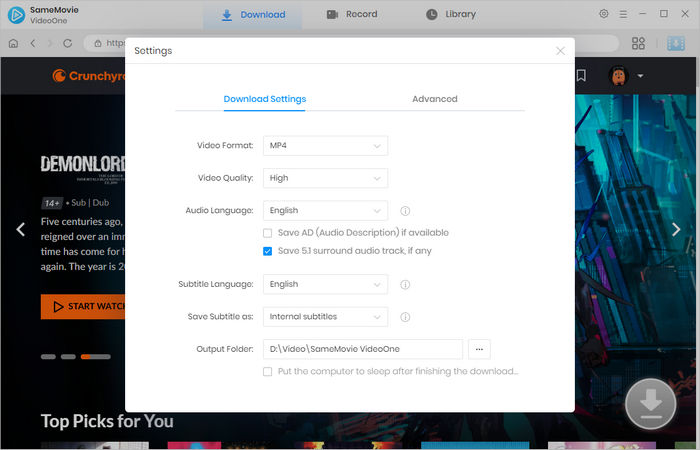
STEP 2 Set Download Preferences
Click the Settings icon in the top-right corner. Choose your preferred video resolution, subtitle and audio language, and output folder.
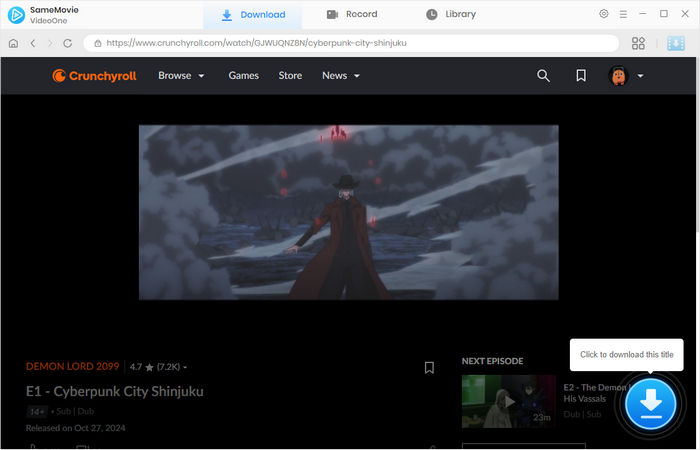
STEP 3 Search for Crunchyroll Anime
Use the search bar to enter the anime title you want to download or just paste the link of the Crunchyroll anime. Then, click the Download button.
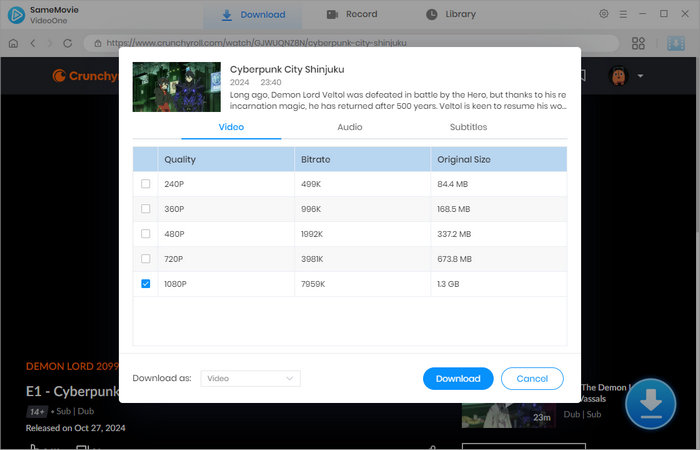
STEP 4 Adjust Advanced Options
Before downloading, you can fine-tune advanced settings such as video quality, audio tracks, and subtitle types to match your streaming needs.
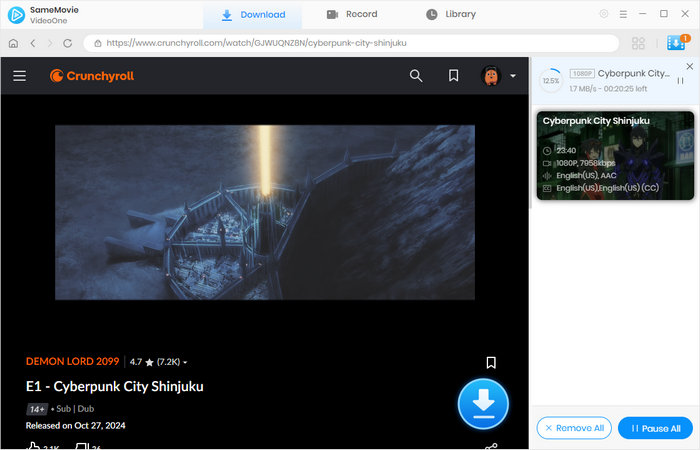
STEP 5 Download Crunchyroll Videos
Click Download again to start the process. SameMovie supports batch downloads, allowing you to download multiple episodes or entire seasons efficiently.
STEP 6 Access Your Downloaded Videos
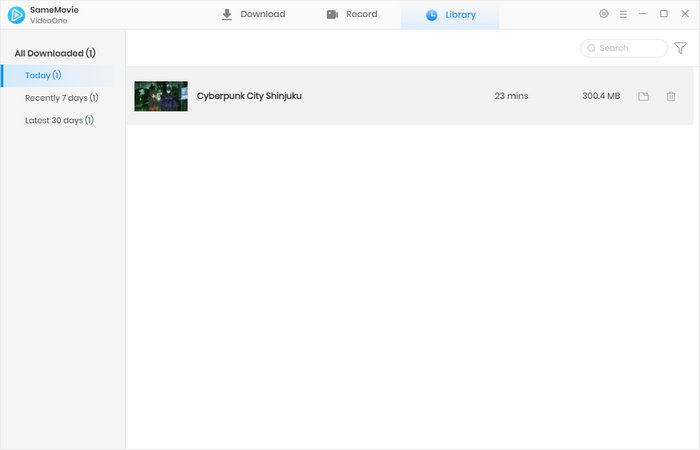
Once the download is complete, go to the Library tab at the top. All downloaded Crunchyroll videos will be neatly organized and ready to play offline.
STEP 7 Stream Crunchyroll on Discord Without Black Screen
Open the downloaded video using any media player on your computer.
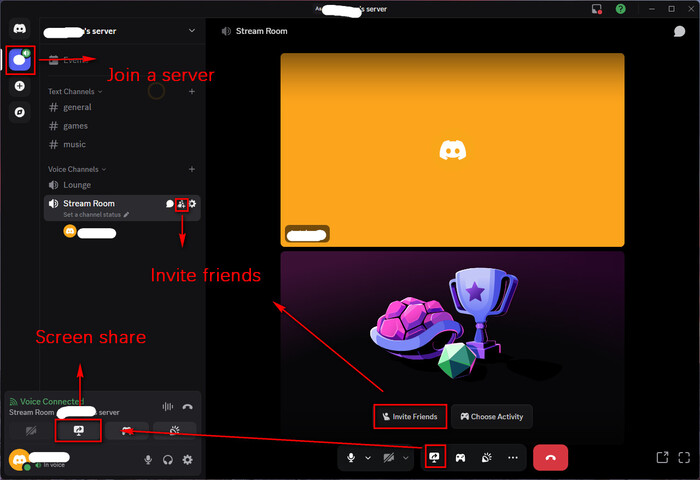
Launch the Discord desktop app, click the Screen icon, select Application Window, choose your media player window, and click Go Live.
Your Crunchyroll anime will now stream smoothly on Discord — with no black screen, no lag or unstable connections, and no browser limitations.
Part 4: FAQs about Streaming Crunchyroll on Discord
Will Discord detect offline videos downloaded with SameMovie?
No. Discord treats locally saved MP4/MKV files like any other video. There are no screen sharing limitations applied, so streaming offline videos avoids black screen issues.
Can I share Crunchyroll videos in a public Discord server?
Sharing copyrighted content publicly may violate copyright laws and Discord's terms. We suggest stream Crunchyroll within private channels or with a closed group of friends.
Can I stream Crunchyroll on mobile using SameMovie downloads?
Yes, you can. Simply transfer the downloaded MP4 or MKV file from your computer to your mobile device or iPhone. Once the video is on your phone, open it with a media player app and share your screen on Discord. This way, you can stream Crunchyroll on mobile without encountering black screen issues.
Conclusion
You don't have to be frustrating for the black screens when streaming Crunchyroll on Discord. We have provided detailed steps of how to stream Crunchyroll on Discord for mobile, Mac, Firefox, and Opera GX, and there must be something that works for you. If you want to enjoy a 100% black-screen-free and high quality streaming experience on PC and Mac, SameMovie is a good . Watching and streaming your favorite Crunchyroll anime on Discord with your friends now!
Clark Clinton is a senior writer renowned for her expertise in resolving streaming platform download errors. Her concise writing style and practical methods have earned her a stellar reputation among readers and peers alike. Whether you're facing a technical glitch or seeking streaming tips, Clark's guidance ensures a smooth and enjoyable reading experience.