



SameMovie Netflix Video Downloader
- Download movies on Netflix on laptops in high quality(1080P);
- Download Netflix movies and TV shows to MP4/MKV Format in batch;
- Save multilingual audio tracks (including Atmos) and subtitles;
- Super high download speed & download success rate.
KeepStreams Netflix Downloader Review: Is It Still Working in 2026?

Clark Clinton September 25, 2026 Category: Topics
Netflix has been a popular streaming platform worldwide, but its download feature is very limited. Many users have found that Netflix has no download option on Windows, no Netflix app for Mac, and that downloads often expire after a while. That's why many people tend to explore a third-party tool like KeepStreams Netflix Downloader.
However, is KeepStreams still working in 2026? Is KeepStreams Netflix Downloader free? Is KeepStreams legal to use? To find out all these questions and gain real-world experience, we decided to give KeepStreams Netflix Downloader a hands-on review, testing its success rate, downloadable Netflix content, speed, quality, and KeepStreams' best alternative. If you want to know, keep reading.
 You May Also Like: KeepStreams Review 2026: Pricing, Safety, & Performance
- Part 1: What Is KeepStreams Netflix Downloader?
- Part 2: Is KeepStreams Netflix Downloader Free?
- Part 3: Is KeepStreams Legal to Use?
- Part 4: Real Test - Is KeepStreams Netflix Downloader Still Working?
- Part 5: Pros and Cons of KeepStreams Netflix Downloader
- Part 6: Best Alternative to KeepStreams Netflix Downloader ✨
- Part 7: FAQs about KeepStreams Netflix Downloader
Part 1: What Is KeepStreams Netflix Downloader?
Unlike a normal recorder, which records the video 1:1, KeepStreams downloads Netflix movies and shows on a laptop as MP4/MKV files in 1080P. After downloading, you can save Netflix videos permanently, transfer them to other devices, breaking Netflix's 48-hour expiration rule and limited device download restrictions.
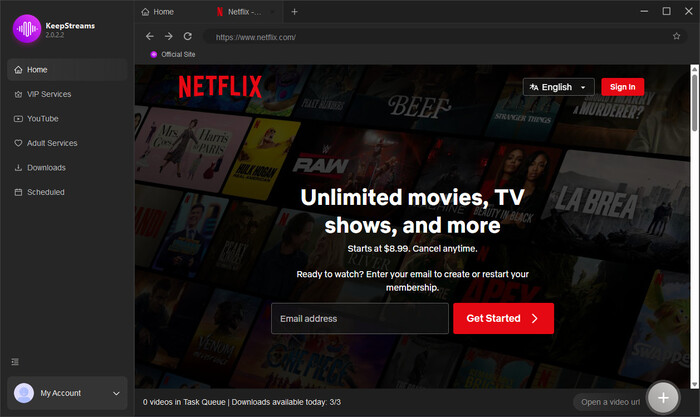
Basic Information and Features of KeepStreams Netflix Downloader
| Features | KeepStreams Netflix Downloader |
|---|---|
| Compatibility | Windows 10/11 macOS 12.0 or later |
| Netflix Account Requirements | Standard with Ads (and above) |
| Netflix App Required | No Netflix app required |
| Login | Within built-in browser |
| Maximum Quality | 1080P |
| Resolution Selection | 480P / 720P / 1080P |
| File Size Control | Supported |
| Audio Quality | AAC 2.0, EAC3 5.1, Dolby Atmos |
| Subtitle Support | Retains original Netflix subtitles Multi-language subtitle support |
| Output Options | Embedded or external SRT files |
| Batch Download | ✅ |
| Global Accessibility | ✅ |
| Automatic Download | ✅ |
| Ad Removal | ✅ |
| Netflix Content Support | Movies, TV series, multi-season shows |
Part 2: Is KeepStreams Netflix Downloader Free?
Unfortunately, KeepStreams is not a free tool, and it only provides a limited free trial, which includes 3 free downloads for major streaming platforms like Netflix. However, once your free trial quota is used up, the free downloads will be disabled, and you will have to purchase the KeepStreams One plan to continue downloading from Netflix.
In my opinion, if you just want to occasionally download one or two shows to watch locally, this free quota is more than enough.
Here's KeepStreams pricing in detail:
| Plan | Monthly | Yearly | Lifetime |
|---|---|---|---|
| KeepStreams Netflix Downloader | $34.99 | $69.99 | $99.99 |
| KeepStreams One | $69.99 | $169.99 | $269.99 |
| Refund Policy | 7-day money-back guarantee | 7-day money-back guarantee | 14-day money-back guarantee |
| Free Trial |
YouTube: Free to download unlimited videos (only 720P) Other Platforms: 3 free downloads within 30 days |
||
You May Also Like: 6 Legal Ways to Get Netflix for Free in 2026
Part 3: Is KeepStreams Legal to Use?
Generally speaking, KeepStreams itself is not illegal, as it does not host or distribute any copyrighted content. Instead, it functions only as a downloader that processes streaming data from supported platforms.
However, when it comes to whether downloading Netflix movies with KeepStreams is legal, it becomes more complex.
According to American copyright law, there is a principle called Fair Use, which allows the use of copyrighted material without the copyright holder's authorization when it is used for educational, commentary, research, or news purposes.
Therefore, downloading Netflix movies you have subscribed to with KeepStreams and using them for offline viewing only may be considered acceptable. But you need to remember: never share or distribute the downloaded movies to others, and don't download a large quantity of Netflix movies at a time. Otherwise, your account might be banned and you might violate your local policies.
Part 4: Real Test - Is KeepStreams Netflix Downloader Still Working?
To figure out how KeepStreams Netflix Video Downloader is in the real world, we use it to download 3 of Netflix's latest trending series and movies in 2026: His & Hers, Something Very Bad Is Going to Happen, Office Romance. These can represent a mix of a standard drama episode, a heavy CGI sci-fi show, and a full-length feature film.
Additionally, we primarily evaluated KeepStreams in three aspects: Download Speed, Video Quality, and Subtitle/Audio Extraction. Keep reading to find out the detailed testing environment and results.
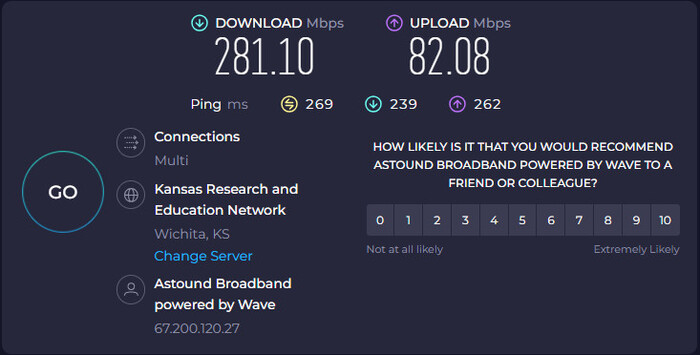
Testing Environment
- Device: Windows 11 Pro
- Storage: 139 GB of 462 GB used
- Processor: Intel(R) Core(TM) i3-10105 CPU @ 3.70GHz (3.70 GHz)
- Graphics: Intel(R) UHD Graphics 630 (128 MB)
- Internet: 226.79 Mbps Mbps
- Program: KeepStreams (latest version)
- Netflix Account: Standard with Ads
Downloading Speed
The average downloading speed is from 7 mb/s to 8mb/s and the download time is acceptable. Even for large files, the download speed and time would not be affected too much, and would perform relatively stably. However, while batch downloading, the downloading speed may be slightly slower.
| Tested Title (2026 Releases) | Length | File Size | Download Time | Average Speed |
|---|---|---|---|---|
| His & Hers (Season 1, Episode 1) | 48 mins | 1.4 GB | 3 mins 15 secs | ~7.3 MB/s |
| Something Very Bad Is Going to Happen (Episode 1) | 55 mins | 1.8 GB | 3 mins 58 secs | ~7.7 MB/s |
| Office Romance (2026) | 1 hr 52 mins | 3.6 GB | 7 mins 42 secs | ~8.0 MB/s |
Video Quality
The downloaded video quality is good. Almost every series can be kept in high quality, close to Netflix's official 1080p high-bitrate quality. However, it doesn't support 4K, which is a bit of a pity for some movies and TV shows that do support 4K.
| Tested Title | Selected Quality | Actual Output Resolution | Video Codec | True Bitrate |
|---|---|---|---|---|
| His & Hers (S1E1) | 1080p | 1920×1080 | H.264 (AVC) | ~4200 kbps |
| Something Very Bad Is Going to Happen | 1080p | 1920×1080 | H.265 (HEVC) | ~3100 kbps |
| Office Romance (2026) | 720p | 1280×720 | H.264 (AVC) | ~2200 kbps |
Subtitle and Audio Track Test
Subtitle and audio track support is excellent. For most content, you can keep the original audio and multilingual subtitles, or extract the audio and subtitles separately. However, in some cases, you may need to re-download the files to fix issues.
| Tested Title | Selected Audio | Selected Subtitles | Subtitle Output Format |
|---|---|---|---|
| His & Hers (S1E1) | English [Original] (AAC 2.0) | English (CC), Spanish | External .SRT files |
| Something Very Bad Is Going to Happen | English (EAC3 5.1) | English, Japanese | Remuxed |
| Office Romance (2026) | English (Dolby Atmos) | English, French, German | External .SRT files |
Part 5: Pros and Cons of KeepStreams Netflix Downloader
The Author's Reviews of KeepStreams Netflix Downloader:
😊 What I Liked about KeepStreams
- KeepStreams break through Netflix expiration limits, and downloads Netflix movies as MP4/MKV files and saves them forever.
- KeepStreams can remove Netflix ads and download only the video content.
- Official Netflix downloads can only be viewed within the app, but downloads made with KeepStreams can be transferred to any device.
😣 What I Disliked about KeepStreams
- During testing, when my internet speed was slow or unstable, KeepStreams often failed to process the video and would stay stuck on loading.
- It's not a separate specialized tool for Netflix - Instead, it is bundled with support for 1,000+ other platforms.
- KeepStreams is a paid tool, and The free trial is quite limited, offering only 3 free Netflix downloads.
Real Reviews of KeepStreams Netflix Downloader from Other Platforms
Positive Review
1. "Some users think KeepStreams has a clean and user-friendly interface making downloading process simple and easy."
2. "I like the ease of use in downloading from multiple movie sources. One suggestion I might make is to identify occurrences when I might be downloading a file already obtained, t herefore avoiding creating duplicates..."
3. "Most stable stream capture programs i have found so far, it have had some periods of problems with downloading but all these programs do. KeepStreams also let you easy select video and audio formats of your choice and the possibility to save subtitles as srt if you want is a big benefit."
Negative Review
1. "Would give this site no stars. Paid for a subscription but there is no activation for the software. After the support staff said it was fixed, the software still does not work. The support staff continues to argue about fixing the software instead of providing a refund. Requested a refund within their 7 day 'satisfaction guarantee'. Was told that a refund is not unconditional. "
2. "I purchased the lifetime subscription. I'm only happy with the service about 50% of the time. Every month, there is another update, and a critical error occurs approximately 33% of the time. Right now, my account shows 7 support tickets over the last year caused by the updates. Most of the titles start, 'Following the latest update...'"
3. "Had an issue with this software, I requested refund on ticket within time as stated in refund policy but my request was just ignored, they just tried to get over 7 day refund time."
In short, KeepStreams performs well in terms of features and download quality, but its cost and post-purchase experience caused dissatisfaction among some users, particularly regarding the failure to comply with the refund policy.
Part 6: Best Alternative to KeepStreams Netflix Downloader
If KeepStreams doesn't comply with the refund and realty make users worry, here's the best KeepStreams alternative in 2026:
SameMovie Netflix downloader, unlike KeepStreams, which constantly tries to push its all-in-one package, is a truly standalone, dedicated downloader for Netflix. It features a simple interface, no cluttered unrelated platforms, and uses less memory.

Key Features of SameMovie Netflix Video Downloader:
- Allows you download Netflix movis on laptops.
- Remove Netflix ads and download all movies without limits.
- 10X faster download speed for quick and efficient saving.
- Offers 1080p resolution, MP4/MKV formats, and multiple subtitle/audio track options.
- Supports batch downloads for full seasons or playlists.
- Clean interface and completely ad-free experience.
Check out full review of SameMovie Netflix Downloader >>
Free Trial Free TrialHow to Download Netflix Movies with SameMovie
STEP 1 Install SameMovie Netflix Video Downloader
Install and launch SameMovie Netflix Video downloader on your device. Then, log in to your Netflix account.
Note: SameMovie works on Windows 11/10 and macOS 11 - macOS 26.
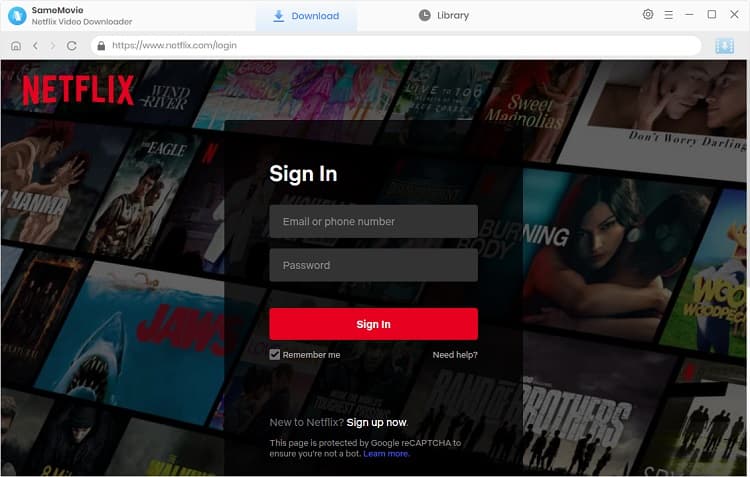
STEP 2 Search for Netflix Movies and Series
With SameMovie Netflix Video Downloader's built-in browser, you can easily browse and find the Netflix movies you want to download within the program. Or, simply copy and paste the video link in the search bar.
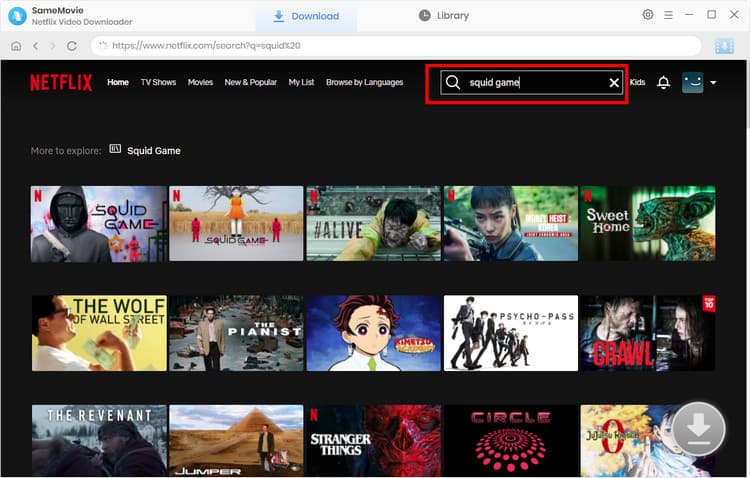
STEP 3 Customize Netflix Download Settings
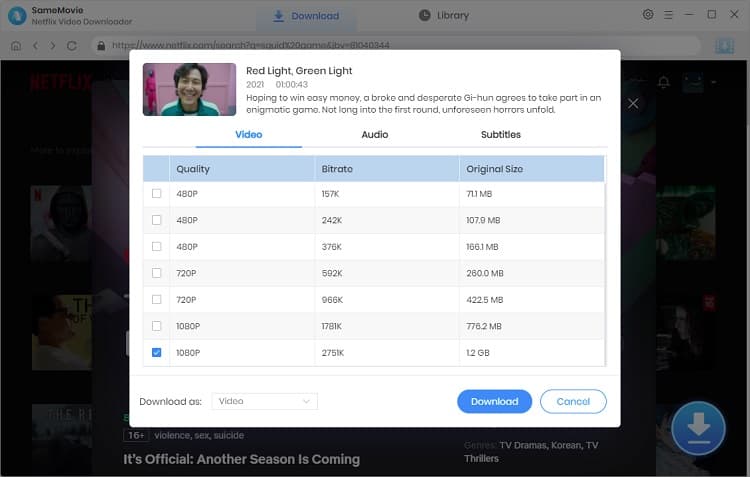
Once the video has loaded, click the Download button in the bottom right corner and choose your desired video quality, audio tracks, and subtitle options in the Advanced Download window. Then, click the Download button again.
STEP 4 Locate Downloaded Netflix Movies
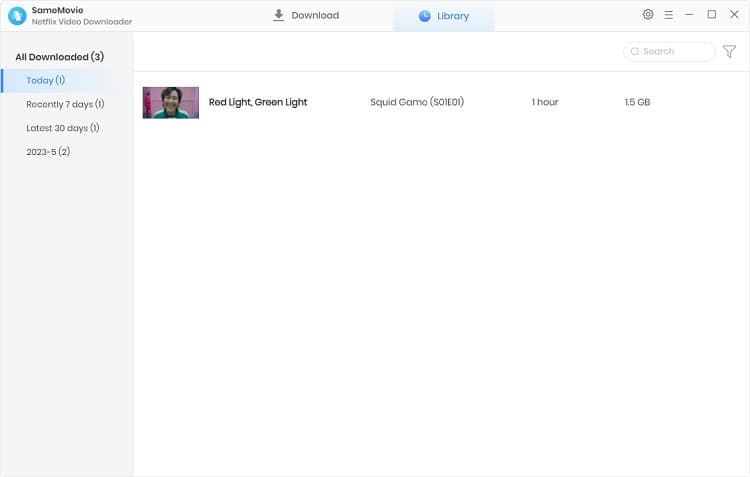
With SameMovie hardware acceleration, the downloads will be finished very fast. Once done, go to the Library tab to locate all downloaded Netflix movies.
SameMovie Netflix Downloader vs SameMovie Video One vs KeepStreams
| SameMovie Video One | SameMovie Netflix Downloader | KeepStreams | |
|---|---|---|---|
| Rating | 🌟🌟🌟🌟🌟 | 🌟🌟🌟🌟 | 🌟🌟🌟🌟 |
| Pricing | $149.9 LFT | $79.9 LFT | $99.9 - $269.9 LFT |
| Compatibility | Windows 10-11 macOS 11-26 |
Windows 10-11 macOS 11-26 |
Windows 10-11 macOS 12 and later |
| Supported Platforms | All OTT platforms & 1000+ streaming sites | Netflix | 3000+ streaming sites |
| Free Trial | Unlimited downloads for 1000+ sites: YouTube, Abema, TikTok, Facebook, Viki, etc. |
Download first 5 minutes of each video, no quality, quantity, or time limits |
Free downloads of YouTube (only 720P) 3 downloads of Netflix, Amazon, Disney+... |
| Maximum Quality | 8K | 1080P | 4K |
| Audio Quality | Dolby 5.1 / AAC 2.0 audio | Dolby 5.1 / AAC 2.0 audio | Dolby 5.1 / AAC 2.0 audio |
| Multiple Audio Tracks | ✅ | ✅ | ✅ |
| Subtitle Support | Internal, External, Hardcoded | Internal, External, Hardcoded | Embedded / External |
| Multi-language Support | ✅ | ✅ | ✅ |
| Batch Download | ✅ | ✅ | ✅ |
| Hardware Acceleration | ✅ | ✅ | ✅ |
| Recording Feature | ✅ | ❌ | ❌ |
Part 7: FAQs about KeepStreams Netflix Downloader
Does KeepStreams Netflix Downloader work on PC?
Yes. KeepStreams Netflix Downloader works on PC. It supports Windows 10 and later, as well as macOS 12 or later.
Is there a KeepStreams Netflix Downloader APK?
No. KeepStreams only supports downloading Netflix movies or shows on laptops, including Windows PCs and MacBooks. There isn't a KeepStreams Netflix Downloader APK, and according to its official website, there is no plan to support Netflix downloads on mobile devices like Android, iPhone, or iPad.
What is the best Netflix downloader in 2026?
It's hard to say which downloader is the best. It depends more on your personal needs. This guide introduced our test of KeepStreams Netflix Downloader and its alternative SameMovie Netflix Downloader, which can provide you with a point of view. If you want to know more about downloaders and real reviews, you can check out:
Conclusion
In this guide, we break down what KeepStreams Netflix Downloader is, and whether KeepStreams Netflix Downloader is still working in 2026. We also showed our tests of KeepStreams, presenting its download speed, video quality, audio/subtitle support, and more. While it performs well in function, failure to comply with the refund policy is truly concerning.
If you're looking for a Netflix downloader that's just as stable and successful at downloading Netflix movies but offers better value for money, we recommend SameMovie Netflix Downlaoder.
Clark Clinton is a senior writer renowned for her expertise in resolving streaming platform download errors. Her concise writing style and practical methods have earned her a stellar reputation among readers and peers alike. Whether you're facing a technical glitch or seeking streaming tips, Nina's guidance ensures a smooth and enjoyable reading experience.