



SameMovie Video One
- Download movies, TV shows and more from 1000+ video sites;
- Download videos in HD quality, including 720p, 1080p, and 8K
- Preserve multilingual audio tracks and subtitles;
- 8X speed recording for any sites: YouTube, Amazon, TikTok & more
KeepStreams Review 2026: Pricing, Safety, & Performance

Clark Clinton May 11, 2026 Category: Topics
Is KeepStreams free? Is KeepStreams safe and legit? Is KeepStreams worth it?
If you're on the fence about whether to buy KeepStreams, you can't miss this detailed KeepStreams review. I personally tested the software and analyzed real user feedback from Trustpilot, all of which are included in this review. After reading it, you'll have a comprehensive understanding of KeepStreams pricing, features, security, and download performance. Let's dive in.
 You May Also Like: KeepStreams Netflix Downloader Review: Is It Still Working in 2026?
- Part 1: What is KeepStreams?
- Part 2: Key Features of KeepStreams
- Part 3: Is KeepStreams Legal and Safe to Use?
- Part 4: KeepStreams Performance Test (Speed, Quality & Stability in 2026)
- Part 5: Pros and Cons of KeepStreams
- Part 6: Best KeepStreams Alternative in 2026 ✨
- Part 7: FAQs about KeepStreams and Its Alternative
Part 1: What is KeepStreams?
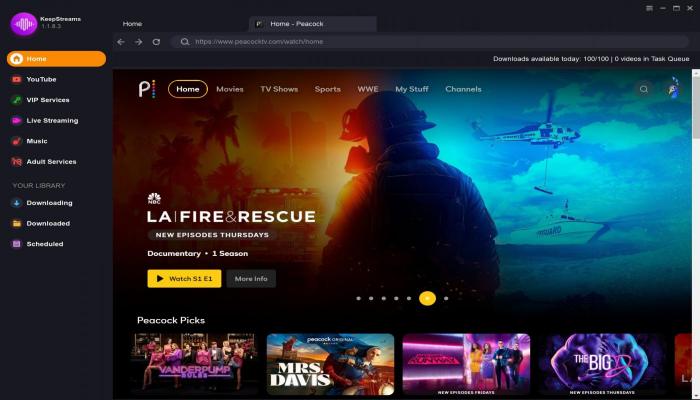
KeepStreams One is an all-in-one downloader that allows users to download videos from thousands of popular platforms, including Netflix, Amazon Prime Video, Disney+, and more, in HD on both PC and Mac.
After downloading, you can save these videos forever without worrying about your subscription expiring date, and watch them offline anytime on any device.
Here's the basic information of KeepStreams
| Features | KeepStreams One |
|---|---|
| Is KeepStreams Free? | ❌ |
| Compatibility | Windows 10/11 macOS 11.0 or later |
| Supported Streaming Services | 3000+ (Netflix, Amazon Prime, Disney+, etc.) |
| Maximum Video Quality | Up to 4K |
| Audio Effects | Dolby Atmos / 5.1 / AAC |
| Output Formats | MP4, MKV |
| Video Codec | H.264, H.265, VP9, AV1 |
| Language Support | Multi-language (25+) |
Pricing of KeepStreams
| Plan | Monthly | Yearly | Lifetime |
|---|---|---|---|
| KeepStreams One | $69.99 | $169.99 | $269.99 |
| KeepStreams Single Product | $34.99 | $69.99 | $99.99 |
| KeepStreams MyChoice (customizable bundle) |
/ | / | $99.99 - $199.99 |
| Refund Policy | 7-day money-back guarantee | 7-day money-back guarantee | 14-day money-back guarantee |
| Free Trial |
YouTube: Free to download unlimited videos (only 720P) Other Platforms: 3 free downloads within 30 days |
||
Part 2: Key Features of KeepStreams
There are a few features of KeepStreams that I particularly like:
Feature 1: Batch & Scheduled Download
One of the features I like most about KeepStreams is its batch and scheduled download capability.
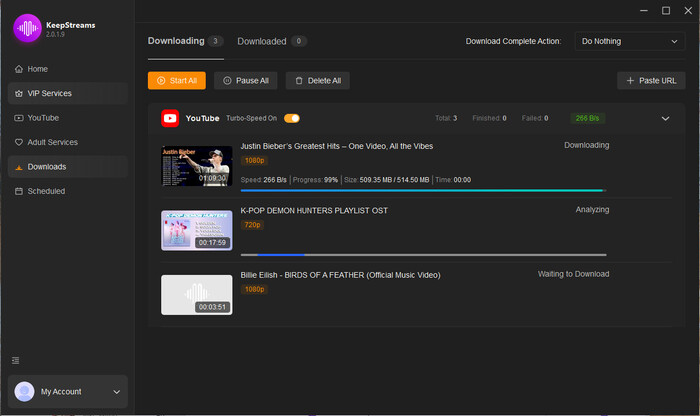
You can add multiple movies or TV shows to the download list and download them with one click. In addition, KeepStreams allows you to subscribe to your favorite YouTube channels in the Scheduled tab, so it can automatically download newly uploaded videos from those channels.
These features make KeepStreams especially convenient for users who want to download videos in bulk or keep their favorite YouTube content updated without manual effort.
Feature 2: Remove Ads
The ad-free experience is one of the key reasons why KeepStreams is worth it.
There is no doubt that you must have experienced similar issues with me – feeling reluctant to pay extra for your premium subscription, but having to endure commercials every single time.
With KeepStreams download feature, you can get rid of all the ads and download only video content directly. The downloaded files are totally ad-free, so you can enjoy a truly uninterrupted viewing experience.
You May Also Like: Does Netflix Have Ads in 2026? How to Remove Them?
Feature 3: Download in any regions
There are some streaming sites that are exclusive to certain regions. For instance, Hulu operates mainly in the USA, whereas Disney+ Hotstar operates mostly in India.
But here comes KeepStreams, which allows you to escape those geographic limitations. Regardless of your location, you are allowed to use KeepStreams download function to download videos from compatible streaming sites and enjoy viewing them offline whenever you want.
Part 3: Is KeepStreams Legal and Safe to Use?
Is KeepStreams Malware-Free?
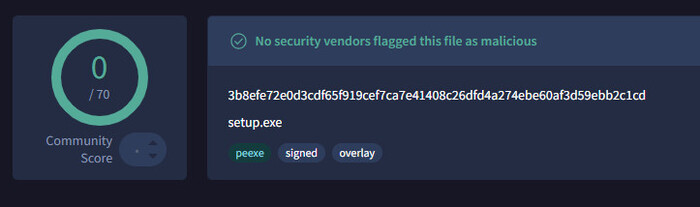
To check whether KeepStreams contains malware or bundled viruses, I scanned its installation package on a well-known online security scanning platform - VirusTotal. The result showed 0/72 detections. This means there is no malware in KeepStreams.
In addition, I did not find any suspicious background activity, unexpected redirects to other websites, or bundled third-party software while installing. Thus, in my opinion, KeepStreams seems to be relatively safe to use.
Does KeepStreams Contain Malicious Ads?
No. There are no pop-ups, redirects or fake download buttons in KeepStreams. What it has is only the clean interface and several supported websites listed here. Therefore, while using, you don't need to worry about clicking any buttons by accident and being redirect to an unknown page. From this perspective, I think KeepStreams is relatively safe and reliable.
Will My Streaming Account Get Banned?
This might be one of the most significant worries for users and is also what I am most concerned about. So, I used my own Netflix account to download movies from KeepStreams for testing. So far, I haven't received any account bans or suspension warnings.
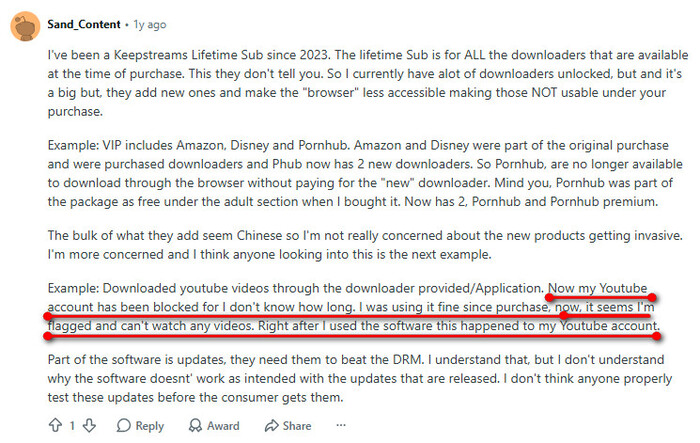
However, to gain a more comprehensive perspective, I also checked other users' comments of KeepStreams on Reddit and Trustpilot, and I found that a reddit user reported his YouTube account was banned after using KeepStreams.
Is KeepStreams Legal?
Streaming services all have strict policies to protect their copyrighted content. This raises the concern of using downloading tools like KeepStreams. Is it legal? Do I violate the terms of services or even local policies?
After checking, I find that using KeepStreams to download movies and shows for personal offline viewing is considered acceptable. However, if you distribute the downloaded files or even sell them without permission, it might be illegal. Therefore, when using these kinds of downloaders, always remember to respect others' copyrights.
Part 4: KeepStreams Performance Test (Speed, Quality & Stability in 2026)
To get a real downloading performance of KeepStreams, I tested three different videos from YouTube, Netflix, and Amazon. Through testing, I found that although the success rate is high, the downloading speed is relatively slow.
Before downloading, I tested my downloading speed using Speedtest by Ookla, and it showed my downloading speed is 281.0 Mbps. However, when I use KeepStreams to download videos from YouTube, Netflix, and Amazon, the speed is only limited to around 4.5MB/s. This might be due to the platform servers, computer performance, VPN influence, or the program's limitations. Each device and internet environment can bring different testing results.
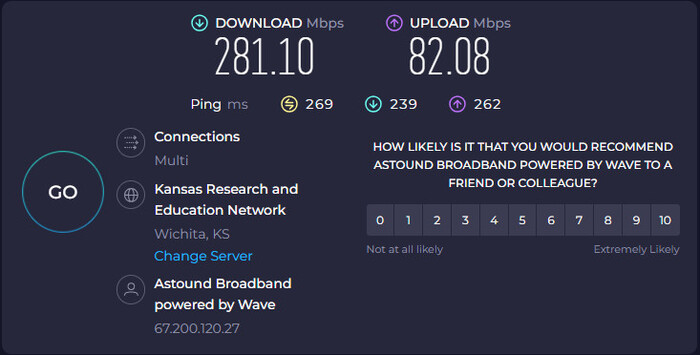
The following are the details of my testing:
Testing Environment
- Device: Windows 11 Pro
- Storage: 139 GB of 462 GB used
- Processor: Intel(R) Core(TM) i3-10105 CPU @ 3.70GHz (3.70 GHz)
- Graphics: Intel(R) UHD Graphics 630 (128 MB)
- Internet: 281 Mbps
- Program: KeepStreams (latest version)
Testing Results
| Metrics | YouTube Video | Stranger Things S01E01 (Netflix) | Interstellar (Amazon) |
|---|---|---|---|
| Duration | 16:33 | 17:52 | 2:49:00 |
| Download Time | 4.4 min | 6.1 min | 27.7 min |
| Speed | 4.54 MB/s | 4.10 MB/s | 4.82 MB/s |
| Video Quality | 1080P | 1080P | 1080P |
| Audio Quality | AAC Stereo 128kbps | Dolby Digital Plus 5.1 | Dolby Digital 5.1 |
Part 5: Pros and Cons of KeepStreams
If you are still wondering whether KeepStreams is worth it, this section can help you know more about the pros and cons of KeepStreams. All reviews mentioned below are real user reviews collected from Trustpilot.
Pros of KeepStreams
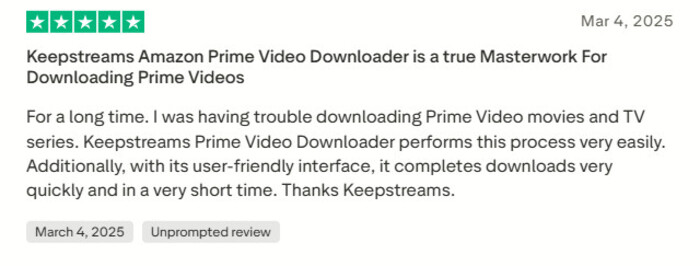
1. Easily download videos
Some users think KeepStreams has a clean and user-friendly interface making downloading process simple and easy.
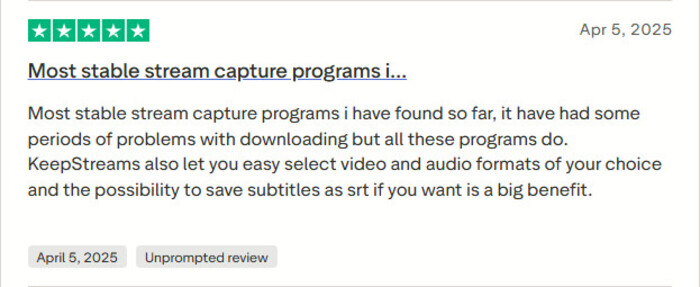
2. Downloading performance is stable
Some users believe that although there are some issues concurring sometimes, the downloading performance and downloading success rate is still relative stable comparing to other downloaders.
Cons of KeepStreams
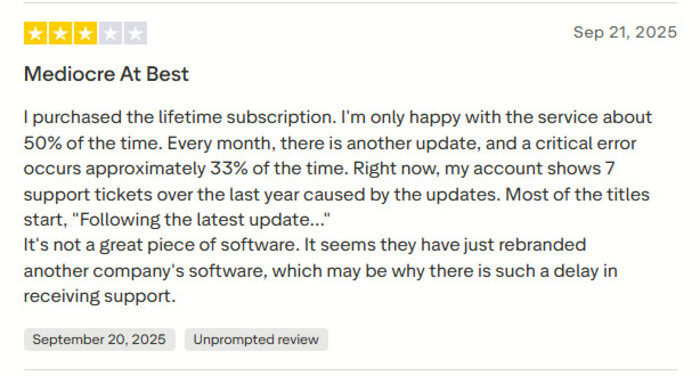
1. Frequent bugs occurs every month
I noticed that a user report that there are frequent bugs occurring every month after updating, and the customer service respond slow which affect using experience significantly.
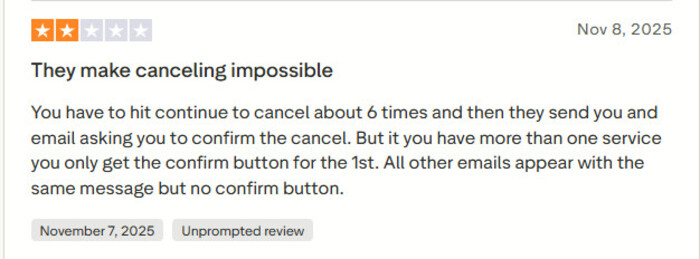
2. It's very difficult to unsubscribing
According to users review on Trustpilot, it seems very hard to cancel subscription of KeepStreams. You can't cancel subscription by one-click, but have to click a "Continue" button at 6 times. Even worse, some users complained that when they want a refund, the customer service just make excuses to delay until the refund policy expires, so that they can't get refund anymore.
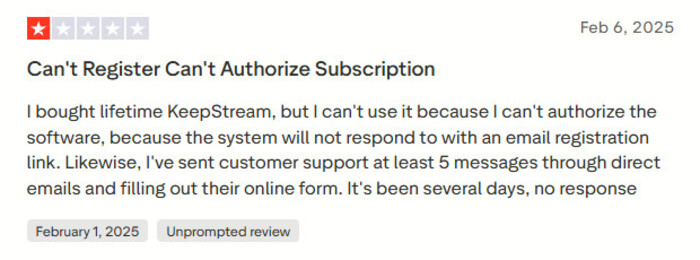
3. Customer Service's slow respond
I also found that there are some complaint about slow respond from KeepStreams' customer service. Some users reflect that they sometimes waiting for several days for a basic task.
Part 6: Best KeepStreams Alternative in 2026
After reading the KeepStreams review above, I'm sure you'll have a full understanding of KeepStreams pricing, features, safety and legality, and its pros and cons. While KeepStreams offers east and stable downloads for streaming platforms, the difficult to unsubscribing and refund really makes users worry that their money will go to waste.
Therefore, finding an alternative to KeepStreams is wise. According to my experience, SameMovie Video One is such a great tool that can take place of KeepStreams. It completely covers the basic features of KeepStreams, which allows you download videos from any OTT streaming platforms, including popular services such as, Netflix, Amazon Prime, Disney+, HBO Max, YouTube, and more.
Plus, two additional advantages of SameMovie compared to KeepStreams are that it supports downloading videos in up to 8K (while KeepStreams supports up to 4K), and it supports hardware acceleration making the downloading speed up to 10X faster.
Here's a detailed comparison of SameMovie and KeepStreams:
| Features | SameMovie | KeepStreams |
|---|---|---|
| Compatibility | Windows & Mac | Windows & Mac |
| Pricing | $149.9 LFT | $269 LFT |
| TrustPilot Rating | 4.0 (33 reviews) | 2.9 (110 reviews) |
| Supported Platforms | Any OTT Platforms & 1000+ Websites | 3000+ streaming sites |
| Supported Formats | MP4 & MKV | MP4 & MKV |
| Free Feature | Downloading from 1000+ platforms (YouTube, Abema, etc.) without time, quality, and quantity limitations |
Free to download on YouTube (only 720P) |
| Maximum Video Quality | 8K | 4K |
| Audio Quality | Dolby 5.1 | Dolby 5.1 |
| Batch Download | ✅ | ✅ |
| Remove Ads | ✅ | ✅ |
| Downloading Speed (Real Test) | 10.3 MB/s | 4.82 MB/s |
| Special Feature | Multiple-speed recording | Schedule downloading |
Check out full review of SameMovie Video One >>
How to Download Videos with SameMovie
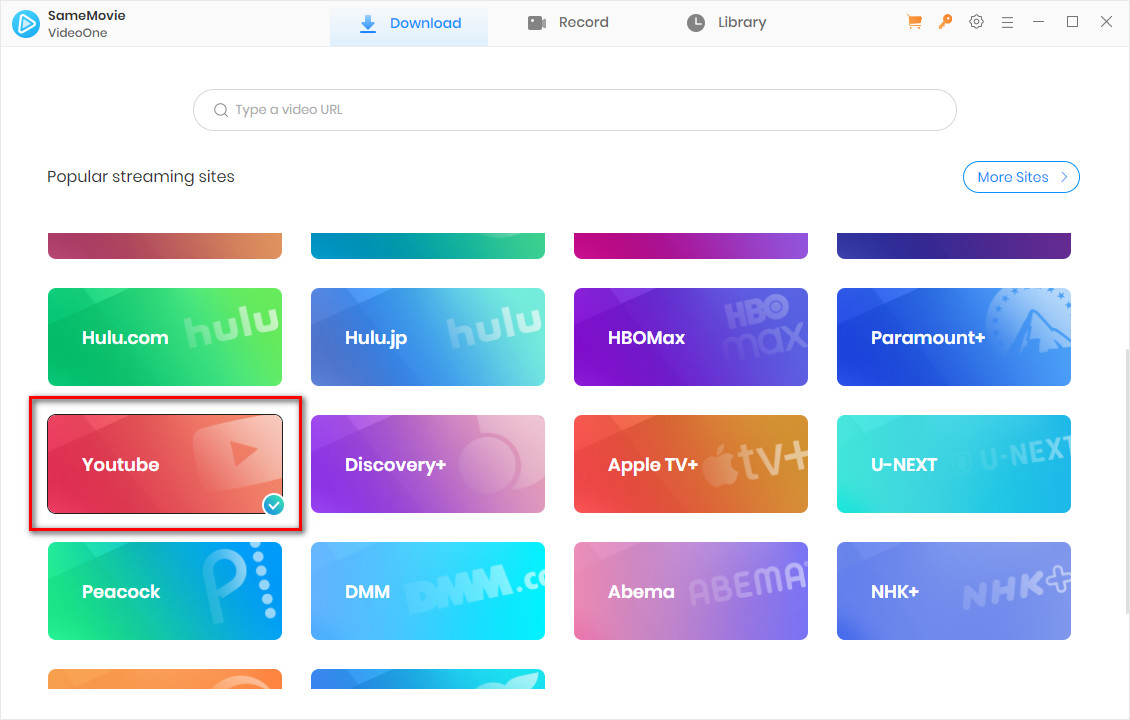
STEP 1 Download SameMovie
Download and open SameMovie Video One on your computer, then choose a website from the list. Here, I'll use YouTube as an example.
Note: SameMovie works on Windows 11/10 and macOS 11 - macOS 26.
STEP 2 Choose Your Video
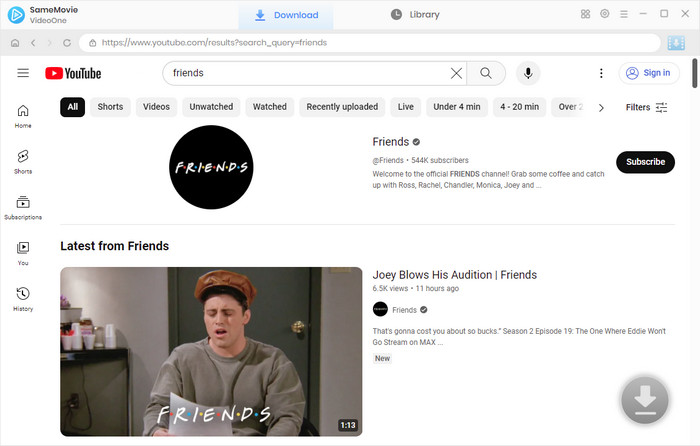
Due to SameMovie's built-in browser, you can directly browse and find videos within the program. Simply type the video name or copy and paste the video link to find the video.
STEP 3 Advanced Download
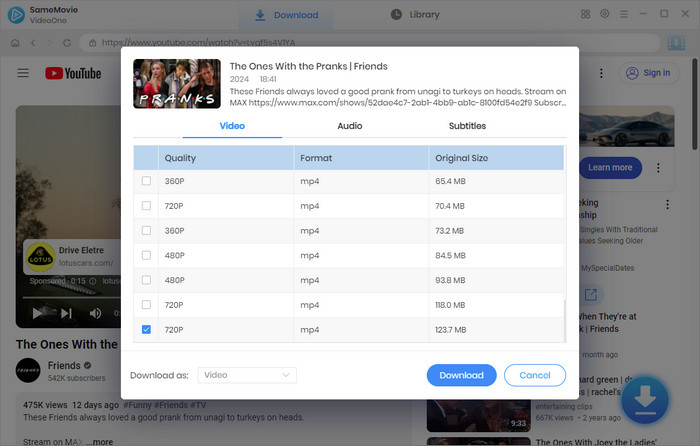
Once the video is loaded, click the Download button in the bottom-right corner. The Advanced Download window will pop up. Here, you can customize the video quality, audio tracks, and subtitle mode. Once you finish setting everything up, click Download again.
STEP 4 Find Downloaded Files
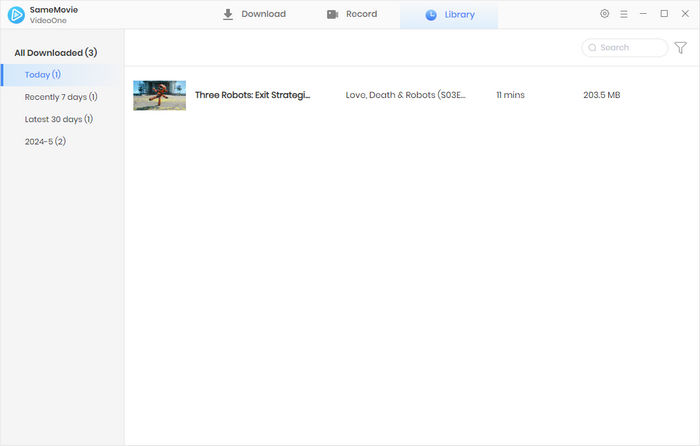
With hardware acceleration, downloads can be completed very quickly. Once finished, head to the Library tab to locate all your downloaded files.
Part 7: FAQs about KeepStreams and Its Alternative
Does KeepStreams Require Login?
Yes. KeepStreams offers free and paid versions. For the free version, you can download videos without logging in, but there are download limitations. For the paid version, you need to purchase a registration code and log in to activate all functions.
Are There KeepStreams Coupons?
Yes! Sometimes, during major holidays such as Black Friday and Christmas, KeepStreams offers special coupons and discounts. For exact information, please check their official website.
Does KeepStreams Linux Version Exist?
No. Currently, KeepStreams only supports Windows and macOS, and there is no official Linux version available.
Is SameMovie Safe and Legal to Use?
Yes, but only for personal offline viewing. SameMovie is designed to offer a convenient and smooth viewing experience without the internet. We do not recommend using SameMovie for commercial purposes or distributing downloaded files without permission. Please always respect others' copyrights.
Conclusion
This KeepStreams review provides a detailed overview of KeepStreams' pricing, features, whether KeepStreams is safe and legit, whether KeepStreams is worth it, and more. While KeepStreams offers an easy download method, its refund policy may raise concerns.
For a safer and more reliable KeepStreams alternative, SameMovie Video One covers all the features of KeepStreams and even offers better ones, such as higher video quality (8K), faster downloading speed, and more complete functions and support in the free version. If you like it, click to start the free trial right now!
Clark Clinton is a senior writer renowned for her expertise in resolving streaming platform download errors. Her concise writing style and practical methods have earned her a stellar reputation among readers and peers alike. Whether you're facing a technical glitch or seeking streaming tips, Nina's guidance ensures a smooth and enjoyable reading experience.