


SameMovie Netflix Video Downloader
- Download any TV shows and movies from Netflix easily;
- Download Netflix videos to MP4/MKV Format in batch;
- Save multilingual audio tracks (including Atmos) and subtitles;
- Super high download speed & download success rate.
CleverGet Netflix Video Downloader Tested Review: Does It Still Work in 2026?

Clark Clinton August 20, 2026 Category: Topics
If you are considering purchasing CleverGet Netflix Video Downloader, you've likely been drawn in by its claims of “lossless Netflix downloads” and “removing offline restrictions.” But does CleverGet really work in 2026? Is it worth using and safe to use?
To provide you with an objective and accurate assessment, this article will conduct a comprehensive analysis of CleverGet based on hands-on testing of its features, speed, safety, legality, and real user reviews, while also introducing a more cost-effective alternative to CelverGet.
 You May Also Like: CleverGet Full Review: Is It Worth Trying?
- Part 1: What Is CleverGet Netflix Video Downloader
- Part 2: How to Use CleverGet Netflix Video Downloader
- Part 3: CleverGet Netflix Video Downloader Hands-On Review
- Part 4: CleverGet Netflix Downloader Pros and Cons
- Part 5: Is CleverGet Netflix Video Downloader Safe and Legal to Use?
- Part 6: Best CleverGet Netflix Video Downloader Alternative ✨
- Part 7: SameMovie vs CleverGet Netflix Video Downloader: Which Is Better?
- Part 8: FAQs about CleverGet Netflix Video Downloader
Part 1: What Is CleverGet Netflix Video Downloader
CleverGet Netflix Video Downloader is a desktop streaming video download tool. The key feature of it is that it can download movies and shows from Netflix to your local devices (Windows & Mac) in the original quality. The downloaded files are often saved as MP4/MKV files, which can get rid of the download and device limits of official Netflix downloads.
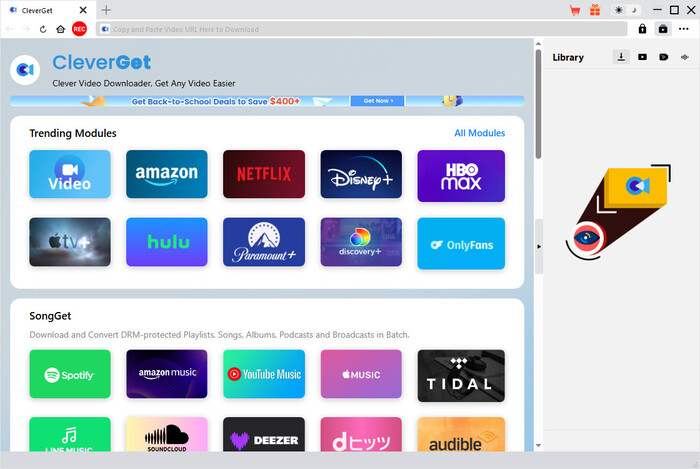
Key Features of CleverGet Netflix Video Downloader:
- Download Netflix movies and shows in up to 1080P.
- Preserve Netflix videos as MP4/MKV files and transfer them to any device.
- Save multiple language audio tracks and subtitles.
- Download entire Netflix seasons or multiple movies.
- Built-in browser for easy Netflix login and browsing.
Is CleverGet Netflix Video Downloader Free?
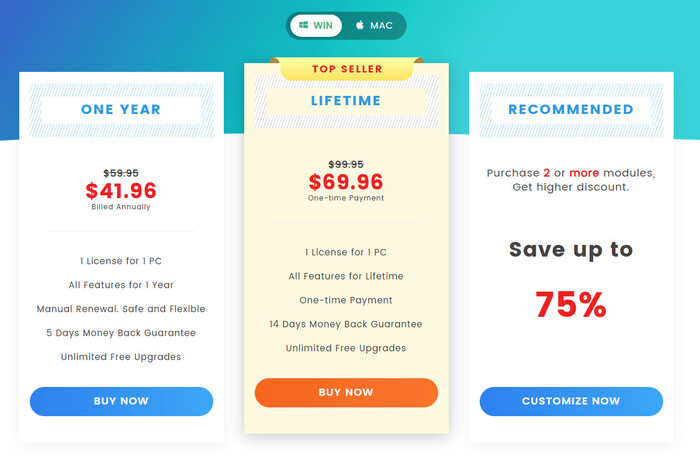
CleverGet Netflix Video Downloader is not a free tool, but it offers a free trial that allows users to download up to 3 full-length Netflix movies or episodes. To unlock unlimited Netflix downloads, the recording feature, and technical support, users need to purchase a subscription. It offers two main plans: a yearly plan ($41.96) and a lifetime plan ($69.96). Both plans include only one license for a single PC or Mac.
Part 2: How to Use CleverGet Netflix Video Downloader
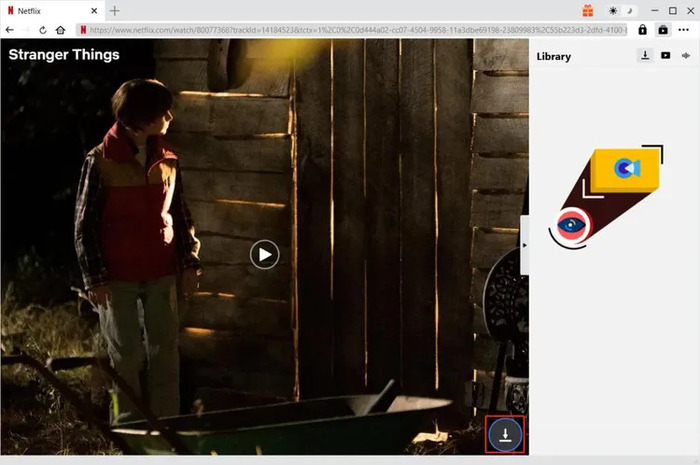
- Launch CleverGet, choose Netflix as the platform, and log in with your Netflix account.
- Browse within the built-in browser and choose the movies or shows you want to download.
- Once selected, click the Download button in the bottom-right corner.
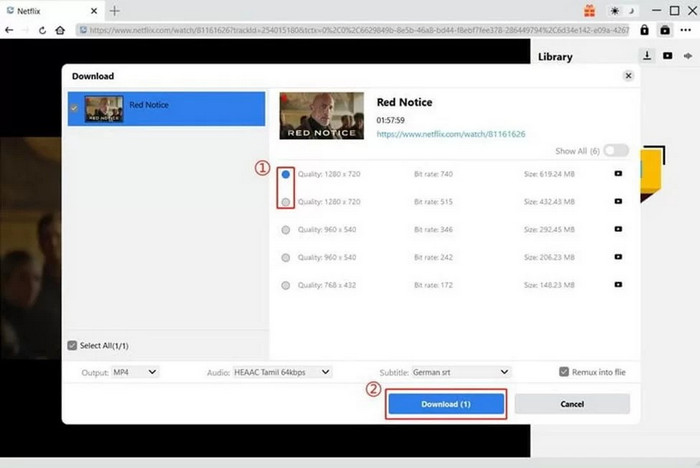
- Set up your desired video quality, audio tracks, and subtitles.
- Click Download again and wait for it to finish.
Part 3: CleverGet Netflix Video Downloader Hands-On Review
To get a comprehensive understanding of how Cleverget performs in terms of download speed, success rate, and video quality, we used the free version of Cleverget to test two movies and one TV episode.
Test Environment
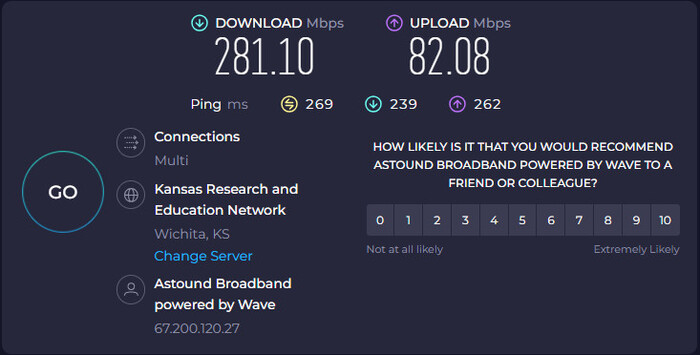
To ensure the objectivity of the test results, all practical tests were conducted under a standardized hardware and network environment.
- Device: Windows 11 Pro
- Storage: 139 GB of 462 GB used
- Processor: Intel(R) Core(TM) i3-10105 CPU @ 3.70GHz (3.70 GHz)
- Graphics: Intel(R) UHD Graphics 630 (128 MB)
- Internet: 281 Mbps
- Program: CleverGet (latest version)
Test Result
| Metrics | Movie 1 (The Gray Man, 2022) | Movie 2 (Glass Onion: A Knives Out Mystery) | TV Episode (Stranger Things S4E1) |
|---|---|---|---|
| File Size | 4.65 GB | 3.82 GB | 1.85 GB |
| Time Taken | 15 min 15s | 12 min 40s | 7 min 10s |
| Output Quality | 1080P | 1080P | 1080P |
| Audio Format | AAC 2.0 (320 kbps) | AAC 2.0 (320 kbps) | AAC 2.0 (320 kbps) |
| Result | Success | Success | Success |
Success Rate: CleverGet can download nearly 99% Netflix movies and shows. We can say that the success rate is guaranteed.
Video Quality: The max video quality that CleverGet can download from Netflix is 1080P.
Audio Quality: Netflix offers the latest sound quality that is Dolby 5.1. However, CleverGet can only download normal audio quality at AAC 2.0 (320 kbps).
Download Speed: The download speed is relatiely slow. An average episode takes 7-10 min to finish.
The Author’s Experience
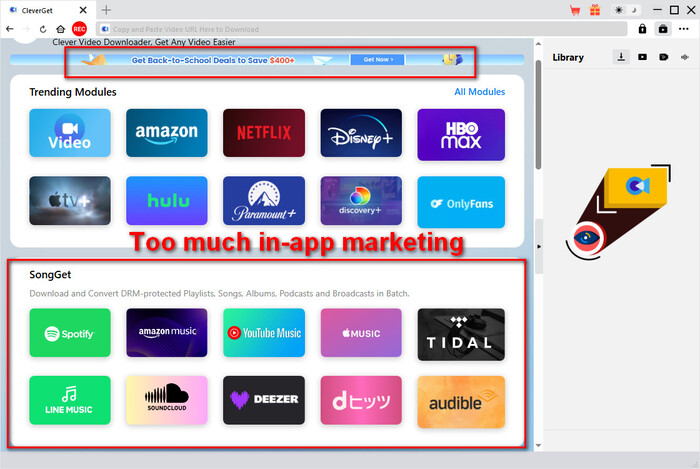
Experience 1: Frequent Ads Disrupt User Experience
Every time CleverGet is launched, promotional ads and trial period reminders pop up. Their frequent appearance significantly affects the overall user experience.
The interface is littered with recommendation buttons for other products from the same company, and their layout resembles the platform’s download section, making it easy for new users to accidentally click on them and download unrelated software.
Experience 2: Confusing Interface Design
It’s confusing to group “screen recording” — a feature with a completely different operating logic — with other website downloading sections without separating them.
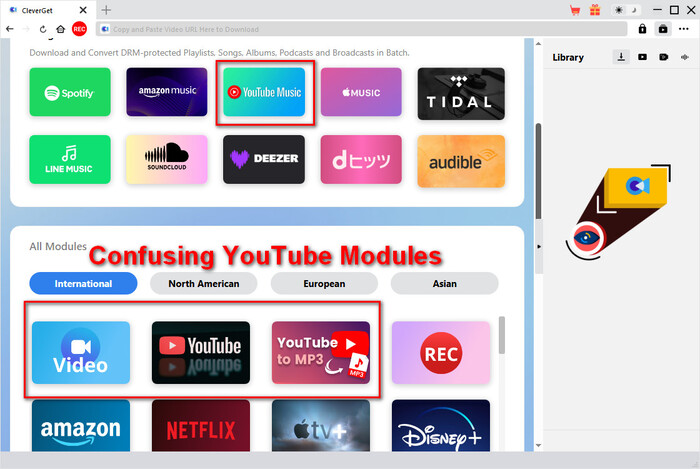
What’s more, CleverGet’s YouTube-related sections are too fragmented and confusing. For example, the basic icon for downloading YouTube videos is labeled with the vague term “Video”, while multiple overlapping options — such as “YouTube Music,” “YouTube to MP3,” and “YouTube Movies & TV Store” — appear alongside it. (Check out for more free YouTube video downloaders >>)
Experience 3: Hard to Find Supported Websites
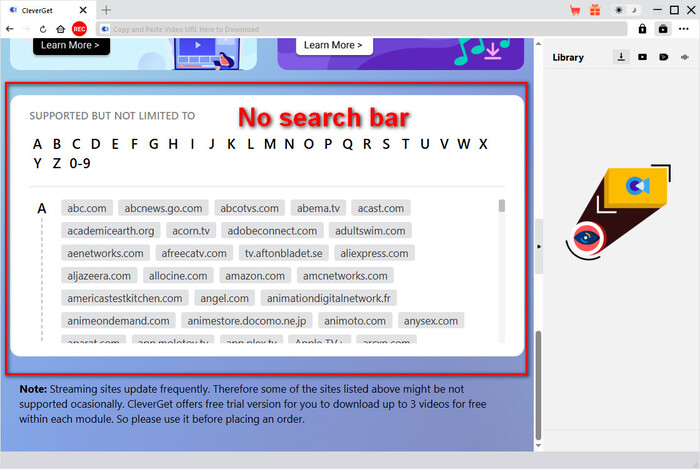
Although official promotional materials claim support for thousands of video websites, the software does not provide a convenient search mechanism for these sites.
Users cannot search directly by name but must manually scroll through a dense list of web pages and protocol tags, making it difficult to quickly find the desired platform.
Part 4: CleverGet Netflix Downloader Pros and Cons
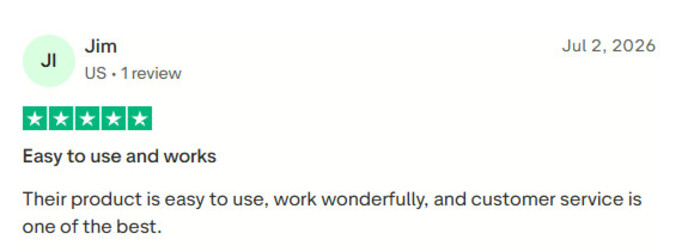
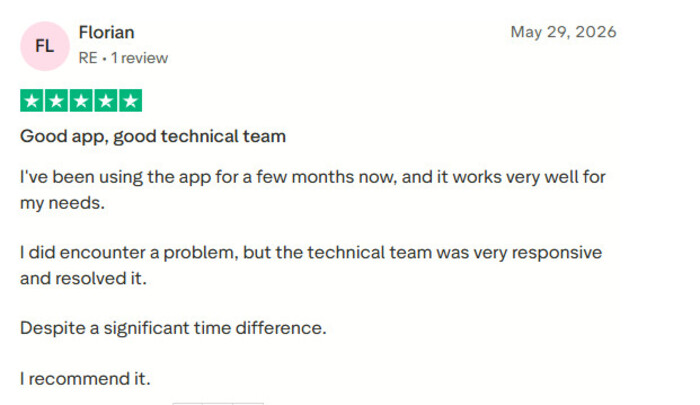
After conducting an in-depth analysis of CleverGet’s core features and real-world performance, we collected and compiled feedback and reviews from real users on the well-known review platform Trustpilot to provide a more objective reference.
Pros of CleverGet Netflix Video Downloader
1. CleverGet is easy to use.
2. The technical team is very responsive
Cons of CleverGet Netflix Video Downloader
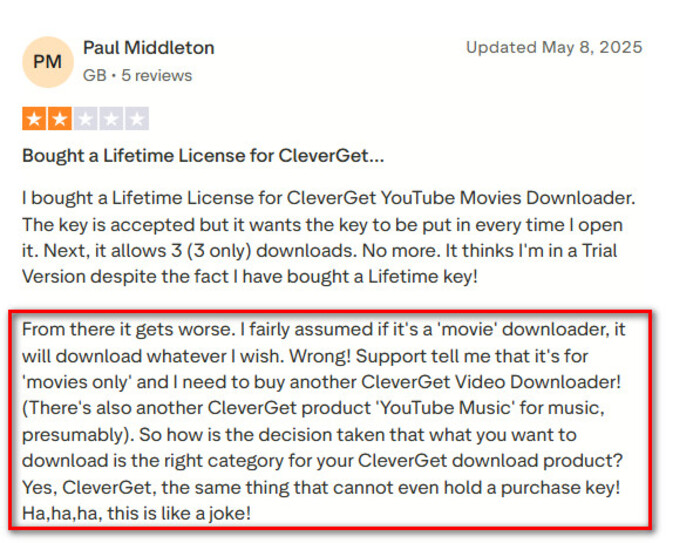
1. Misleading product categories confuse users, as different download features require separate purchases.
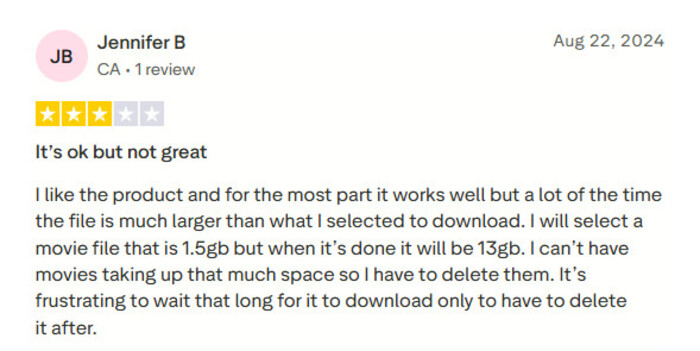
2. Downloaded files can be much larger than expected.
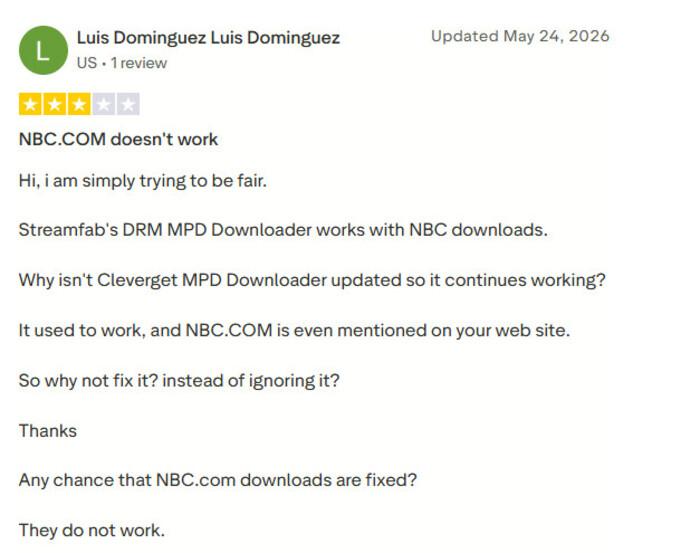
3. Slow Updates for Website Compatibility
Part 5: Is CleverGet Netflix Video Downloader Safe and Legal to Use?
Is CleverGet Netflix Video Downloader Safe?
When using third-party download tools, security is always the top priority. To verify whether CleverGet is safe, I uploaded the link to its official website and the official installer (cleverget_setup.exe) to VirusTotal for a comprehensive security scan.
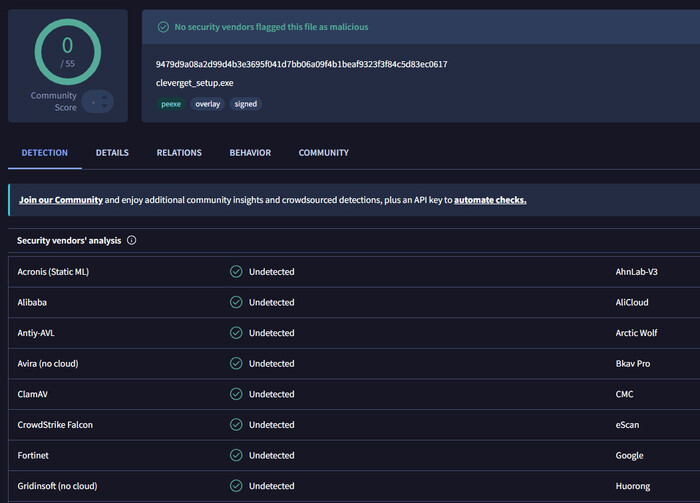
The scan results showed 100% safety (0 false positives from antivirus software), confirming that the installer downloaded from the official website does not contain any viruses, Trojans, or bundled malware.
Is CleverGet Netflix Video Downloader Legal?
If you have a valid Netflix subscription, downloading videos to your device only for personal offline viewing, personal archiving, or playback in areas without internet access is generally considered reasonable.
However, if you use the downloaded videos for sale, re-upload them to YouTube or online storage services, or show them commercially in public places, you are seriously infringing on the rights of the copyright holder, which constitutes a clear violation of the law.
Part 6: Best CleverGet Netflix Video Downloader Alternative
Although CleverGet can meet basic Netflix download needs, its confusing interface, in-app ads, and poor audio quality mean it may not be suitable for everyone. To overcome these shortcomings, I’ve selected one of the most popular CleverGet alternative available.
SameMovie Netflix Video Downloader focuses on Netflix, allowing users to download Netflix movies on laptops in up to 1080P as MP4/MKV files. While SameMovie shares the core features with CleverGet, it offers more professional handling of audio quality and subtitles. It fully preserves the original film’s Dolby Digital 5.1 surround sound and supports both separate SRT subtitle exports and hard-coded subtitles embedded into the video.
In addition, it has a clean and simple interface, which means you won’t see a bunch of disjointed submodules scattered across the interface or be distracted by ads.
SameMovie Netflix Video Downloader:
- Unlimited downloads of Netflix movies, TV shows, documentaries, and save them forever
- Save Netflix as MP4/MKV files, transfer them to any device
- Download Netflix videos in up to 1080P quality
- Download Netflix with all subtitles and audio tracks at on time
- Remove Netflix ads, watch without interruption.
- Download different episodes and movies simultaneously
Check out SameMovie Netflix Video Downloader Review 2026: Is It Safe & Worth It?
Free Trial Free TrialHow to Download Netflix Movies with SameMovie
STEP 1 Install SameMovie Netflix Video Downloader
Install and launch SameMovie Netflix Video Downloader, and log in with your Netflix account.
Note: SameMovie works on Windows 11/10 and macOS 11 - macOS 26.
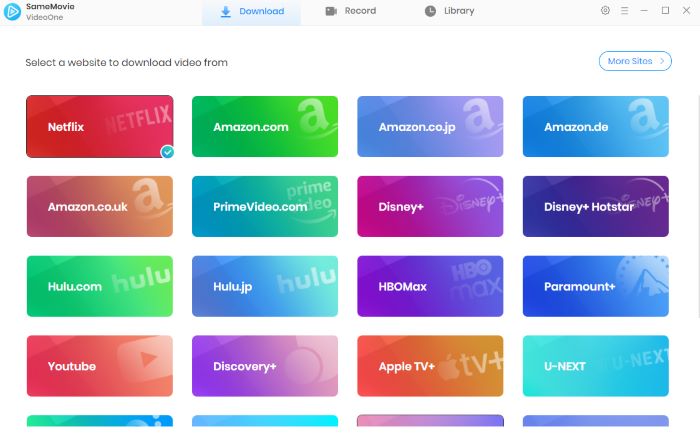
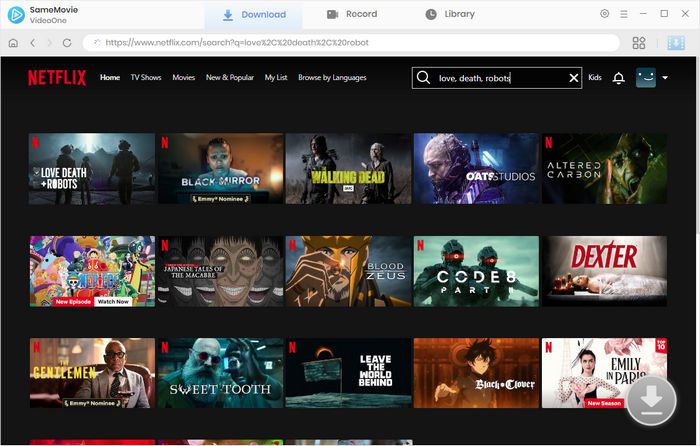
STEP 2 Add Netflix Movies and Shows
Browse and find the Netflix movies or shows you want to download within the built-in browser.
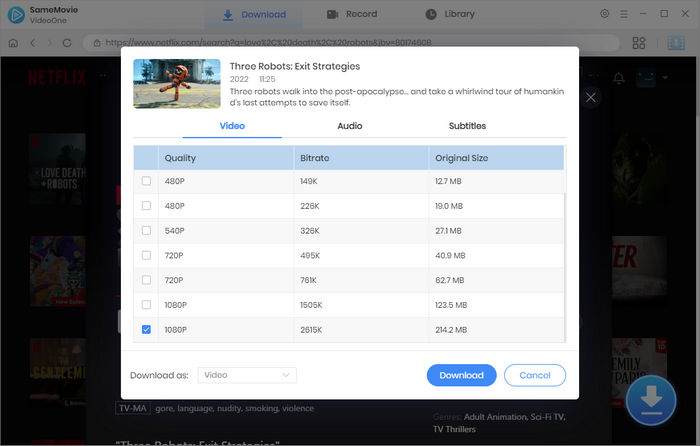
STEP 3 Customize Output Settings
In the Advanced Download window, select the video quality, audio tracks, and subtitles. After that, click Download to start downloading.
STEP 4 Locate Downloaded Netflix Files
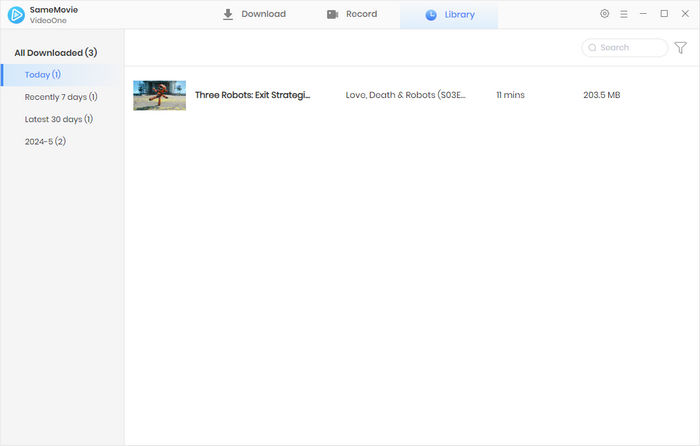
With SameMovie’s hardware acceleration, the downloading process can be finished very fast. Once done, head to the Library tab to find all your Netflix downloads.
Part 7: SameMovie vs CleverGet Netflix Video Downloader: Which Is Better?
| Feature | SameMovie Netflix Video Downloader | CleverGet Netflix Video Downloader |
| Compatibility | Windows 10-11; macOS 11-26 |
Windows 7/8/8.1/10/11; macOS 11/12/13/14/15/26 |
|---|---|---|
| Pricing | $79.9 Lifetime License | $41.69 Yearly / $69.96 Lifetime License |
| Refund Policy | 30 Days | 7 Days / 14 Days |
| Free Trial | The first 5 minutes of each video | 3 full-length videos |
| Video Quality | 1080P | 1080P |
| Audio Quality | Netflix original Dolby Atmos/5.1 audio | AAC 2.0 |
| Subtitle Support |
Internal subtitles External subtitles (SRT/VTT) Hardcoded subtitles |
Internal subtitles (embedded) External subtitles (SRT) SUP subtitles |
| Multilingual Audio/Subtitles | ✅ | ✅ |
| Batch Download | ✅ | ✅ |
| Remove Netflix Ads | ✅ | ✅ |
| Clean & Simple Interface | ✅ | ❌ |
SameMovie performs similarly to CleverGet in terms of video downloads, video quality, and batch downloads, but it has an advantage in audio quality by preserving Netflix's original Dolby Atmos/5.1 audio.
Part 8: FAQs about CleverGet Netflix Video Downloader
Does CleverGet Netflix Video Downloader Require a Netflix Account?
Yes. You need a Netflix account but you can subscribe the Standard with ads plan. This is because most desktop tool like CleverGet and SameMovie can get rid of Netflix ads and only download the video content. And the downloaded files are completely no ads and interruption.
You may also like 👉: 6 Legal Ways to Get Netflix for Free in 2026 >>
What happens if a downloaded video gets out of sync with subtitles or audio?
You can enable or disable “Hardware Acceleration” in the CleverGet settings and try again. Or export the subtitles as a separate .srt file and manually adjust the subtitle delay in a media player such as VLC or PotPlayer.
What should I do if the download speed suddenly slow down or get stuck at 99%?
You can try completely uninstalling the software and then reinstalling it.
Conclusion
Overall, CleverGet Netflix Video Downloader can meet the basic need of downloading Netflix movies as MP4/MKV files. However, its confusing interface, misleading sections, and lower audio quality can negatively affect the overall user experience.
If you want a simpler, cleaner, and ad-free interface, along with better Dolby 5.1 audio quality, a more professional tool like SameMovie Netflix video downloader is undoubtedly a more cost-effective choice.
Clark Clinton is a senior writer renowned for her expertise in resolving streaming platform download errors. Her concise writing style and practical methods have earned her a stellar reputation among readers and peers alike. Whether you're facing a technical glitch or seeking streaming tips, Nina's guidance ensures a smooth and enjoyable reading experience.