


SameMovie Netflix Video Downloader
- Download any TV shows and movies from Netflix easily;
- Download Netflix videos to MP4/MKV Format in batch;
- Save multilingual audio tracks (including Atmos) and subtitles;
- Super high download speed & download success rate.
StreamFab Netflix Video Downloader Review 2026: Is It Worth It?

Clark Clinton August 19, 2026 Category: Topics
StreamFab is a common tool for downloading Netflix movies on laptops. As Netflix continues to evolve, many users are wondering whether StreamFab still works in 2026. Is it worth purchasing? Is it safe?
To answer these questions, I conducted hands-on testing of StreamFab Netflix Video Downloader, focusing on its download success rate, video quality, download speed, subtitle and audio support, and batch download features. If you're considering purchasing StreamFab, this review can help you understand how it actually performs and whether it's worth the money.
 You May Also Like: StreamFab Review 2026: Everything You Need to Know
- Part 1: What Is StreamFab Netflix Video Downloader
- Part 2: How to Use StreamFab Netflix Video Downloader: Hands-On Review
- Part 3: Is StreamFab Netflix Video Downloader Safe and Legal to Use?
- Part 4: Best StreamFab Netflix Video Downloader Alternative ✨
- Part 5: SameMovie vs StreamFab Netflix Video Downloader: Which Is Better?
- Part 6: FAQs about StreamFab Netflix Video Downloader
Part 1: What Is StreamFab Netflix Video Downloader
StreamFab Netflix Video Downloader is a specific desktop tool that allows users to download movies and shows from Netflix as MP4 or MKV files for offline viewing and keep them forever.
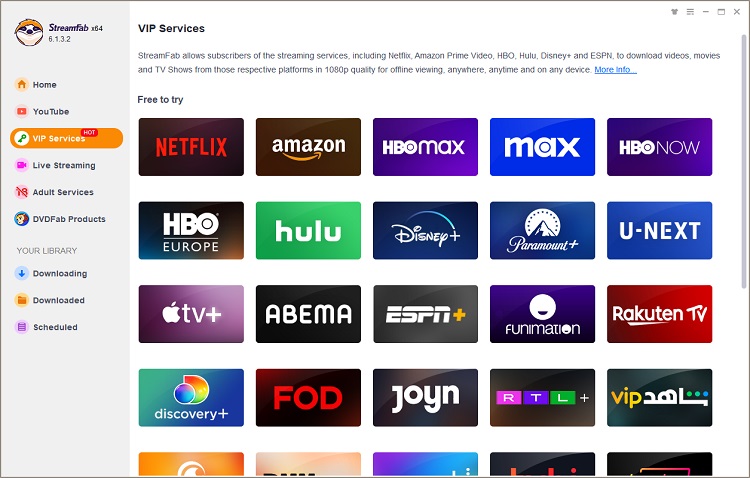
The key difference between StreamFab Netflix Video Downloader and the Netflix app is that downloads from the official Netflix app are encrypted, time- and device-limited, and cannot be transferred. In contrast, StreamFab converts Netflix movies to MP4/MKV files, which can be transferred to other devices for playback.
Key Features of StreamFab Netflix Video Downloader:
- Download high-quality Netflix movies in up to 1080p as MP4/MKV files.
- Preserve Dolby Atmos, EAC3 5.1 surround sound, or AAC 2.0 stereo.
- Support multiple language subtitles, including internal and external files.
- Download an entire season or a number of videos at once, as well as schedule automatic downloads of new episodes.
- Log in to your Netflix account directly within the app using the built-in browser — no need to manually copy the link.
StreamFab Netflix Video Downloader Pricing: Free vs Paid
| Features | Free Trial | Paid |
|---|---|---|
| Pricing | Free | $54.99/month; $99.99 Lifetime |
| Duration | 30 days | 1 Month / Lifetime |
| Refund Policy | - | 7 Days / 14 Days |
| Download Limit | Only 3 full-length movies | No limits |
| Video Quality | 1080p | 1080p |
| Sound Quality | Dolby Atmos / EAC3 5.1 / AAC | Dolby Atmos / EAC3 5.1 / AAC |
| Subtitle Support | Internal & External | Internal & External |
| Batch Download | ✅ | ✅ |
| Auto-Download New Episodes | ✅ | ✅ |
| Video Format | MP4 / MKV | MP4 / MKV |
You may also like 👉: 6 Legal Ways to Get Netflix for Free in 2026 >>
Part 2: How to Use StreamFab Netflix Video Downloader: Hands-On Review
2.1 How to Use StreamFab Netflix Video Downloader (Step-by-Step Guide)
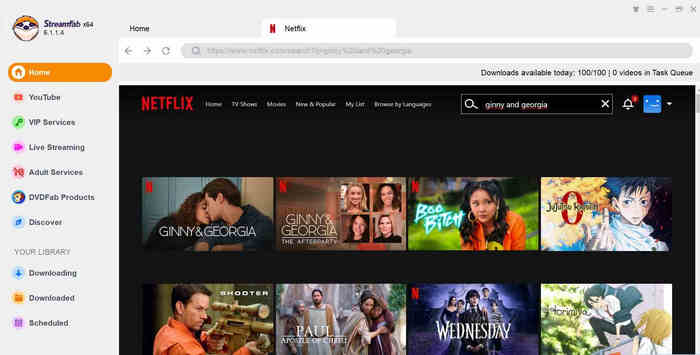
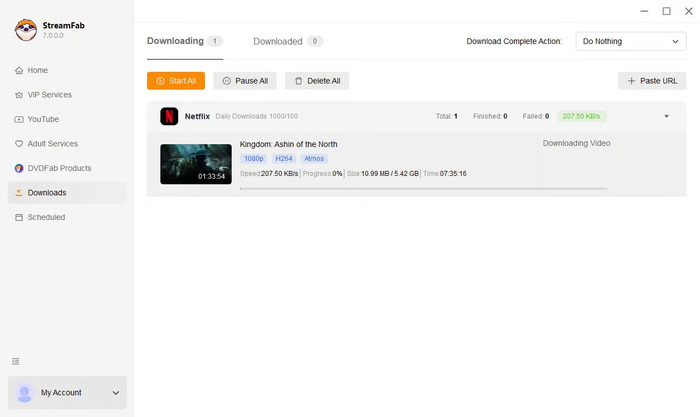
- Download and install StreamFab Netflix Video Downloader on your computer.
- Launch the program and choose Netflix as the website, then log in to your account.
- Browse and choose the video you want to download. Once you have chosen it, click the Add button in the bottom-right corner.
- Customize the video quality, audio quality, subtitle type, and output path, then click “Download Now” to start the process.
2.2 Real Test Results & Performance
To find out how well StreamFab performs in real-world usage, I tested it on my Windows 10 computer by downloading 10 different Netflix movies and TV shows. Below are some of the actual test results.
| Type | Name / Link | File Size | Actual Bitrate / Quality | Download Time | Result |
|---|---|---|---|---|---|
| Movie | The Gray Man (2022) | 4.82 GB | 1080p H.264 + Atmos | 10 min 42s | Success |
| TV Episode | Stranger Things S4E1 | 1.67 GB | 1080p H.265 + EAC3 5.1 | 7 min 15s | Success |
| TV Episode | The Crown S6E3 | 1.41 GB | 1080p H.264 + AAC 2.0 | 6 min 08s | Success |
| TV Season | The Good Doctor Season 1 (18 eps) | - | 1080p | 22 min 54s | Success (Batch download, processed one by one in queue) |
Success Rate: The success rate is relatively high, with 99% of the movies successfully downloaded.
Video Quality: Most of the downloaded videos can reach a maximum resolution of 1080p.
Download Speed: For a typical episode lasting 40–60 minutes, it takes about 6–10 minutes to complete. A 2-hour movie takes about 13–26 minutes.
Batch Support: Although StreamFab claims to support batch downloads, when downloading multiple episodes, they are actually queued and downloaded one by one.
2.3 Pros And Cons of StreamFab Netflix Video Downloader
Pros of StreamFab Netflix Video Downloader
- Download Netflix movies in 1080p.
- Preserve Netflix movies as MP4/MKV files forever.
- The downloaded files can be transferred to other devices.
- Support multiple audio tracks and multiple language subtitles.
Cons of StreamFab Netflix Video Downloader
- Can't download 4K content, and the highest resolution available is 1080p.
- The free trial period is only 30 days, and you can download only 3 Netflix videos, so the trial period is relatively short.
- Buying the Netflix module or the All-in-One package separately isn't cheap.
- The paid version also has a daily download limit (approximately 100 titles).
- When Netflix is updating, you may occasionally experience temporary issues with downloads.
- Some users have reported difficulties obtaining refunds from customer service.
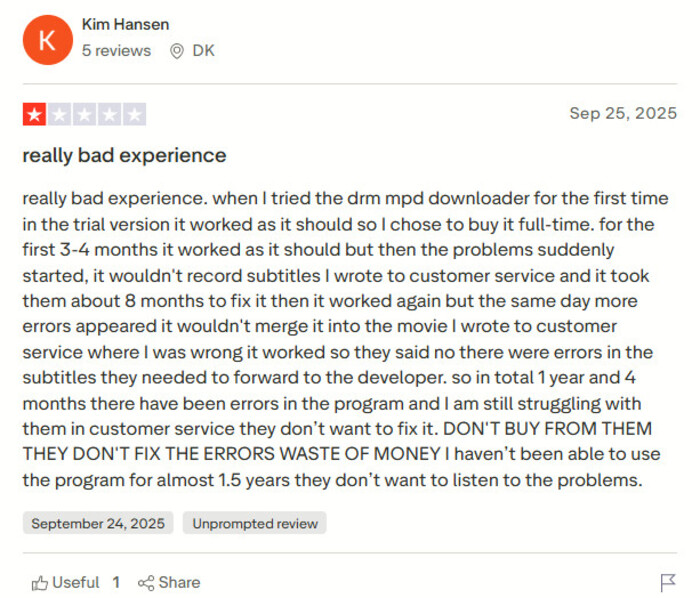
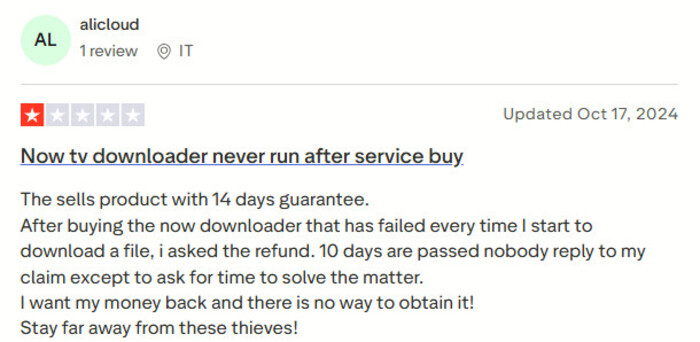
⚠️ Note: If you're considering purchasing StreamFab Netflix Video Downloader, I recommend contacting their customer service to clarify the refund policy and considering the possibility of download issues when Netflix updates its app.
Part 3: Is StreamFab Netflix Video Downloader Safe and Legal to Use?
When discussing whether StreamFab Netflix Video Downloader still works in 2026, safety and legality are two of the biggest concerns for users. Let's take a look at each of them below.
Is StreamFab Netflix Video Downloader Safe?
To assess its safety, we tested it using the professional virus scanning tool VirusTotal. We tested both the official StreamFab website and the download link for StreamFab Netflix Video Downloader. The test results showed that no viruses were detected on the official website or in the installation package.
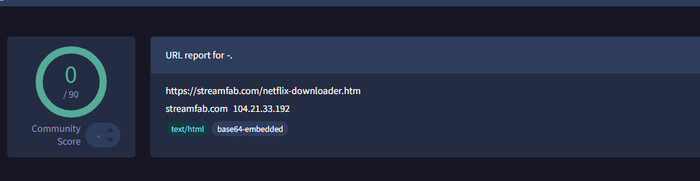
However, StreamFab is not an officially licensed Netflix downloader, so you should still exercise caution when using it.
Is StreamFab Netflix Video Downloader Legal?
There are certain legal risks involved when using unofficial download software to download Netflix movies and TV shows. If you share, distribute, or even sell downloaded Netflix movies without permission, you may violate Netflix's Terms of Service and may also be breaking the laws in your area. If you use the downloaded content solely for personal offline viewing, the legal risks may be relatively lower.
Part 4: Best StreamFab Netflix Video Downloader Alternative
Although StreamFab Netflix Video Downloader can meet the basic requirements for downloading Netflix movies, it has some issues that cannot be ignored. Many users have mentioned in their Trustpilot reviews that StreamFab does not strictly adhere to its refund policy and often becomes temporarily unavailable due to Netflix updates.
Given these concerns, I’ve selected an alternative to StreamFab that currently has good reviews, so you can consider it based on your needs.
SameMovie Netflix Video Downloader is one of the more common alternatives to StreamFab currently available on the market. The two do share quite a few similarities in their core features: both support downloading Netflix movies in MP4/MKV formats, with up to 1080p video quality, while preserving multilingual subtitles and audio tracks, and both support batch downloads.
However, SameMovie’s lifetime license ($79.9) is typically cheaper than StreamFab’s ($99.9), and it offers a different kind of free trial, allowing users to watch the first 5 minutes of each movie. If you primarily download Netflix content and don’t want to spend too much, SameMovie is more cost-effective.
SameMovie Netflix Video Downloader:
- Unlimited downloads of Netflix movies, TV shows, documentaries, and save them forever
- Save Netflix as MP4/MKV files, transfer them to any device
- Download Netflix videos in up to 1080P quality
- Download Netflix with all subtitles and audio tracks at on time
- Remove Netflix ads, watch without interruption.
- Download different episodes and movies simultaneously
Check out SameMovie Netflix Video Downloader Review 2026: Is It Safe & Worth It?
Free Trial Free TrialHow to Download Netflix Movies with SameMovie
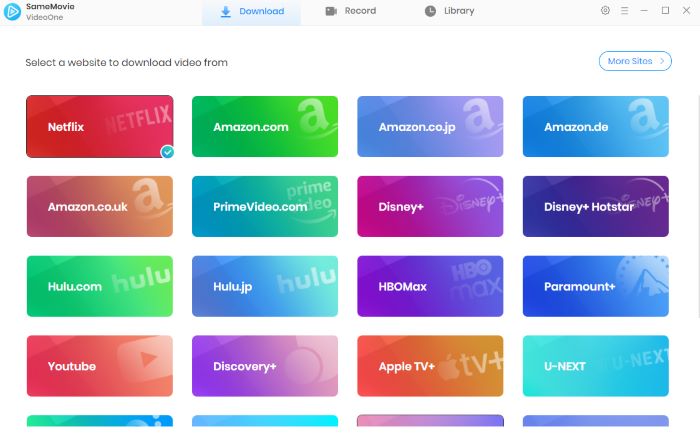
STEP 1 Install SameMovie Netflix Video Downloader
Install SameMovie Netflix Video Downloader from the official website and launch it. Then, log in to your Netflix account.
Note: SameMovie works on Windows 11/10 and macOS 11 - macOS 26.
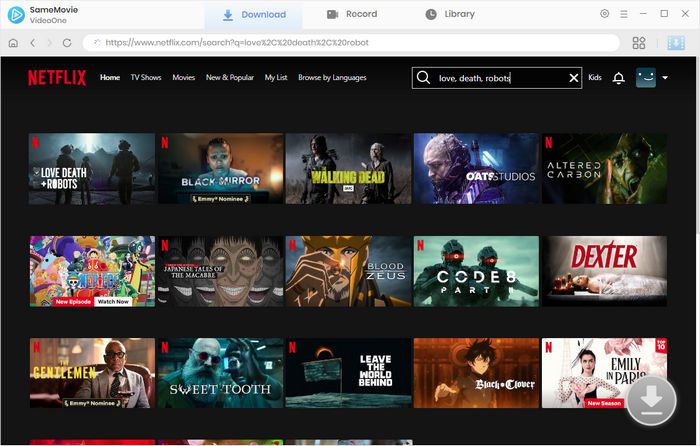
STEP 2 Add Netflix Movies and Shows
Browse Netflix movies or shows within the built-in browser. Once you’ve found the movie you want to download, click the Download button in the bottom-right corner. You can download an entire Netflix season or multiple Netflix movies with one click.
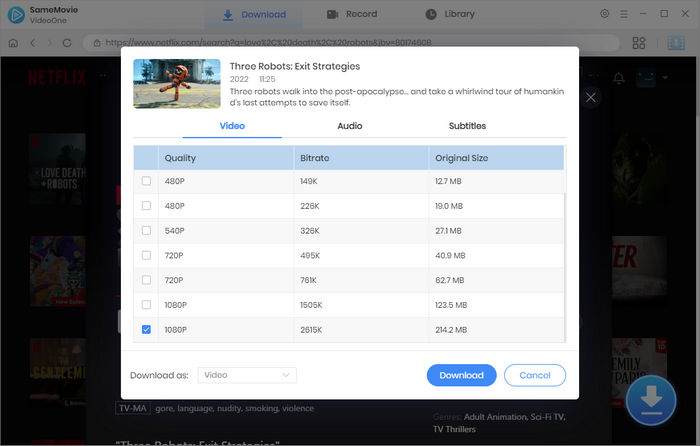
STEP 3 Customize Output Settings
In the new Advanced Download window that pops up, you can select your desired video quality, audio tracks, and subtitles. After finishing the settings, click Download to start the process.
STEP 4 Locate Downloaded Netflix Files
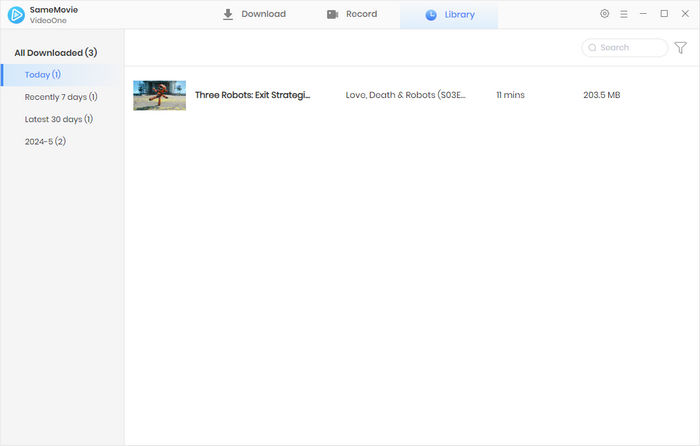
SameMovie has hardware acceleration, so downloads can be completed very quickly. Once done, you can find all the downloaded files in the Library tab.
Part 5: SameMovie vs StreamFab Netflix Video Downloader: Which Is Better?
| Features | SameMovie Netflix Video Downloader | StreamFab Netflix Video Downloader |
|---|---|---|
| Pricing | $79.9 Lifetime License | $99.9 Lifetime License |
| Money-Back Guarantee | 30 Days | 14 Days |
| Free Trial | First 5 minutes of each video | 3 full-length videos within 30 days |
| Download Speed | About 4–7 min for a 40–60 min episode* | About 6–10 min for a 40–60 min episode |
| Maximum Video Quality | 1080p | 1080p |
| Audio Quality | Dolby Atmos / EAC3 5.1 | Dolby Atmos / EAC3 5.1 |
| Subtitle Support |
Internal subtitles External subtitles (SRT / VTT) Hardcoded subtitles |
Internal subtitles External subtitles (SRT / VTT) |
| Batch Downloads | ✅ | ✅ |
| Refund Experience | ✅ | ❌ Reported refund issues |
| Overall Value | ⭐⭐⭐⭐⭐ | ⭐⭐⭐⭐ |
Part 6: FAQs about StreamFab Netflix Video Downloader
Why StreamFab Netflix Video Downloader Is Not Working?
StreamFab is not an official Netflix downloader. Due to Netflix’s copyright protection, downloads may sometimes fail. This is often because Netflix detects that you are using a VPN, logging in from a different location, or exceeding the number of devices allowed to stream simultaneously. Currently, these issues cannot be completely avoided. We recommend not downloading too many files at once.
Can StreamFab Download Multiple Netflix Videos at the Same Time?
Actually, no. Although StreamFab claims on its official website to support batch downloads, the downloading process doesn’t happen at the same time. The files are queued up in the download list and wait to be downloaded one by one.
Do I Need a Netflix Account to Use StreamFab?
Yes. You need at least a Standard with Ads Netflix account. StreamFab cannot download anything if you don’t provide a Netflix account.
Conclusion
After testing, StreamFab Netflix Video Downloader is still working in 2026. It can meet users' basic needs for downloading Netflix videos as MP4/MKV files. However, it is not a perfect solution. A maximum video quality of 1080p, batch downloads that actually require queuing, a relatively high price, and potential refund issues are all factors you need to consider before purchasing.
If you're more concerned about price, free trials, subtitle support, and value for money, SameMovie Netflix Video Downloader might be a better choice.
Clark Clinton is a senior writer renowned for her expertise in resolving streaming platform download errors. Her concise writing style and practical methods have earned her a stellar reputation among readers and peers alike. Whether you're facing a technical glitch or seeking streaming tips, Nina's guidance ensures a smooth and enjoyable reading experience.