



SameMovie YouTube Video Downloader
- Download YouTube videos, Shorts, podcasts, gaming, and kids content for free;
- Save YouTube videos in 720p, 1080p, 4K, and 8K;
- Preserve multi-language audio tracks and subtitles;
- Batch download playlists, channels, 3D videos, and 360° VR videos;
Top 5 YouTube Video Download 4K Tools in 2026

Clark Clinton September 25, 2026 Category: Topics
Trying to download YouTube videos only to find that YouTube Premium is required? Even worse, YouTube Premium can only download videos in up to 1080P quality.
No worries. This article will introduce 5 powerful and reliable tools for YouTube Video Download 4K on desktops — all safe and 100% ensuring 4K quality.
⚠️Note: Please respect YouTube's Terms of Service and copyright regulations when downloading videos. The tools introduced in this article are intended for personal use only.
 You May Also Like: Top 9 Safe & Free YouTube Video Downloaders [PC/Online/Android]
- Part 1: Why Choose YouTube 4K Video Desktop Downloaders?
- Part 2: SameMovie - Best Free All-In-One YouTube 4K Downloader 🆓
- Part 3: YTD Video Downloader - Easy YouTube 4K Downloader
- Part 4: 4K Video Downloader Plus - Simple 4K YouTube Downloader
- Part 5: SnapDownloader - Fast 4K YouTube Batch Downloader
- Part 6: StreamFab - Advanced 4K YouTube Downloader
- Part 7: Comparison: Which One is the Best 4K YouTube Downloader?
- Part 8: FAQs about YouTube Video Download 4K
Part 1: Why Choose YouTube 4K Video Desktop Downloaders?
There are many 4K YouTube downloaders on the market, including both online and desktop downloaders. While online downloaders offer advantages like no login needed, easy to use, and no app installation required, desktop downloaders usually provide more stable download performance, faster downloading speed, higher resolution, and a safer, cleaner user experience.
Here's a detailed table comparing the pros and cons of online and desktop 4K YouTube video downloaders.
| Feature | Desktop Downloader | Online Downloader |
|---|---|---|
| Speed | ✅ Faster | ❌ Slower |
| Maximum Quality | ✅ True 4K / 8K | ❌ Often limited to 1080p or compressed 4K |
| Batch / Playlist Download | ✅ Supported | ❌ Very limited or not supported |
| Ads / Pop-ups | ✅ Almost none (official software) | ❌ Many ads, higher security risks |
| Best For | Frequent downloads, heavy users | Occasional use, users who prefer no installation |
Part 2: SameMovie - Best Free All-In-One YouTube 4K Downloader
If you want to find a safe and clean 4K YouTube downloader that allows you to download YouTube videos in 4K or even 8K — most importantly, completely for free — you must consider SameMovie 4K YouTube Video Downloader.
SameMovie 4K YouTube Video Downloader supports downloading YouTube 4K videos, shorts, and podcast videos 100% for free. Besides, you can download YouTube videos in more than one format, like MP4, MKV, MP3, or M4A, so you can transfer them to any device you want.
What's more impressive, SameMovie 4K YouTube Video Downloader supports batch download, so you can download multiple YouTube videos with one click, or download a whole YouTube playlist, channels, or shorts collections in one go. With SameMovie's hardware acceleration, they will be finished quickly with 10X faster downloading speed.
Features of SameMovie YouTube Video Downloader:
- Free to download YouTube videos, Shorts, and playlists
- Save YouTube content in up to 8K without compression)
- Permanently download YouTube videos as MP4, MKV, or MP3 files
- Batch download multiple videos with 10X faster speed to save your time
- Download from other 1000+ streaming sites
How to Download 4K YouTube Video with SameMovie
Downloading 4K YouTube videos just needs a few simple steps and is completely for free.
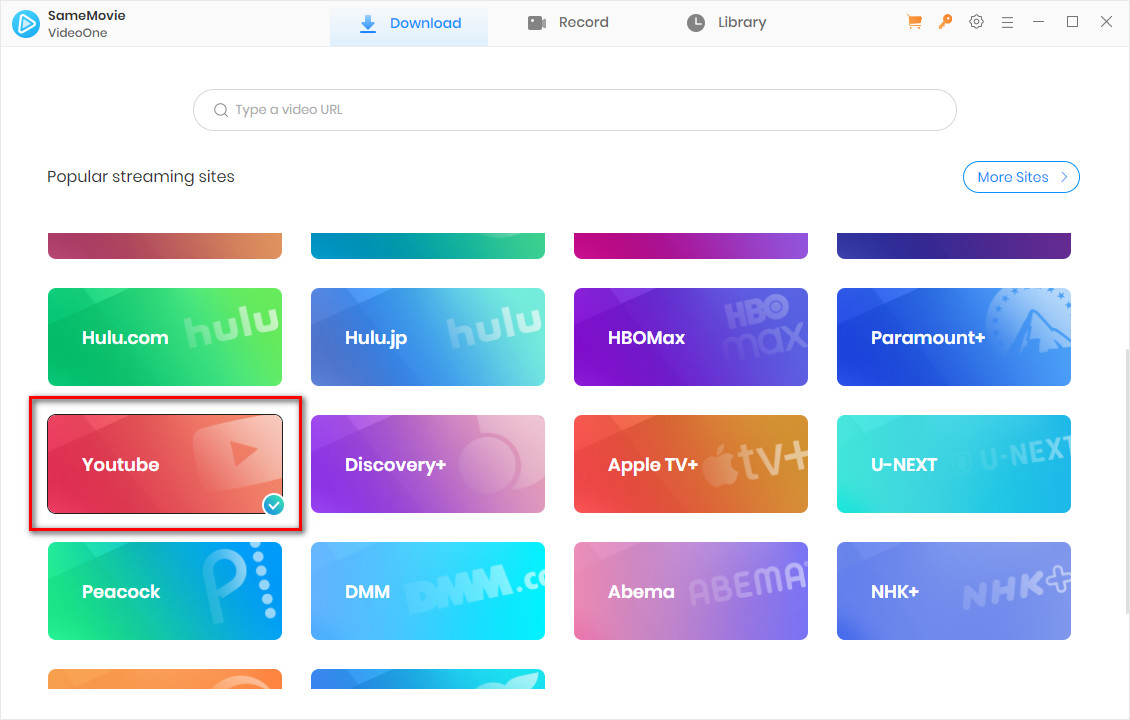
STEP 1 Install SameMovie YouTube Video Downloader
Go to SameMovie's official website and download the latest version of SameMovie YouTube Video Downloader. Run it, select "YouTube" as website and log in to your account.
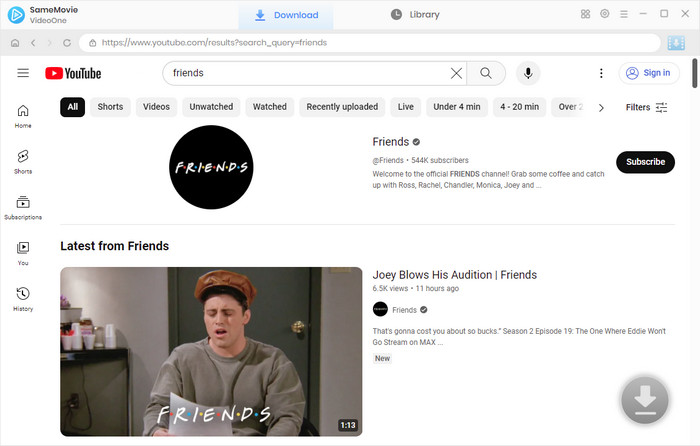
STEP 2 Search YouTube Video
SameMovie has built-in browser so you can directly browse and search for the video you like. Or, you can simply copy and paste the video link in the search bar.
STEP 3 Customize Output Settings
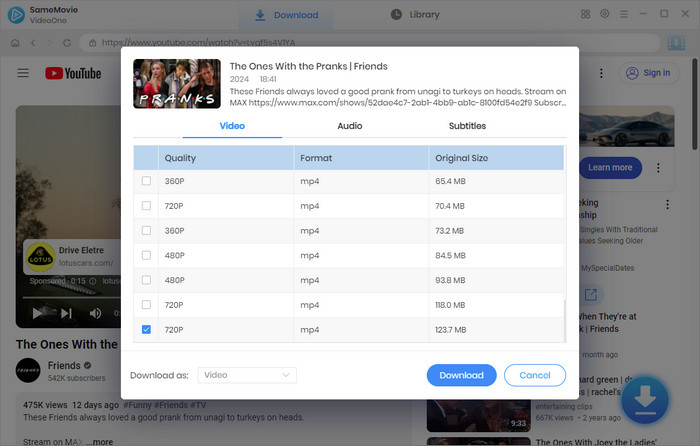
Click the Download button at the right-bottom corner. In the new pop-up window, choose video quality to 4K, or even 8K, then select the language and formats of audio and subtitles. When you are ready, click "Download" again.
STEP 4 Locate Downloaded YouTube Videos
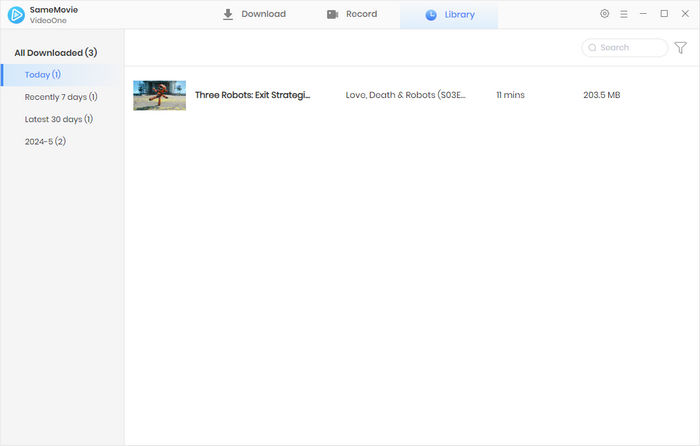
Once the downloads are finished, you can head to the "Library" tab to find all downloaded 4K YouTube videos.
Part 3: YTD Video Downloader - Easy YouTube 4K Downloader
YTD Video Downloader has amassed a large user base since its release in 2007, and its years of stable operation attest to the reliability of this tool.
YTD Video Downloader supports downloading 4K YouTube videos on Windows and Mac for free. It also supports multiple formats such as MP3, MP4, WAV, MKV, M4A, FLV, MOV, 3GP, AVI, and more, convenient for users who want to watch YouTube on different devices.
However, unlike the ad-free tool SameMovie 4K YouTube Video Downloader, YTD Video Downloader is ad-supported. To remove ads, you need to upgrade to the Pro version, which costs around $12.99 per month. In addition, while YTD Video Downloader supports batch download, this feature is not available in the free version.
You May Also Like: How to Download YouTube Videos to USB Drive
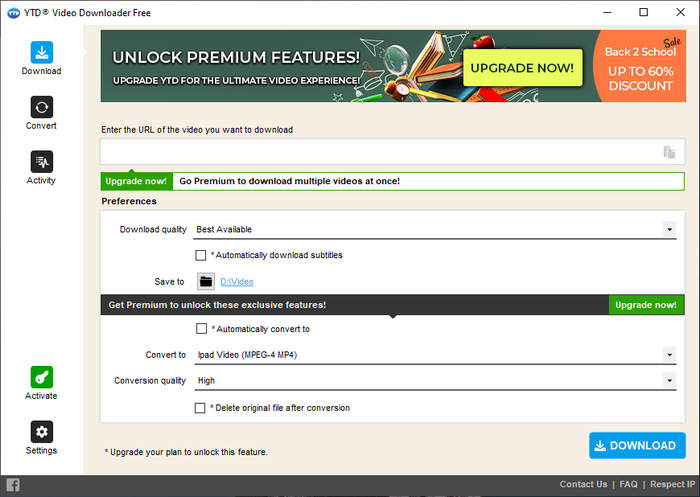
How to Download 4K YouTube Videos with YTD Video Downloader
- Download YTD Video Downloader from its official website.
- Copy and paste the video link that you want to download to YTD Video Downloader.
- Choose your desired output formats like MP4 or MP3.
- Click Download, and it will automatically download the video.
What Are the Pros and Cons of YTD Video Downloader
| Pros |
|
|---|---|
| Cons |
|
Part 4: 4K Video Downloader Plus - Simple 4K YouTube Downloader
4K Video Downloader Plus is a popular and well-known tool that allows you to download 4K or even 8K YouTube videos, Shorts, and playlists to your Windows, Mac, or Android. Besides YouTube, you can also download content from websites like Vimeo, TikTok, SoundCloud, and so on.
However, in the free version, you can only download 10 videos each day, and batch downloads are limited to just 3 videos at a time. Want to save higher-quality multi-language audio? You also need to upgrade — at least $45. Plus, during our testing, this program frequently encountered technical issues such as being unable to open the platform or freezing when pasting video links.
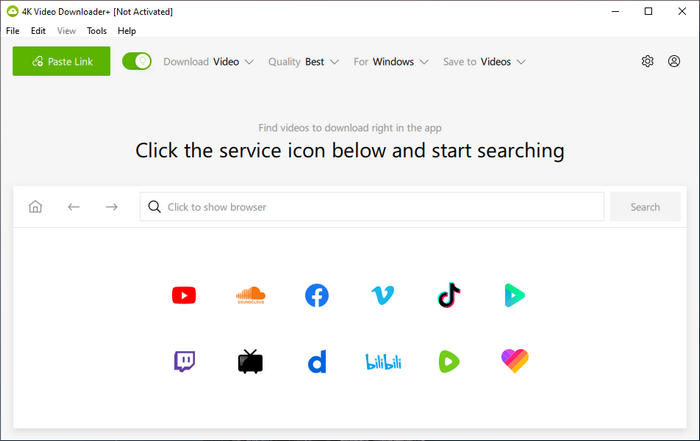
How to Download 4K YouTube Videos with 4K Video Downloader Plus
- Download 4K YouTube Video Downloader from its official site and run it on your computer.
- Select YouTube as the website or simply paste the YouTube video link in the search bar.
- Select your desired video format, quality, and output folder on your computer.
- Click the Download button to start the process and find the video on your device.
What Are the Pros and Cons of 4K Video Downloader Plus
| Pros |
|
|---|---|
| Cons |
|
Part 5: SnapDownloader - Fast 4K YouTube Batch Downloader
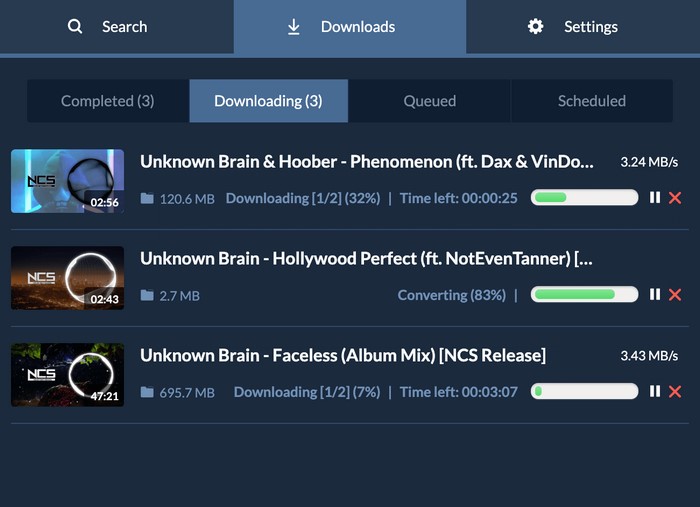
SnapDownloader is another easy-to-use but paid YouTube 4K download tool. It offers a 48-hour free trial. During these 48 hours, you can freely enjoy all premium features without limits, such as the basic downloading feature, high-quality output (up to 8K), batch downloads, and more. After the free trial, you have to pay at least $7.99/month to download videos.
SnapDownloader supports downloading videos, Shorts, and playlists from YouTube and other 1000+ streaming sites like Instagram, Vimeo, Facebook, Twitter, and TikTok. It also supports a wide variety of output formats, including MP4, MP3, MOV, AVI, AAC, M4A, WAV, AIFF, FLAC, and WMA. As a paid YouTube 4K download tool, SnapDownloader is practical and reliable.
How to Download 4K YouTube Videos with SnapDownloader
- Download SnapDownloader to your Windows or Mac.
- Paste the video link into the search bar.
- Select your output format and video quality, then click "Download" to start.
What Are the Pros and Cons of SnapDownloader
| Pros |
|
|---|---|
| Cons |
|
Part 6: StreamFab - Advanced 4K YouTube Downloader
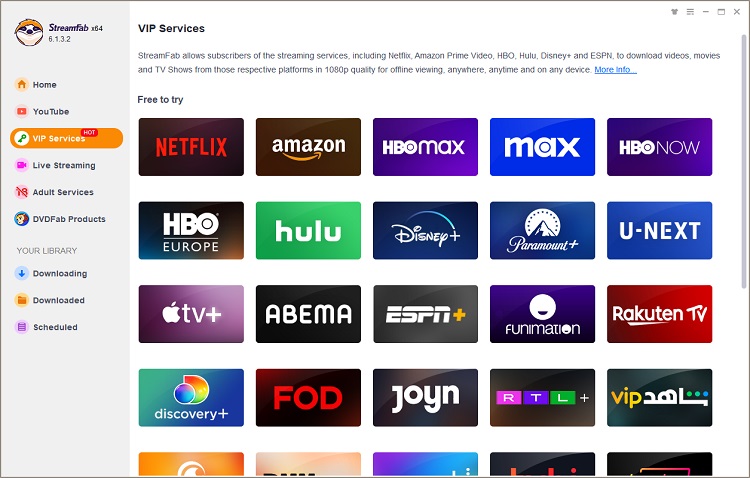
StreamFab is an all-in-one downloader supporting more than 1,000 platforms, including YouTube, Netflix, Amazon, Disney+, and more. However, it is a paid program, and the free version only allows you to download videos in up to 720P quality. Playlist downloads and simultaneous downloads are also limited to just 1 playlist and 5 files.
You May Also Like: StreamFab Review 2026: Everything You Need to Know
How to Download 4K YouTube Videos with StreamFab
- Install and run StreamFab YouTube Video Downloader on your device.
- Select YouTube as the website, then search for the video you want to download.
- Once the video is loaded, click the Download button at the bottom-right corner.
- Customize your video quality, audio, and subtitle formats, then click Download again.
What Are the Pros and Cons of StreamFab
| Pros |
|
|---|---|
| Cons |
|
Part 7: Comparison: Which One is the Best 4K YouTube Downloader?
To help you better select the right tool, we've compiled a detailed comparison of each tool's download quality, features, and output formats in the table below.
| Feature | SameMovie 🏆 | YTD Video Downloader | 4K Video Downloader Plus | SnapDownloader | StreamFab |
|---|---|---|---|---|---|
| Rating |
⭐⭐⭐⭐⭐ |
⭐⭐⭐ |
⭐⭐⭐ |
⭐⭐⭐⭐ |
⭐⭐⭐ |
| Pricing |
Free |
$71.88/year |
$15/year |
$29.99/year |
$49.99/year |
| Multi-Language |
✅ |
✅ |
✅ |
✅ |
✅ |
| Free YouTube 4K Download |
✅ |
✅ |
❌ |
❌ |
❌ |
| Free YouTube 8K Download |
✅ |
✅ |
❌ |
❌ |
❌ |
| Free & Unlimited Batch Downlaod |
✅ |
❌ |
❌ |
❌ |
❌ |
| No Ads |
✅ |
❌ |
✅ |
✅ |
✅ |
| Compatibility |
Windows & Mac |
Windows & Mac |
Windows & Mac & Android |
Windows & Mac |
Windows & Mac & Android |
| Output Formats |
MP4, MKV, MP3, M4A |
MP3, MP4, WAV, MKV, M4A, FLV, MOV, 3GP, AVI |
MP4, MKV, MP3, M4A, OGG |
MP4, MP3, MOV, AVI, AAC, M4A, WAV, AIFF, FLAC, and WMA |
MP4, MKV, FLV, M4A. MP3 |
| Other Supported Sites |
Free to Download Almost All youtube-dl Platforms |
50+ sites, Paid |
10+ sites but Paid |
1000+ sites but Paid |
1000+ sites but Paid |
Part 8: FAQs about YouTube Video Download 4K
Is it legal to download YouTube videos in 4K?
Downloading YouTube videos for personal offline viewing is generally acceptable in many regions, but distributing or using them for commercial purposes may violate YouTube's terms of service. Always make sure you follow local laws and respect copyright rules.
Can I download YouTube videos without Premium?
Generally, downloading videos from the official YouTube website requires Premium, and the video quality is often limited to 1080P. However, SameMovie YouTube Video Downloader helps you download YouTube videos, Shorts, and playlists — completely for free!
You May Also Like: How to Download YouTube Videos without Premium (Free & Safe)
Can I download YouTube videos with subtitles?
Yes! SameMovie YouTube Video Downloader supports downloading YouTube videos with subtitles. You can even choose the subtitle format — internal, external, or hardcoded — before downloading.
Can I download YouTube videos in 4K for free?
Some tools offer free trials for downloading 4K YouTube videos, such as 4K Video Downloader Plus and SnapDownloader. Even better, SameMovie YouTube Video Downloader allows you to download YouTube videos, Shorts, and playlists completely for free with no limitations at all!
Conclusion
This article introduces 5 of the best YouTube 4K download tools. Tools like YTD Video Downloader and SnapDownloader offer more output formats, and tools like StreamFab and 4K Video Downloader Plus are compatible with more devices.
However, these tools all have limitations for YouTube 4K downloads, either in quantity or free trial time. For an unlimited, free, and smooth YouTube 4K download experience, SameMovie undoubtedly stands out among these tools.
Clark Clinton is a senior writer renowned for her expertise in resolving streaming platform download errors. Her concise writing style and practical methods have earned her a stellar reputation among readers and peers alike. Whether you're facing a technical glitch or seeking streaming tips, Nina's guidance ensures a smooth and enjoyable reading experience.