


How to Record YouTube Videos on Laptop, Mobile & Online in 2026

Nina Prescott March 24, 2026 Category: Topics
Tired of missing YouTube live streams with no replay? Or dealing with poor-quality recordings and annoying black screens?
In this complete guide, you'll discover how to record YouTube videos on PC, Android, and online, as well as the 3 best YouTube recorders that help you capture videos faster, cleaner, and without interruptions.
 You May Also Like: 3 Best Methods to Download YouTube Video Playlist in 2026
Reading Guide
Part 1: How to Record YouTube Videos on PC at 8X Faster Speed)
SameMovie Streaming Video Recorder is a powerful recorder that allows you to record YouTube content, including YouTube videos, shorts, replays, behind-the-scenes footage, clips, and more on your PC and Mac, at 8X faster speed. Plus, during recording, you can manually skip the ads and the unwanted parts, so the final recorded files include only the segment you want and 100% ad-free.
SameMovie also supports recording YouTube live streams - no matter if it's gaming, live concerts, news broadcasts, or more. Simply set your desired auto-stop time, click "Start Recording", and then the software will automatically capture the live video in the background. This way, you can go about your day and never miss a live stream again.
Want to batch download YouTube videos, shorts, and playlists for free? Check out SameMovie YouTube Video Downloader!
Key Features of Streaming Video Recorder
- Record all YouTube content: videos, shorts, live streams, replays, behind-the-scenes footage, clips, and more.
- Record from any platform, including Netflix, Disney+, Hulu, Amazon Prime Video, YouTube, Twitch, TikTok Live, etc.
- Multiple speed recording, up to 8X faster.
- Record video as full 1080P MP4 files, watch on any device.
- Skip ads and unwanted parts manually.
You May Also Like: Top 9 Safe & Free YouTube Video Downloaders [PC/Online/Android]
How to Record YouTube Videos on PC/Laptop with SameMovie
STEP 1 Install SameMovie Video One
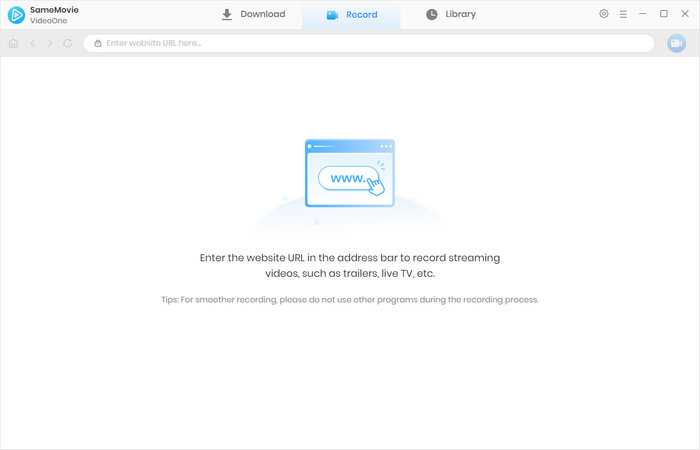
Install SameMovie Video One on your PC or Mac, and head to the Record tab.
STEP 2 Copy and Paste the YouTube Video Link
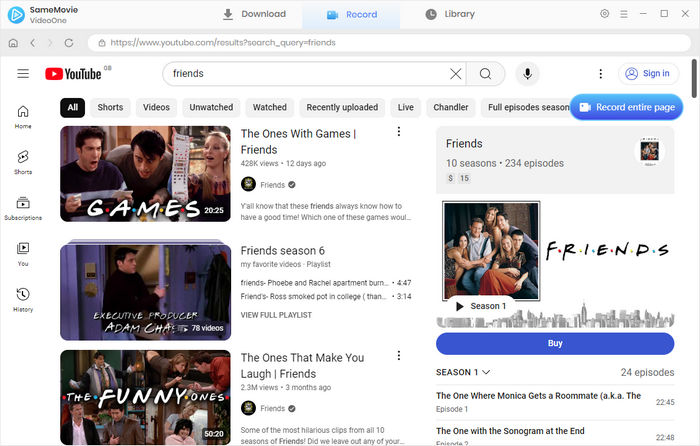
In the Record tab, you will see a search bar at the top. Simply paste the video link into the search bar and press "Enter." The program will detect the video and display it in the program.
STEP 3 Customize YouTube Recording Settings
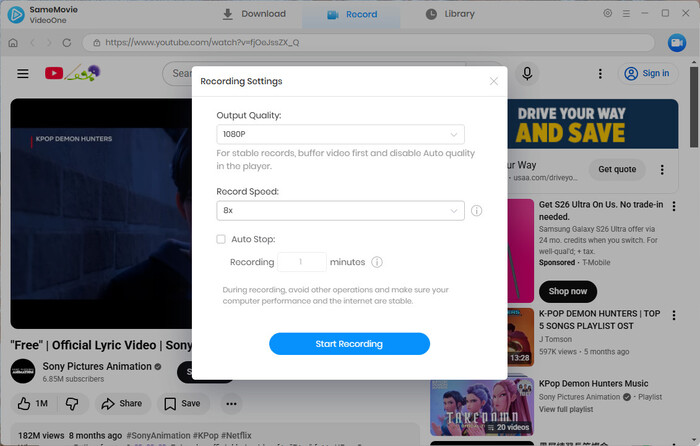
Click the "Record" button next to the search bar. Then you can customize the recording quality, recording speed, and auto-stop time in the new pop-up window.
STEP 4 Record YouTube Videos
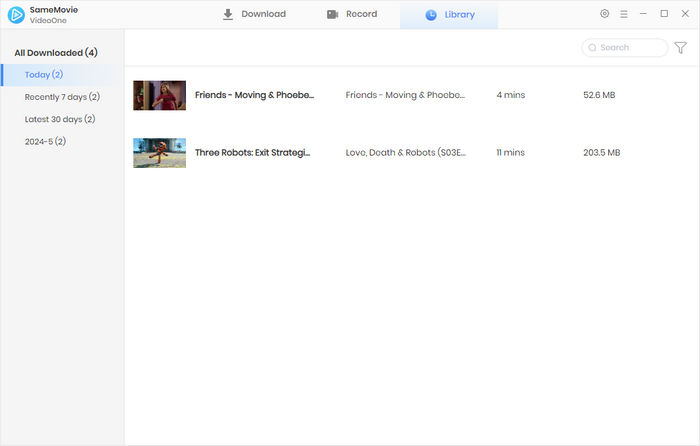
After clicking "Start Recording", the program will automatically capture only the video playback area in the background, and it will stop recording at the time you set. Once finished, you can go to the Library to find your recorded videos.
Part 2: How to Record YouTube Videos on Android for Free
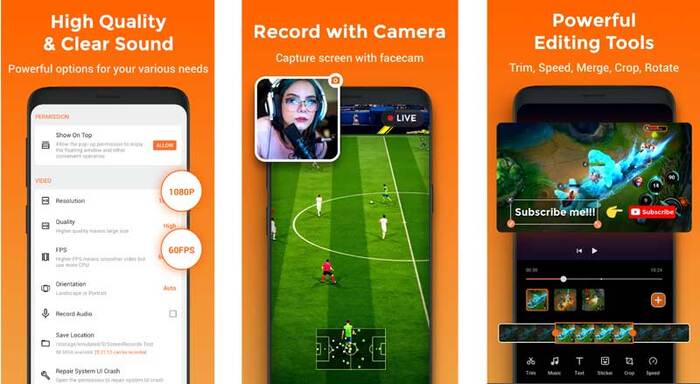
XRecorder is a widely praised tool for recording YouTube videos on Android, with a high rating of 4.7 (7.56M reviews) on Google Play. XRecorder allows you to record YouTube videos, shorts, and live streams in 1080P without watermarks and time limits. But far beyong a YouTube recorder, XRecorder also offers other special features like video editing and audio recording.
You May Also Like: How to Screen Record Netflix in High Quality on Mac
How to Record YouTube Videos on Android with XRecorder
- Download and launch XRecorder on your Android. Remember to allow the app to access your microphone, storage, and screen overlay.
- Click the Settings menu to customize your video resolution, frame rate, and show/hide the floating toolbar.
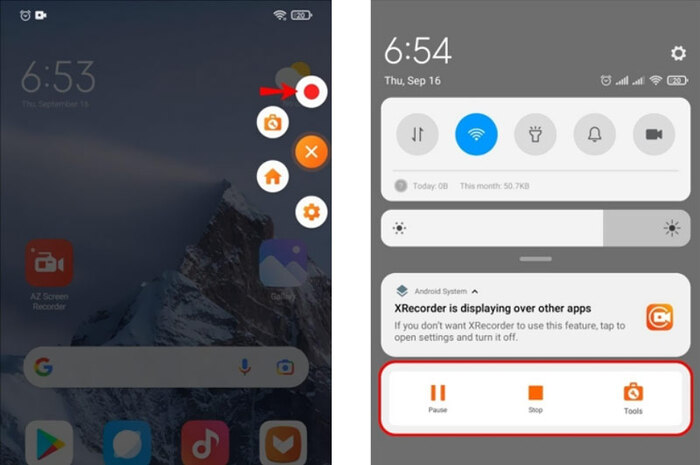
- Click the Record button on the floating toolbar, select whether to record with or without sound, and XRecorder will record everything on your screen.
- Switch to the YouTube video page and start playing the videos. After finishing recording, tap the Stop button, and the video will be saved to your gallery. You can edit the video and delete the unwanted part directly in the app.
What are the pros and cons of XRecorder
| ✅Pros |
|
|---|---|
| ❌Cons |
|
Part 3: How to Record YouTube Videos Online for Free
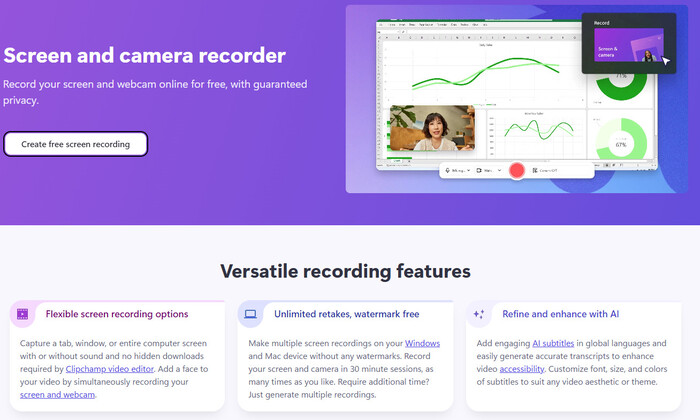
Clipchamp is widely recognized as one of the best free online YouTube recorders in 2026, which runs entirely in the browser, with no need to download any software. With Clipchamp, you can use both internal or external cameras to record your computer screen and the scene off the screen, which is convenient for vloggers who create video walkthroughs or reaction videos.
Besides, Clipchamp adopts advacned AI techonology to easily remove long pauses and awkward silences from your videos, and automatically generate subtitles. However, Clipchamp supports video recordings of up to 30 minutes at a time, and it does not support recording live streams, which is a drawback for those who want to record long movies or live streams of games, sports events, or concerts.
How to Record YouTube Videos with Clipchamp
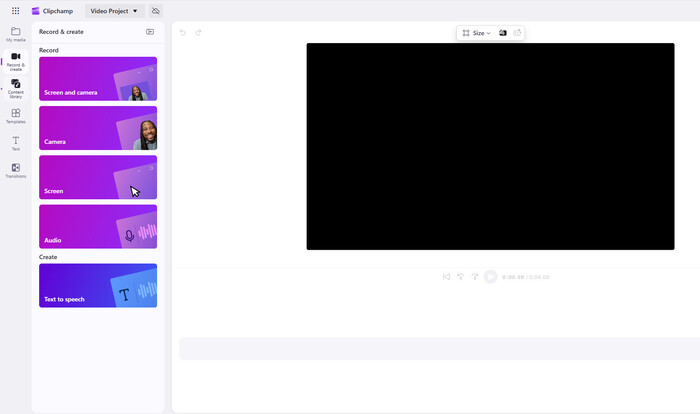
- Go to the Clipchamp official website, find the screen recorder page, click "Capture a webcam video," then log in to your account.
- Click "Create a new video", and in the video editing panel, click "Record and Create" on the left side.
- Choose the "Screen" or "Screen and Camera" tab, and select your microphone and camera.
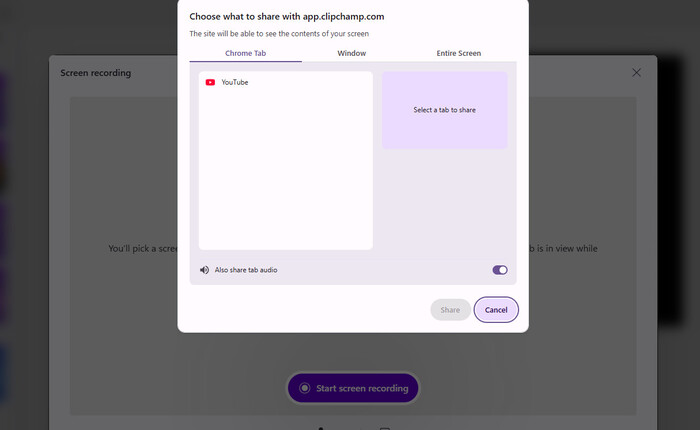
- Click "Start Screen Recording", select the YouTube page, and it will automatically record the videos you are playing.
What are the pros and cons of Clipchamp
| ✅Pros |
|
|---|---|
| ❌Cons |
|
Part 4: FAQs about Recording YouTube Videos
Is it legal to record YouTube videos?
Only if you record YouTube videos for personal offline viewing. Distributing recorded YouTube videos may go against YouTube's terms of service or even violate your local laws. Always remember to use these recording tools legally and respect others' copyrights.
Does recording YouTube videos reduce video quality?
Yes, some tools can compress video quality while recording. For a more stable recording experience, use SameMovie Streaming Video Recorder to record your YouTube videos and live streams in 1080P and watch them on any device.
Which one is the best tool to record YouTube videos?
To help you choose more easily, we compare the recording features, output quality, pricing, and more of the three YouTube recorders in detail.
| Features | SameMovie 👑 | XRecorder | Clipchamp |
|---|---|---|---|
| Rating | ⭐⭐⭐⭐⭐ | ⭐⭐⭐ | ⭐⭐⭐⭐ |
| Compatibility | Windows & Mac | Android | Web-based |
| Is it Free? | ✅ Free to download YouTube videos |
✅ | ✅ |
| Recording Video Quality | Up to 1080P | Up to 1080P | Up to 1080P |
| Record YouTube Live | ✅ | ✅ | ❌ |
| Ad-Free | ✅ | ❌ | ✅ |
| Recording Speed | ✅ Up to 8X faster recording |
❌ Real-time recording |
❌ Real-time recording |
| Background Recording | ✅ | ❌ | ❌ |
| Other Features | 1. Manually skip ads and unwanted parts 2. Record from Netflix, Amazon, Disney+, etc. |
1. Edit videos in the app 2. Record only the audio |
1. Automatically remove long pauses 2. Automatically generated subtitles. |
Final Words
After reading this article, you will have a broader understanding of how to record YouTube videos. XRecorder works well on Android, offering complete functions for recording YouTube videos and live streams. Clipchamp also provides great recording features and some excellent AI functions.
However, if you are looking for a tool that allows you to record YouTube videos at 8X faster speed in the background, or skip ads and unwanted parts, SameMovie is undoubtedly the top choice to try.
Nina Prescott is a senior writer renowned for her expertise in resolving streaming platform download errors. Her concise writing style and practical methods have earned her a stellar reputation among readers and peers alike. Whether you're facing a technical glitch or seeking streaming tips, Nina's guidance ensures a smooth and enjoyable reading experience.
What You'll Need
Recommend