



SameMovie Netflix Video Downloader
- Download movies on Netflix on laptops in high quality(1080P);
- Download Netflix movies and TV shows to MP4/MKV Format in batch;
- Save multilingual audio tracks (including Atmos) and subtitles;
- Super high download speed & download success rate.
[2026] How to Download Netflix Movies on Mac for Offline Viewing

Claire Green May 7, 2026 Category: Netflix Tips
Quick Answer – Can I Download Netflix on Mac?
Afraid not. Netflix does not provide an official Netflix app free download for MacBook Air, MacBook Pro, or macOS 26, so most users can only watch Netflix on their MacBook through a browser like Safari or Chrome, which doesn't support downloading.
But what if you want to download Netflix movies on MacBook or laptops and watch them offline? This guide will introduce 8 pratical methods to download Netflix movies and shows for offline viewing. Let's explore more below.
You may also want to know 👉: How to watch Netflix on MacBook on airplane
Reading Guide
- Part 1. The Benefits of Downloading Netflix Content on Mac
- Part 2. Why Can't I Download Netflix on Mac?
- Part 3. How to Download Netflix on Mac: 8 Best Methods in 2026
- 3.1 How to Download Netflix on Mac with SameMovie 🍿
- 3.2 Download Netflix on Mac by Recording
- 3.3 Download Netflix on Mac through Android Emulator
- 3.4 Download Netflix on Mac via iOS Simulator
- 3.5 Download Netflix on Mac via Mirroring
- 3.6 Download Netflix on Apple Silicon Mac (M1/M2/M3/M4)
- 3.7 Download Netflix on Mac Using PlayCover
- 3.8 Download Netflix on Mac via Browser PWA Shortcut
- Part 4. What's the Best Way to Download Netflix on Mac?
- Part 5. FAQs About Downloading Netflix on Mac
Part 1. The Benefits of Downloading Netflix Content on Mac
Downloading Netflix movies and shows on your MacBook offers several benefits:
- ✅ Watch Netflix offline on MacBook Air, MacBook Pro, or macOS 26, anytime and anywhere
- ✅ Enjoy Netflix movies on a larger MacBook screen compared to phones or tablets
- ✅ Watch Netflix movies on travel, long flights, or during internet outages (chekc out how to watch Netflix on MacBook on airplane)
- ✅ No download expiration limits like in the official Netflix app
So how can you download Netflix on a laptop, especially a MacBook Air, even without an official app? Read Part 3 to get the detailed methods directly.
Part 2. Why Can't I Download Netflix on Mac?
✅ You CAN download Netflix shows & movies on:
- Your iPhone or iPad (using the Netflix app)
- Your Android phone or tablet (using the Netflix app)
- Your Amazon Fire tablet (using the Netflix app)
- Your Google Chromebook (with Google Play Store installed)
❌ But You CANNOT download Netflix on Mac. Why?
As of 2026, Netflix still hasn't released an official macOS app , meaning there is no Netflix app for MacBook Air, MacBook Pro, macOS 26, or any option for a direct Netflix app free download on Mac. Therefore, on a Mac, you can't download Netflix movies on Mac directly for offline viewing. You can only stream Netflix online. If you want to watch Netflix offline on a MacBook Air, you'll need to use some viable workarounds (which we'll cover in detail later).
Part 3. How to Download Netflix on Mac: 8 Best Methods in 2026
3.1 Download Netflix on Mac with SameMovie 🍿
SameMovie Netflix Video Downloader is a reliable and safe tool that I have been using for several months. It supports downloading Netflix movies and shows on both Windows and MacBook, including M1, M2, M3, and M4 Macs, addressing the fact that Netflix doesn't allow downloads on laptops. After some time using it, I find that it performs stably when downloading Netflix movies on MacBook. Here's what I like about SameMovie:
- 👍 Supports Most Macs: Works on Intel and Apple Silicon Macs, including MacBook Air, MacBook Pro, iMac, etc., running macOS 11 or later.
- 👍 Permanent Downloads: Downloads from the Netflix app expire. SameMovie downloads don't. Netflix titles are yours to keep, even if your subscription runs out.
- 👍 High-Quality Netflix Videos: Download Netflix in 1080p HD quality with the audio language and subtitles you want.
- 👍 Batch Download Entire Seasons: Download multiple Netflix episodes at time while SameMovie runs in the background.
- 👍 Remove Netflix Ads: SameMovie lets you download Netflix movies and shows without ads even if you're using Netflix's cheapest ad-supported plan.
However, SameMovie Netflix video downloader is a paid software, and the free trial version allows downloading only the first 5 minutes of each video. Check out SameMovie Netflix Video Downloader Review [2026 Latest]
❗️Note: SameMovie downloads are for personal and legal use only. Please comply with Netflix's Terms of Service.
Features of SameMovie Netflix Video Downloader:
- Download Netflix on laptop (Windows/Mac) permanently.
- High-quality downloads for both audio and video.
- Get rid of ads and no need to install Netflix app.
- No ads, plugins and malware.
How SameMovie works to download Netflix movies on Mac laptop (it's so easy):
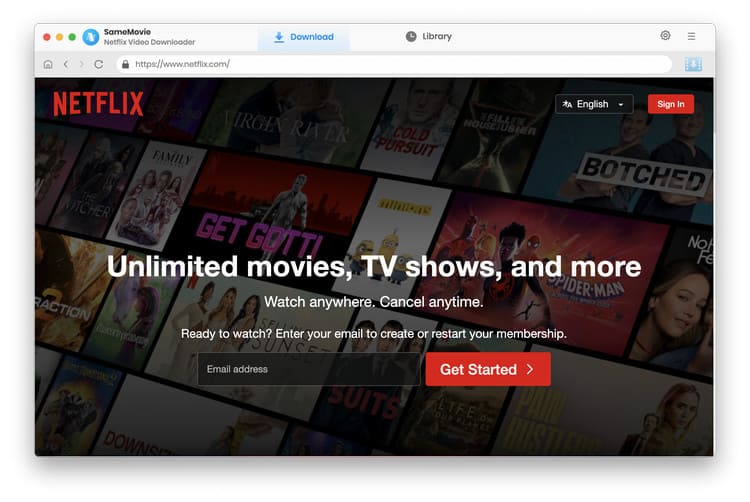
Step 1. First things first, launch the SameMovie Netflix Video Downloader on your Macbook. Hit that Sign In button and log into your Netflix account like you normally do.
SameMovie needs to work with a Netflix account to access its services. Fret not, SameMovie won't collect any information other than the videos. Your privacy and safety can be guaranteed to the greatest extent.
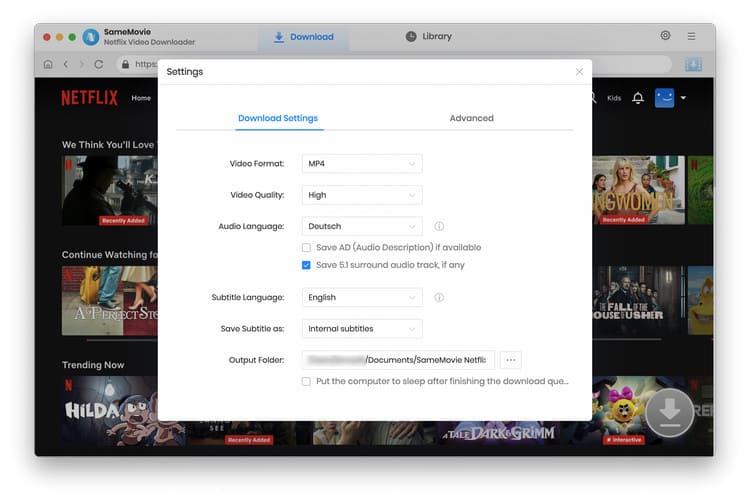
Step 2. Now let's choose your Settings for Netflix movies. You can choose Video format (MP4 is a solid pick), and Quality (go for High to get HD 1080P).
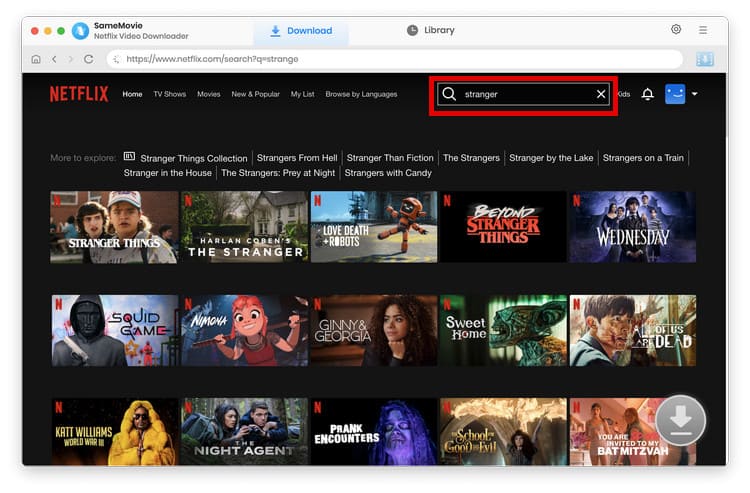
Step 3. Browse Netflix movies inside SameMovie's built-in browser, or you can just type the movie/show name in the search bar.
Step 4. Open the movie or TV show detailed page, then hit Download. In the new window, you can also select the detailed video & audio quality, as well as the subtitle language.
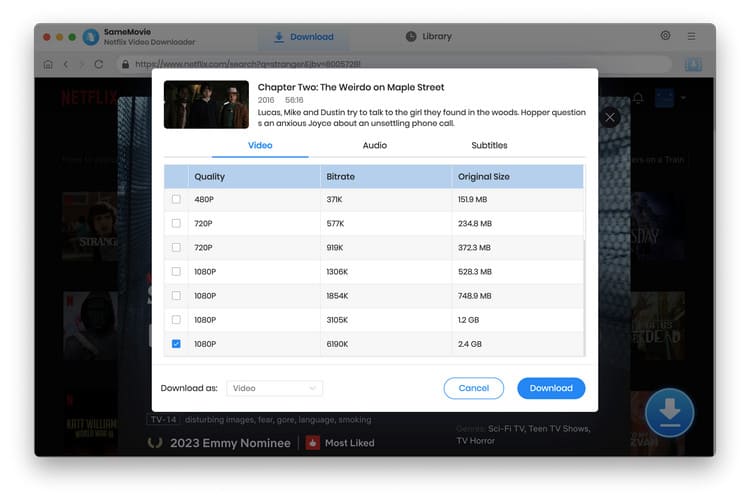
Step 5. Once selected, click Download again, and all your Netflix videos will start saving into your Mac.
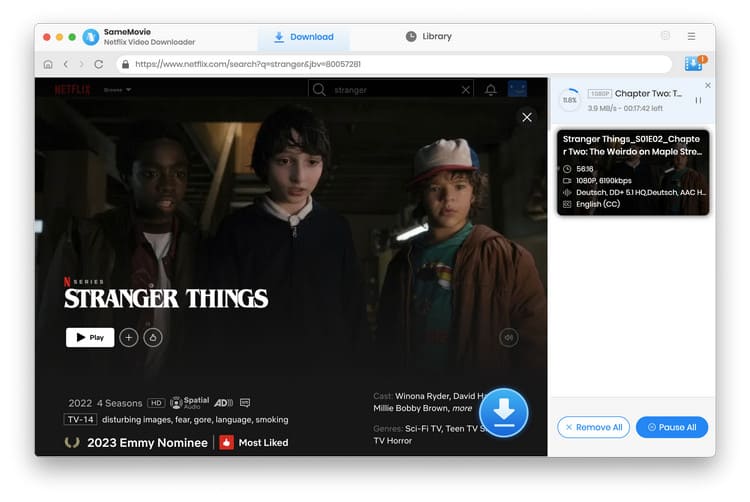
3.2 Download Netflix on Mac by Recording
Recording Netflix is another effective way to download Netflix movies on Mac for offline viewing. However, because of Netflix's strict content protection policies, most people encounter black screens when recording.
Luckily, I found that SameMovie Video One has a recording feature, and the recorded Netflix movies do not have black screens. What surprised me even more is its multiple-speed recording, with a maximum speed of 8X. This allows me to record a 2-hour movie in just 15 minutes — making it a practical way to watch Netflix offline on MacBook Air, MacBook Pro, and macOS.
⚠️ Limitations: The free version only allows 5-minute recording.

Features of SameMovie All-in-one Video Downloader:
- Record Netflix movie & TV shows to MP4 or MKV, in real-time.
- Batch download streaming video from 1,000+ sites at high speed.
- Save videos in top quality (up to 8K).
- Preserve multi-language audio tracks & subtitles.
How to record Netflix videos on Mac without black screen:
Step 1. Download and install this SameMovie Netflix Video Recorder tool on your Mac.
Step 2. Go to the tab of Record, then copy & paste Netflix site on it. Find and start playing Netflix videos there.
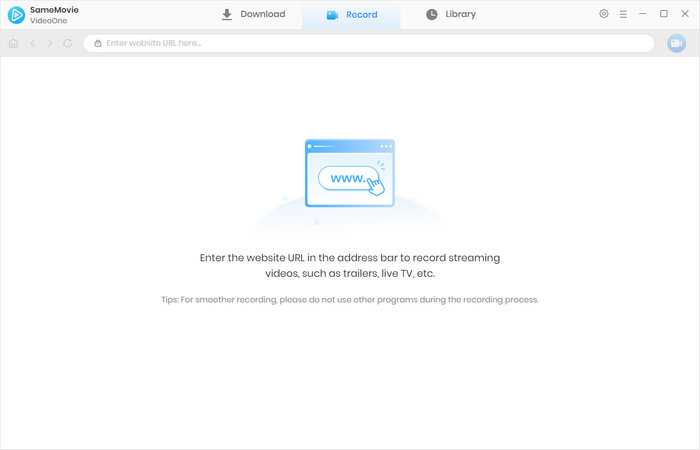
Step 3. Then click the Record icon at the upper right corner. Select video quality, and start.
Step 4. When you finish watching the movie, stop SameMovie and save it to local offline video file.
3.3 Download Netflix on Mac through Android Emulator
By using an Android emulator on your Mac, you can effectively access the mobile version of Netflix on your MacBook's desktop (including MacBook Air, MacBook Pro, macOS 26), allowing you to download Netflix movies and shows to your Mac. However, please note that this method may fall outside the scope of Netflix’s supported usage. Additionally, you are still subject to Netflix’s official download restrictions (check out Netflix streaming issues and how to fix them >>).
How to Download Netflix on Mac through Android Emulator
Step 1. Install an Android emulator on your Mac. Here, we take BlueStacks as an example.
Step 2. Open BlueStacks and sign in to Google Play with your Google account.
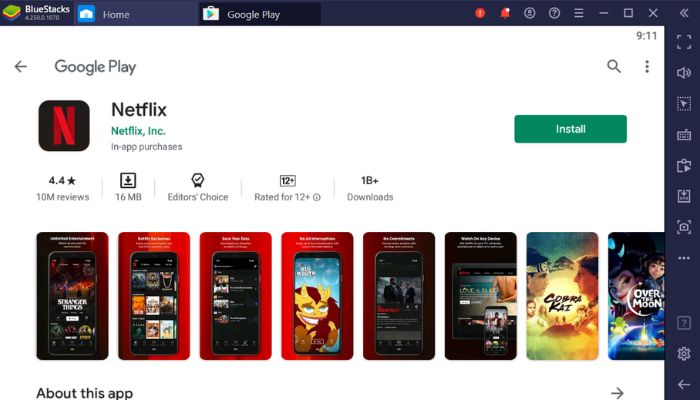
Step 3. Search for Netflix in the Play Store, install it, then open the app and log in to your Netflix account.
Step 4. Choose a movie or show in Netflix and tap the download button to save it to your Mac.
| ✅ Pros |
|
|---|---|
| ❌ Cons |
|
3.4 Download Netflix on Mac via iOS Simulator
This method is similar to the previous one: install an iOS Simulator on your MacBook Air, MacBook Pro, or macOS 26, then download Netflix movies within the simulator. However, please note that this method only works on Mac computers equipped with M-series chips. Additionally, your macOS version must be Big Sur (11) or later.
You may also like 👉: How to Fix Netflix Download Not Working
How to Download Netflix on Mac via iOS Simulator
Step 1. Download a Netflix .ipa file to your Mac from a trusted third-party website.
Step 2. Install an IPA sideload tool such as Apple Configurator 2, iMazing, Sideloadly, or PlayCover.
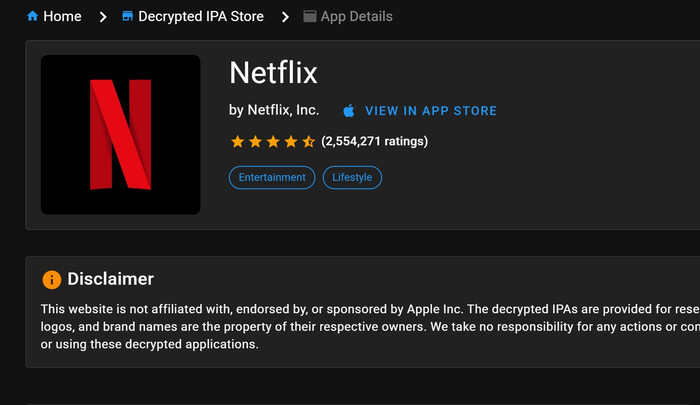
Step 3. Install the .ipa file by either dragging it into Finder or using a sideload tool like iMazing/Sideloadly to select it and sign in with your Apple ID if required.
Step 4. Once installed, open Netflix from Applications and check if it works properly.
| ✅ Pros |
|
|---|---|
| ❌ Cons |
|
3.5 Download Netflix on Mac via Mirroring
Apple devices have a convenient feature called Screen Mirroring. You can use the Screen Mirroring app on your iPhone to stream Netflix movies downloaded to your iPhone to devices like a MacBook Air, MacBook Pro, or macOS 26. However, this method doesn't actually download the Netflix movies to your Mac, and you’ll need to keep your phone nearby to control it.
You may also like 👉: How to Share Screen on FaceTime to Watch Netflix
🛠 What You'll Need:
- ✅ Apple Silicon Mac with Intel T2 security chip
- ✅ Log in to your Mackbook and iPhone/iPad with the same Apple ID
- ✅ Keep both devices close with Bluetooth and Wi-Fi enabled
Step 1. Open the iPhone Mirroring feature on your Mac.
Step 2. Select your iPhone from the list and confirm the connection by entering the passcode on both devices.
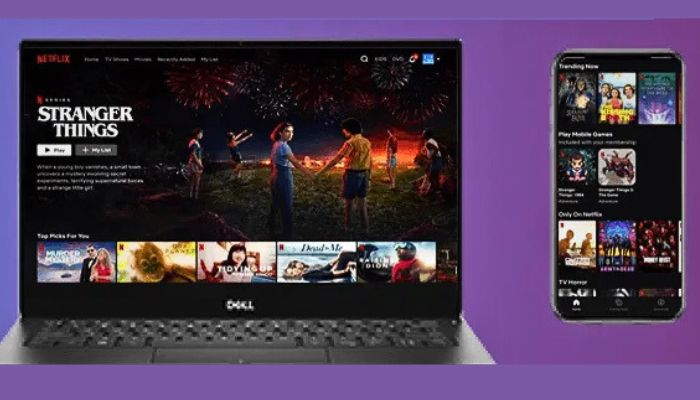
Step 3. Once connected, control your iPhone from your Mac, open Netflix, download the content you want, and watch it offline.
| ✅ Pros |
|
|---|---|
| ❌ Cons |
|
3.6 Download Netflix on Apple Silicon Mac (M1/M2/M3/M4)
If you've got an Apple Silicon Mac (with M1/M2/M3/M4), there's a workaround to download Netflix on MacBook Air by using iMazing. This iMazing can not only transfer photos, music, and videos from your iPhone to Mac, but even install and manage your Netflix app and install it from iPhone to Mac super fast. Here's how to do so.
⚠️ This method has limitations - it doesn't work with macOS Ventura, Sonoma, or Sequoia systems; And the Netflix downloads will be expired after 7 days or 48 hours after starting to watch. If you're looking for a more stable way to download Netflix movies on Mac or even download Netflix on a laptop without expiration limits,, SameMovie Netflix Video Downloader is still the better choice.
🛠 What You'll Need:
- ✅ Apple Silicon Mac (Intel Macs won't work)
- ✅ iPhone/iPad with Netflix installed
- ✅ iMazing (paid tool, free trial available)
- ✅ macOS Big Sur 11.2.3 or earlier (newer versions may block sideloading)
Step 1. Setup iMazing from its official site on your Mac.
Step 2. Connect your iPhone or iPad to Mac. On the iMazing app, find Netflix logo, right-click and choose "Export Netflix IPA".
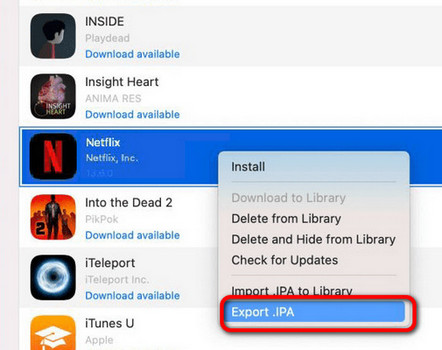
Step 3. On your Mac, find the Netflix IPA file, and run it to install Netflix app on Mac.
All done! Now the Netflix iOS App has been installed on your Mac. You can now find your favorite Netflix videos and download offline.
| ✅ Pros |
|
|---|---|
| ❌ Cons |
|
3.7 Download Netflix on Mac Using PlayCover
Just like the iMazing app, PlayCover also supports to basically trick iOS apps (in their IPA format) into running perfectly on macOS — especially on M1/M2 Macs. So if you want to download Netflix on MacBook Air, this is also your go-to.
Note: Netflix only lets you install its app officially from the iOS App Store. They don't give out the Netflix ipa file. You will need to find a safe one from a social network, or extract your own Netflix iPA file from iMazing app. To use Netflix on MacBook Air safely, it's highly recommended to use SameMovie Netflix Downloader.
What You'll Need:
- A Mac with an M1, M2, M3, M4 chip.
- Some free storage space.
- Netflix IPA file (this is the iOS app file).
- Your Netflix login.
Step 1. Visit the official playcover.io website and download PlayCover. Drag it into your Applications folder.
Step 2. Your Mac might freak out and block PlayCover. Just go to System Settings > Security & Privacy and click "Open Anyway".
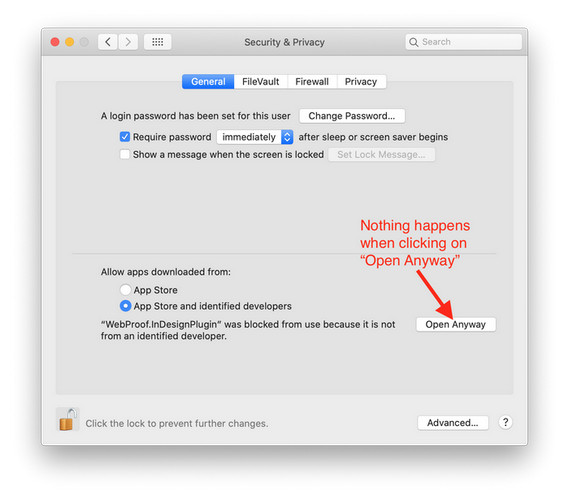
Step 3. You need to find a Netflix .ipa file from a site like IPA Store. Be careful, only use sources you trust to avoid viruses!
Step 4. Open PlayCover, then just drag that downloaded Netflix .ipa file right into its window. It'll handle the rest.
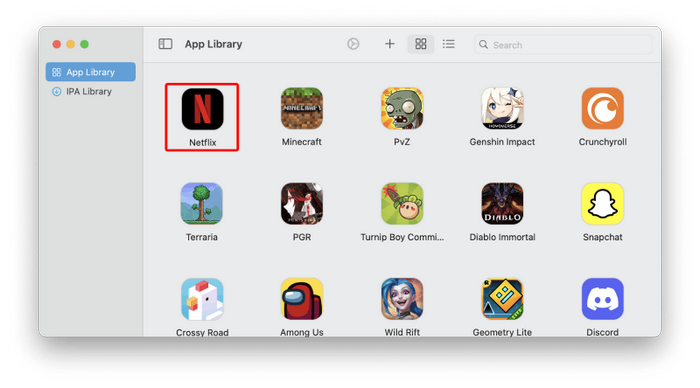
All done! You're In! Find the Netflix icon in PlayCover and click it. Log in with your account, and you should be good to go! You can now download Netflix shows on Macbook for your flight.
3.8 Download Netflix on Mac via Browser PWA Shortcut
Can't download Netflix on MacBook Air? Here's what you can do instead: You can set up a browser shortcut to visit Netflix.com. When you open it, you will feel kinda like a Netflix app on Mac.
Note: This method still needs Wi-Fi or internet to work.
Step 1. Go to the Netflix official website and log in using Safari or Chrome.
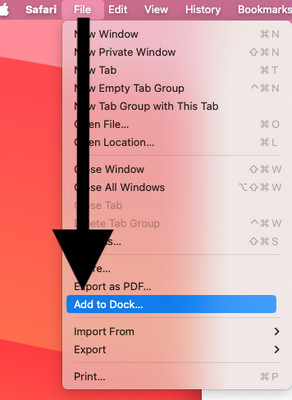
Step 2. For Safari, click the little square with the arrow at the top-right, then choose Add to Dock. Name it "Netflix" or whatever you want.
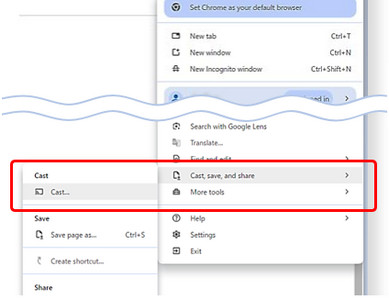
For Chrome, click the top-right three-dot, then "Cast, save, and share" and choose "Create shortcut".
Step 3. Now, you will see Netflix icon in your Dock or Applications folder. It opens in its own window — no tabs, no toolbars, just Netflix.
Pros & Cons:
| Pros |
|
|---|---|
| Cons |
|
Part 4. What's the Best Way to Download Netflix on Mac?
| Method | Forever Downloads | Video Quality | Ease of Use | Safe | Multi-Platform | Works on Latest macOS | Price Friendly |
|---|---|---|---|---|---|---|---|
| SameMovie Netflix Downloader | ✅ | 1080p | ✅✅ Very Easy | ✅ | Netflix | macOS 11 or later | $79.9/lifetime |
| Netflix Video Recorder | ✅ | 1080p | ✅ (Simple, but real-time) | ✅ | Netflix, Amazon Video, YouTube, & over 1000+ sites | macOS 11 or later | $149.9/lifetime |
| iMazing | ❌ (Downloads will expire) | 1080p/4K | ❌ (Messy setup) | ✅ | Netflix, Hulu, Disney+, Amazon Prime Video, etc | macOS 10.11 ~ Sequoia 15 (with M1/M2/M3) | $49.95 |
| PlayCover | ❌ (Downloads will expire) | 1080p/4K | ❌ (Messy setup) | ❌ | Netflix, Crunchyroll, Disney+, etc | macOS 12 or later (with M1/M2/M3) | Free |
| Browser Netflix Shortcut | ❌ (No downloads) | 1080p/4K | ✅ Easy | ✅ | All web | All Macs | Free |
If you want to download Netflix on MackBook Air for watching forever, and don't want any restrictions anymore, SameMovie Netflix Downloader is all you need to download anything for streaming without internet.
If you know more about computer skills, just try to extract Netflix IPA file and install Netflix iOS app on Mac. By this, you can enjoy the native Netflix UI on your Mac.
Part 5. FAQs About Downloading Netflix on Mac
Nope. Sorry! 😕 There is no official Netflix app for Mac. You have to watch it in your browser (like Safari or Chrome), and you can't download shows for offline viewing there. Till 2026, Netflix hasn't announced any plans for one. They've focused on apps for phones, Windows, and smart TVs.
Your best and most reliable option is to use a dedicated tool like SameMovie Netflix Video Downloader. You can even keep the Netflix downloads after the subscription ends.
Yes, for personal use. You can use SameMovie to download shows for yourself, just like using the official Netflix app. Just don't share the files.
Nope. Netflix blocks AirPlay to Macs (and other devices) to prevent recording. So that Netflix video screen won't even show up when your Mac is the target. Learn More on Black screen with sound
If you don't want Netflix anymore, you can try the following streaming video services. Their Mac native apps support downloading titles for offline playback.
| Streaming Platform | Native macOS App | Offline Viewing Support | Key Features | Pricing |
|---|---|---|---|---|
| Apple TV+ | ✅ | ✅ | Original content, 4K HDR, Family Sharing | $9.99/month |
| Amazon Prime Video | ✅ | ✅ | Movies, TV shows, Prime exclusives, 4K | $14.99/month (or $8.99/month standalone) |
| Peacock TV | ❌ | ❌ | NBC shows, live sports, movies | $5.99–$11.99/month |
| Paramount+ | ✅ | ✅ | CBS shows, live sports, movies | $5.99–$11.99/month |
The End
Want to download Netflix shows on your Mac? Unfortunately, Netflix still doesn't offer an official way to download Netflix videos on macOS. However, tools like SameMovie Netflix Downloader allows users to download Netflix movies and TV shows on Mac in high quality, save them locally, and watch Netflix offline on Mac without expiration limits or app restrictions.
Try SameMovie today and start watching Netflix offline on your Mac!
Claire Green, a content writer specializing in blogs. With a passion for streaming video, Claire explores the latest trends, reviews popular platforms, and provides insightful tips for optimizing your streaming experience.