


How to Download Netflix with Subtitles in 2026

Claire Green September 25, 2026 Category: Netflix Tips
Is it possible to download subtitles from Netflix? Yes, but the method depends on what you need.
In this guide, we'll walk you through two reliable ways to download Netflix with subtitles on mobile devices and laptops, including the official Netflix download method and a more flexible solution with SameMovie. Keep reading!
You may also want to know 👉: How to Download Netflix Videos with Multiple Audio Tracks (2026 Guide)

Part 1: Why Download Netflix with Subtitles?
Downloading Netflix videos with subtitles can significantly improve your watching experience. Here are the detailed benefits I summarized:
1. Watch Netflix offline
Downloading Netflix with subtitles makes it easy to watch Netflix videos offline anywhere, whether you are on a plane without an internet connection or in a noisy place where you cannot hear the audio clearly.
2. Better understand the shows and originals
Netflix offers great movies and shows from around the world in different languages. Good subtitles can make your binge-watching experience smoother and help you better understand the content.
3. Improve language learning
Downloading Netflix with subtitles can help multilingual learners improve vocabulary acquisition and listening comprehension. Subtitles allow learners to match spoken words with written text, understand new vocabulary in context, and review difficult sentences repeatedly. With downloaded videos, they can continue learning even without an internet connection.
4. Edit and translate subtitles
If you download Netflix videos with subtitles, you can even edit subtitle settings, such as the font and size, and translate them into the language you want.
Part 2: How to Download Netflix Videos with Subtitles on Mobile
Mobile devices like Android phones and iPhones are the primary devices for watching Netflix for most people. So, how can you download Netflix videos with subtitles on mobile? Here is the step-by-step guide:
- Download and install the Netflix app on your mobile phone.
- Search for the video you want to download and start playing it.
- Tap the "Audio & Subtitles" icon in the bottom-right corner and select the language you want to keep.
- Tap the "Download" button next to the series. Once the download is complete, go to the Downloads tab to find your files.
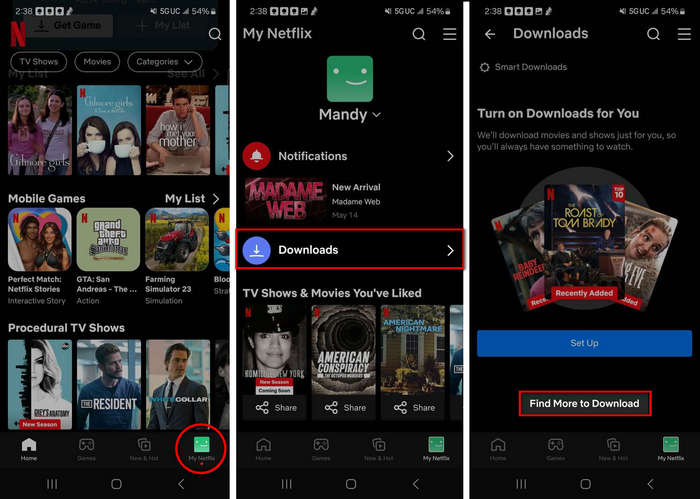
That's how to download Netflix videos with subtitles on mobile devices. However, please note that the downloaded files are only available within the Netflix app. They cannot be transferred to other devices. In addition, the subtitles are embedded in the video, so you cannot export them as text files for browsing, studying, or taking notes freely.
Part 3: How to Download Netflix Videos with Subtitles on Laptop
Compared to mobile devices, laptops offer a bigger screen for watching Netflix and more storage space for preserving high-quality movies and shows. However, unlike mobile devices, laptops do not have a built-in download feature for Netflix. That's why you might need a third-party tool.
SameMovie Netflix Downloader is such a tool, designed specifically for downloading Netflix movies and shows on laptops in up to 1080P quality as MP4/MKV files. For me, the most practical feature is that it supports three types of subtitles: internal, external, and hardcoded subtitles, as well as multilingual subtitles and audio tracks.
This means I can download Netflix videos with the subtitles and audio tracks in the languages I want. The external subtitle option also allows me to edit, customize, and transfer downloaded subtitles more freely. Here's more feature of SameMovie Netflix video downloader that I liked:
Key Features of SameMovie Netflix Video Downloader:
- Unlimited downloads of Netflix movies, TV shows, documentaries, and save them forever
- Save Netflix as MP4/MKV files, transfer them to any device
- Download Netflix videos in up to 1080P quality
- Download Netflix with all subtitles and audio tracks at on time
- Remove Netflix ads, watch without interruption.
- Download different episodes and movies simultaneously
How to Download Netflix with SameMovie
STEP 1 Install SameMovie Netflix Video Downloader
Download and install SameMovie Netflix Video Downloader on your laptop, and then log in to your Netflix account.
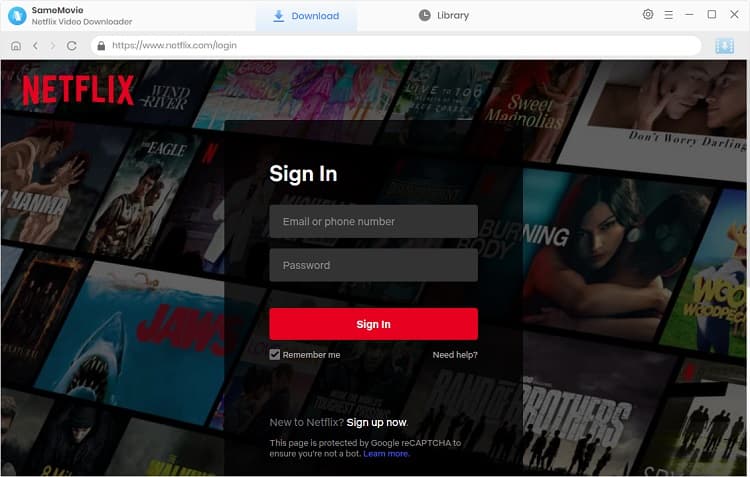
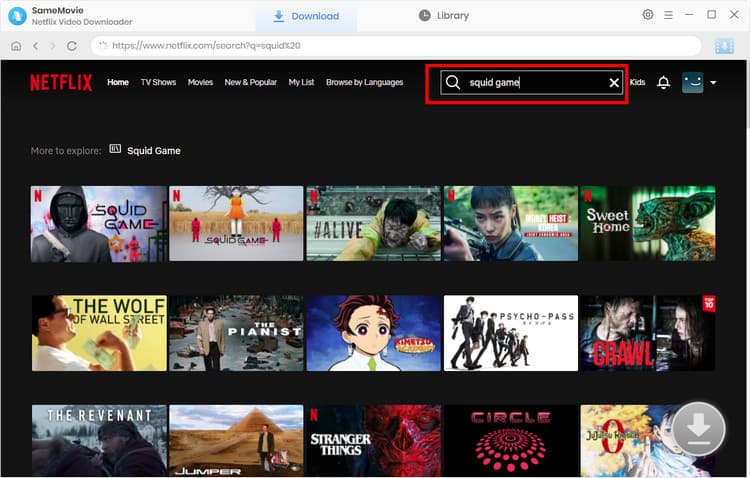
STEP 2 Search for Netflix Movies and Shows
Browse and find the Netflix video you want to download using the built-in browser. Once the video is loaded, click the Download button in the bottom-right corner.
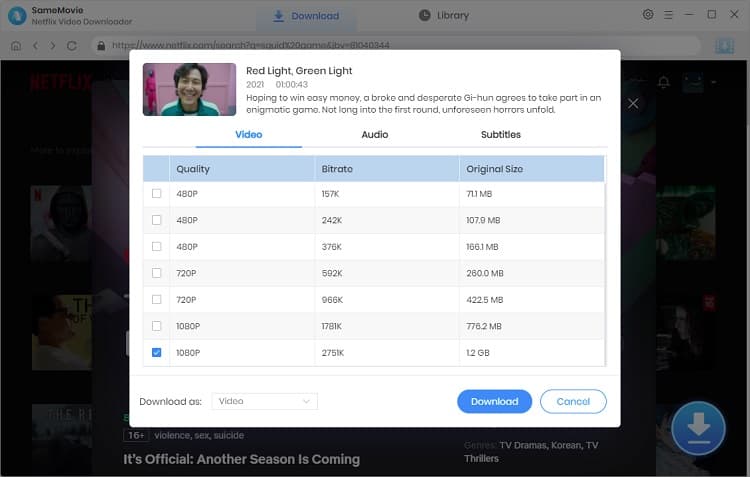
STEP 3 Adjust Advanced Download Settings
In the new pop-up window, you can set up your desired video quality, audio tracks, and subtitles. SameMovie will list all original subtitles and audio tracks for you, including Dolby 5.1 audio and different languages. Plus, you can easily choose to download Netflix subtitles as internal, external (.srt, .vtt), or embedded subtitles as you want.
STEP 5 Locate the Downloaded Files
After finishing the settings, click Download again. Once the download is finished, go to the Library tab, and you can see all your downloaded Netflix files.
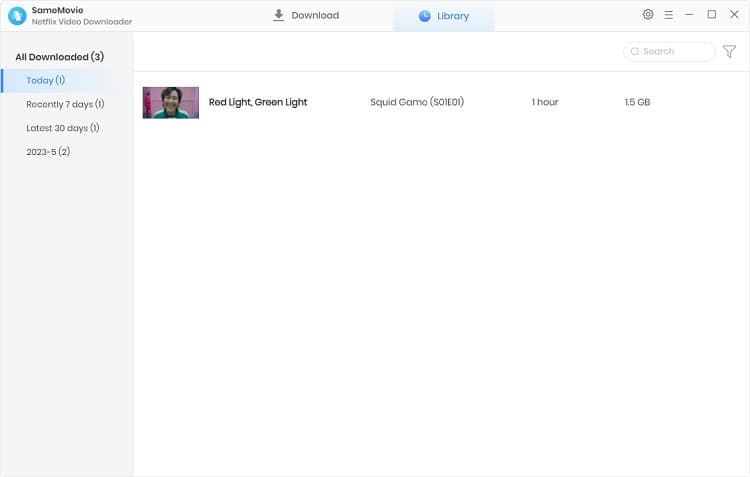
That's it. You have learned how to download Netflix videos with subtitles on laptops. After downloading, you can easily transfer these video files to any device you like or convert these subtitles into text or Word format for study, editing, or translation.
Official Netflix Download vs SameMovie: Which Method Is Better?
| Features | Official Netflix Downloads | SameMovie Netflix Video Downloader |
|---|---|---|
| Supported Devices | Mobile Devices & Tablets | Windows & macOS |
| Output Video Quality | 1080P | 1080P |
| Output Video Format | Netflix App Format | MP4 / MKV |
| Subtitle Formats | Available only within the Netflix app |
Internal subtitles External subtitles (.srt, .vtt) Hardcoded subtitles |
| Audio Tracks | Dolby 5.1 & Multilingual Tracks | Dolby 5.1 & Multilingual Tracks |
| Multiple Subtitle Languages | ❌ Only one subtitle language can be selected at a time | ✅ Download multiple subtitle languages simultaneously |
| Transferable | ❌ | ✅ |
| Keep Downloaded Netflix Movies Permanently | ❌ | ✅ |
| Unlimited Netflix Movie Downloads | ❌ | ✅ |
| Watch Offline Without the Netflix App | ❌ | ✅ |
Part 4: Why Can't I Download Netflix Videos with Subtitles?
1. The Downloaded Netflix Video Has No Subtitles
❓ Reason: Netflix's official download feature does not fully support subtitle downloads, and subtitles are not automatically included as separate files after downloading.
🔧 How to fix: Before downloading, make sure to turn on subtitles for the video and select the language you want.
2. Can't Find the Download Button, or the Button Is Grayed Out
❓ Reason: The download limit for your device may have been reached, or downloads may not be supported for the episode in your region.
🔧 How to fix: Check whether you have reached the limit on the number of devices that can download content simultaneously (usually 6 or fewer). Try switching to a different Wi-Fi network or signing out and signing back in.
You may also want to know 👉: How to Fix Netflix No Download Option (2026)
3. The Downloaded Subtitles Are Out of Sync or Display as Garbled Characters
❓ Reason: The video and subtitle encodings may not match, or the subtitle file downloaded from Netflix may be incompatible.
🔧 How to fix: Use a professional tool like SameMovie that supports SRT subtitle export and download the video again.
4. The Subtitle Language Is Incorrect or the Desired Language Is Not Available
❓ Reason: Netflix officially offers only a limited number of subtitle language options.
🔧 How to fix: Use SameMovie to download Netflix subtitles as external files and translate them into your target language.
Part 5: FAQs about Downloading Netflix Videos with Subtitles
Do Netflix downloads have captions?
Netflix downloads aren't designed for exporting subtitles. Before downloading, you need to make sure you have selected the subtitles you want in the video playback area.
Why can't I get subtitles on Netflix?
Not all Netflix movies or shows have subtitles. For some niche, older, or less popular movies and TV shows, Netflix may not offer subtitles or may only provide English subtitles.
You may also want to know 👉: Full Guide to Fix Netflix Streaming Issues (2026)
Is it legal to download Netflix with SameMovie?
It is legal to use SameMovie for personal offline viewing, learning, educational, and similar purposes. However, please do not redistribute the content or use it for commercial purposes, as this may violate your local laws.
Final Words
In this guide, I introduced two practical ways to download Netflix videos with subtitles. If you only want to watch Netflix videos offline on mobile devices, the official Netflix download feature is the simplest and safest option.
However, if you want to download Netflix videos on laptops, transfer them to other devices, or save and edit subtitles for language learning or translation, a professional tool like SameMovie Netflix Video Downloader provides more flexibility.
Claire Green, a content writer specializing in blogs. With a passion for streaming video, Claire explores the latest trends, reviews popular platforms, and provides insightful tips for optimizing your streaming experience.



What You'll Need
Recommend