


How Long Do Netflix Downloads Last? And How to Save Them Forever

Claire Green September 25, 2026 Category: Netflix Tips
Today, Netflix download feature allows people to watch movies and shows offline without WiFi. But many people may ask: Do downloads in Netflix expire? How long do Netflix downloads last?
This guide will break down these questions, explain how long do Netflix downloads last on iPhone, iPad, Android, and PC, and share a practical way to stop a Netflix download from expiring, so you can save Netflix forever. Interested? Keep reading!
You may also want to know 👉: How to Download Netflix Movies to MP4 [Full Guide]

Part 1: Do Downloads in Netflix Expire?
Yes, downloads on Netflix expire. You might wonder how long can you keep things downloaded on Netflix on your device, but the reality is that whether you are checking how long do netflix downloads last on android, iPad, or PC, the answer is the same - Netflix downloads don't last forever in the app.
Why Downloads on Netflix Expire?
- Copyright and Licensing Restrictions: Netflix only has limited authorization for the movies and shows, which doesn't allow saving copyrighted movies and shows permanently.
- Content Removal: If a movie is removed from Netflix, previously downloaded files will become unplayable.
- Regional Restrictions: Users logging in outside the US may find that Netflix downloads disappear abroad, as copyright laws vary by country.
What Happens When Netflix Downloads Expire?
After Netflix downloads expire, you may experience the following:
- ❌ Can't watch Netflix offline without an internet connection.
- ❌ Can't watch Netflix on a plane, while traveling, or commuting.
- ❌ Can't watch Netflix anywhere around the world.
Part 2: How Long Do Netflix Downloads Last on iPhone, Android, PC, and iPad?
How long do Netflix downloads last on iPhone, Android, and iPad? The answer is the same: it primarily depends on the content and whether it has been played.
- For videos that haven't been played: Netflix downloads can last around 7 days (varies by title).
- For videos that have been played: Netflix downloads often expire after 48 hours.
In terms of how long Netflix downloads last on PC, the fact is that Netflix no longer supports downloads on PC, so you will find Netflix no download option there. If you want to download Netflix movies and shows on a laptop, you might consider using a third-party tool.
Part 3: How Do I Stop A Netflix Download from Expiring?
Netflix has strict policies on how long you can keep things downloaded on Netflix, but there is a workaround to stop a Netflix download from expiring.
SameMovie Netflix Video Downloader is a safe and reliable tool that allows you to download Netflix movies on laptops and save them forever, regardless of how long Netflix downloads last. You can save Netflix movies as MP4/MKV files in high quality (up to 1080P), and then transfer them to any device you like, including iPhone, iPad, Android, or even game consoles (PS4, Nintendo Switch, etc.).
Another exciting feature is that you can add different Netflix movies and shows to the download list and download them with one click. With hardware acceleration, the process can be completed very quickly. What's more, SameMovie can remove Netflix ads. Even if your subscription is Standard with Ads, you can download Netflix movies completely ad-free.

SameMovie Netflix Video Downloader:
- Download Netflix movies, TV shows, documentaries, and more
- Save Netflix as MP4/MKV files, transfer them to any device
- Download Netflix videos with HD (1080p and 720p) quality kept
- Support downloading subtitles and audio tracks
- Support fast multi-stream and multi-video downloading
How to Save Netflix Forever with SameMovie
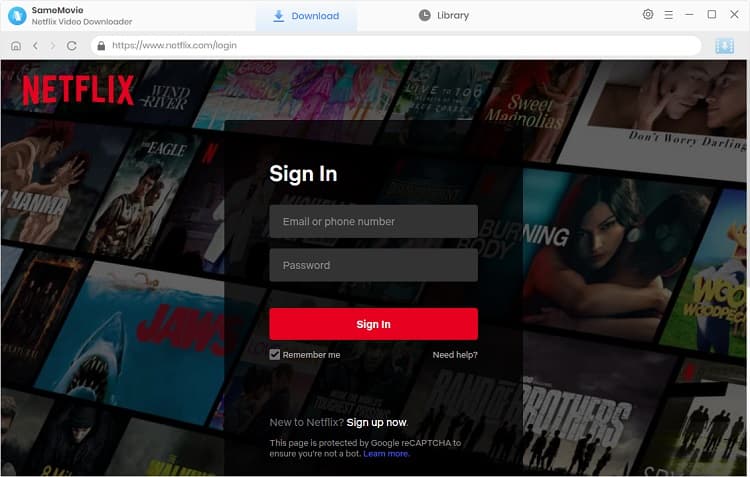
STEP 1 Download and Launch SameMovie Netflix Downloader
To stop a Netflix download from expiring, you first need to download and install SameMovie Netflix Downloader on your device. After that, launch the software and log in to your Netflix account.
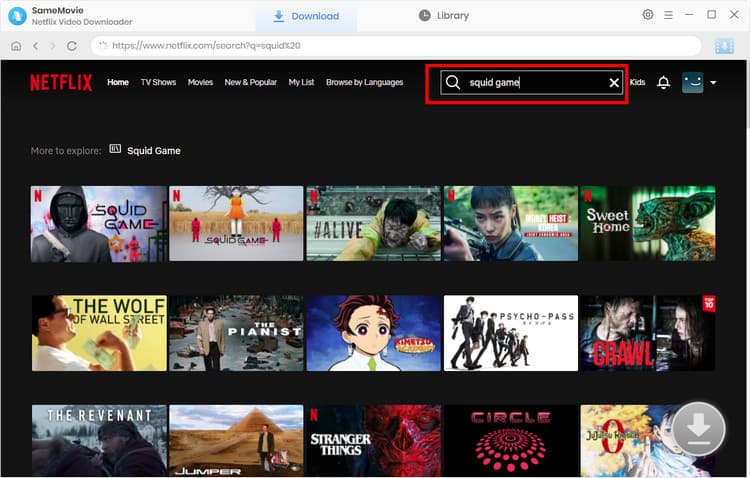
STEP 2 Search for Netflix Movies or Shows
Now, browse or type the name of the Netflix movie or show you want to download within the built-in browser, then click the Download button in the bottom-right corner.
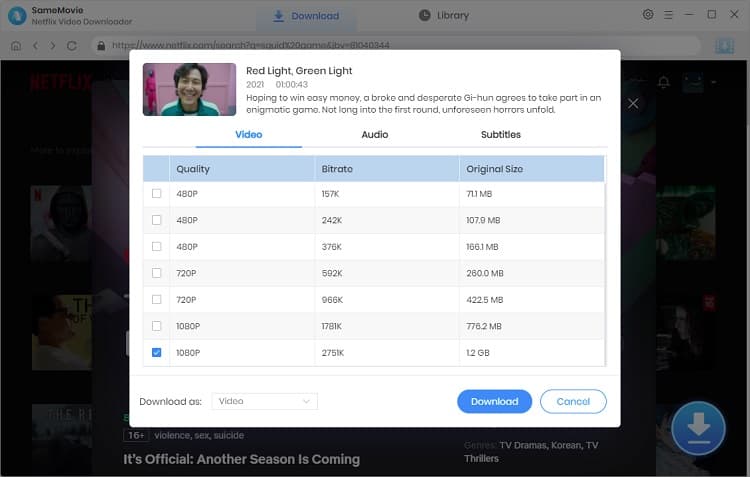
STEP 3 Customize Output Settings
In the pop-up window, you can select the Netflix episode you want to download, as well as the video quality, audio tracks, and subtitle mode. Once you finish the settings, click Download again.
STEP 4 Download Netflix Videos and Save Them Forever
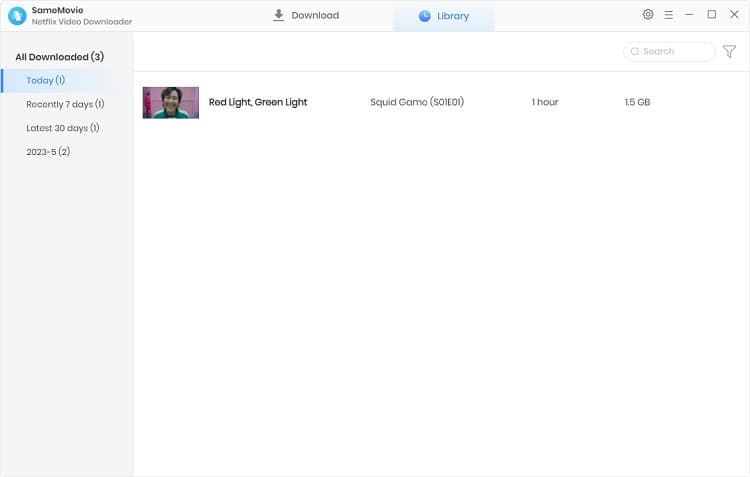
After clicking Download again, it will automatically start downloading in the background. Once finished, you can find all your Netflix downloads in the Library and your local folder.
Now, you have successfully saved Netflix videos to your device forever! Never worry about how long Netflix downloads last or how long you can keep things downloaded on Netflix.
Part 4: FAQs about How Long Do Netflix Downloads Last
What is the 2 minute rule on Netflix?
When you watch Netflix downloaded content in the app,even if you watch it for just 2 minutes, according to Netflix's 2-minute rule, the platform will count it toward your viewing history. And once it records that you have started watching, you need to finishing watching in 48 hours, otherwise Netflix downloads will expire.
How long does netflix downloads take?
The speed of downloading movies in the official Netflix app actually depends on your internet speed. It usually takes 10–15 minutes on a stable Wi-Fi. But if you are in a poor internet environment, it might take longer. However, SameMovie reduces the limitations of internet speed. It adopts hardware acceleration, making your download speed up to 10X faster.
Why Did My Netflix Downloads Disappear Abroad?
When you travel abroad, you might find that your downloaded Netflix movies have disappeared. This is because Netflix has different licensing agreements in different regions, and some content can't be accessed outside your home country. If you want to watch these titles offline while abroad, you might use a third-party tool like SameMovie.
Final Words
This guide explains how long Netflix downloads last and how to stop a Netflix download from expiring. While Netflix downloads often expire after 48 hours to 7 days, you can consider using a practical and reliable tool like SameMovie Netflix Downloader to download Netflix movies and shows as MP4/MKV files, and save them forever.
Claire Green, a content writer specializing in blogs. With a passion for streaming video, Claire explores the latest trends, reviews popular platforms, and provides insightful tips for optimizing your streaming experience.



What You'll Need

Recommend