


How to Fix Netflix No Download Option on Laptop, iPhone, iOS & Android (2026)

Claire Green May 26, 2026 Category: Netflix Tips
Netflix app offers a offline download feature, but many users still run into problems. Some can't find where the download button on Netflix is, while others discover that there is no download button on laptops, iOS, iPhone, or Android.
If you're facing the same issue, don't worry. In this guide, we'll walk you through why there is no download option on Netflix on laptop, iPhone, iPad & Android, and how to fix it. Keep Reading.
You may also want to know 👉: How to Download Netflix Movies to MP4 [Full Guide]
Part 1: Why Is There No Download Option on Netflix on My Laptop?
If you can't find the download button on Netflix on your laptop, you're not alone. This is one of the most common Netflix download issues in 2026.
The main reason is that there is no Netflix app for Mac and Netflix canceled downloading feature on Windows in 2024. In addition, Netflix doesn't support downloads through web browser like Chrome, Edge, or Firefox, so if you log in to your Netflix account on browser, you'll find no Netflix download button in the web page.
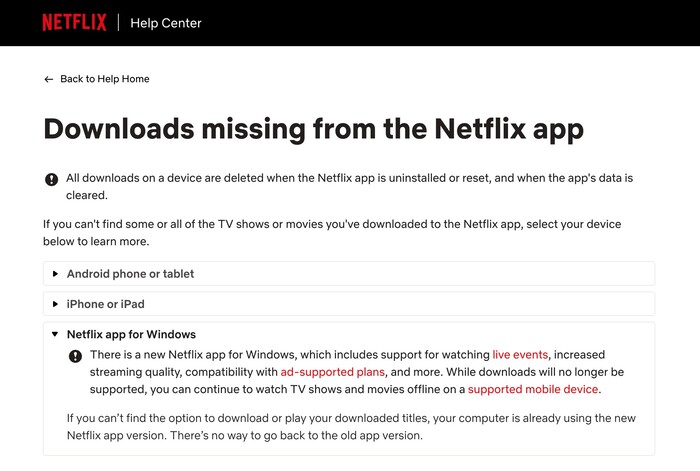
If the official Netflix download feature is unavailable on your laptop, you may need to use an alternative Netflix downloader instead.
Part 2: Why Netflix Has No Download Option on iOS, iPhone, iPad & Android?
Netflix offers an offline downloading feature on mobile devices, but sometimes users will find that there is no download button on their iPhone, iPad, or Android device. There are several main reasons:
Licensing Restrictions
Not all movies and shows on Netflix can be downloaded. Unlike most Netflix original series, which can usually be downloaded, some titles from third parties like Sony, Universal, and Warner Bros. cannot be downloaded. This is because Netflix only has the copyright for streaming, but does not have permission to offer downloads for offline viewing. (Check out How to rip movies from Netflix for offline viewing >>)
Therefore, if you find no download option for certain Netflix content on your iPhone, iPad, or Android device, it means those titles cannot be downloaded.
Where to Find Downloadable Netflix Movies or Shows?
Some titles have no download button and cannot be downloaded, so which Netflix titles are downloadable, and where can you find them?
- Open the Netflix app on your iPhone, iPad, or Android.
- Head to My Netflix > Downloads.
- Tap the button called "See What You Can Download".
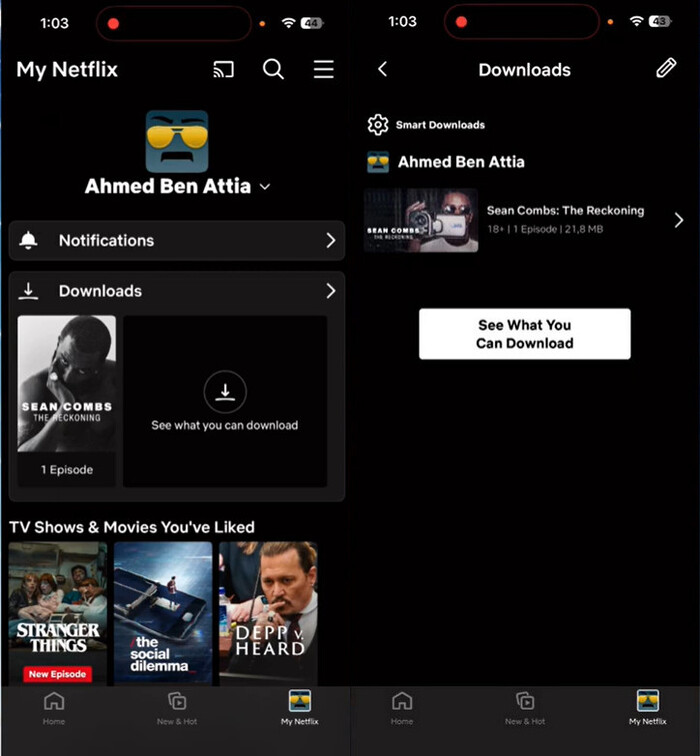
Now you've found all the downloadable titles available on Netflix. You can find the Download button next to each title. Simply click it, and you can watch them offline on your phone.
Outdated Netflix App
Netflix's official download feature was released for iPhone, iPad, and Android devices in 2016. If you can't find the download button on Netflix for any title, it may mean that your Netflix app is outdated. The only thing you need to do is simply update both your Netflix app and your mobile device system to the latest version.
After updating, you should be able to find the Download button next to supported titles. To find more solutions for "can't find the download option on Netflix", please visit the Netflix Help Center.
Part 3: Best Alternative When Netflix Has No Download Option — SameMovie
Netflix has no download option on laptops, and some titles in the Netflix app can't be downloaded. It is a good idea to find a reliable alternative.
SameMovie Netflix Video Downloader is such a safe and powerful alternative. It allows users to directly download all types of movies and shows from Netflix on laptops, whether they are Netflix originals or content from third parties such as Sony, Universal, and Warner Bros. All Netflix movies and shows are saved as MP4/MKV files, in up to 1080p quality with Dolby Digital 5.1 surround sound.
Another feature worth mentioning is its batch download and hardware acceleration functions. With these, you can download multiple movies or an entire season with one click, at up to 10X faster speed. What's more, SameMovie can remove Netflix ads, so even if you are on the Standard plan with ads, you can get completely ad-free and uninterrupted files.
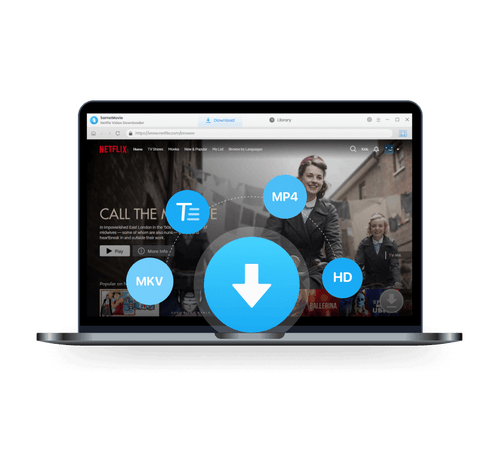
SameMovie Netflix Video Downloader:
- Download Netflix movies, TV shows, documentaries, and more
- Save Netflix as MP4/MKV files, transfer them to any device
- Download Netflix videos with HD (1080p and 720p) quality kept
- Support downloading subtitles and audio tracks
- Support fast multi-stream and multi-video downloading
How to Download Netflix with SameMovie
STEP 1 Install SameMovie Netflix Video Downloader
Install SameMovie on your Windows 11 or macOS 11–26 device first. Then launch it and log in to your Netflix account.
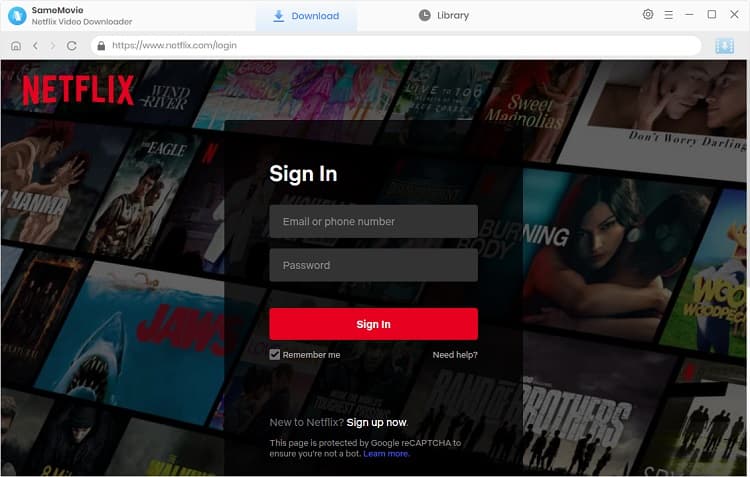
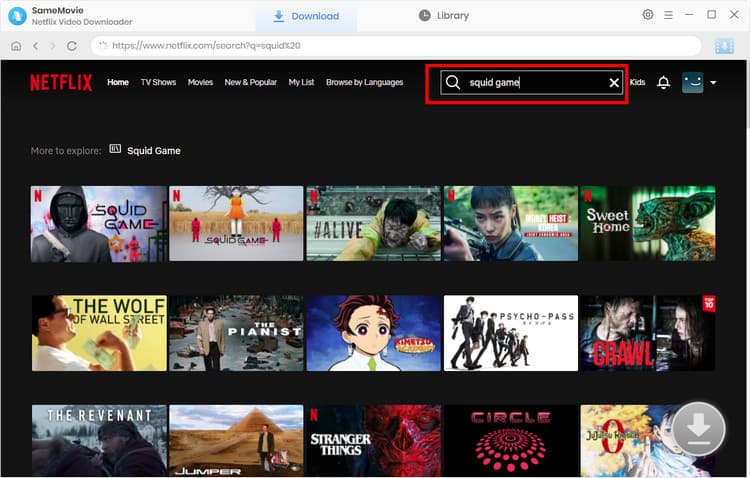
STEP 2 Search for Netflix Movies
Simply browse Netflix movies or type the name of the movie you want to download in the built-in browser, then click the Download button in the bottom-right corner.
STEP 3 Customize Netflix Download Settings
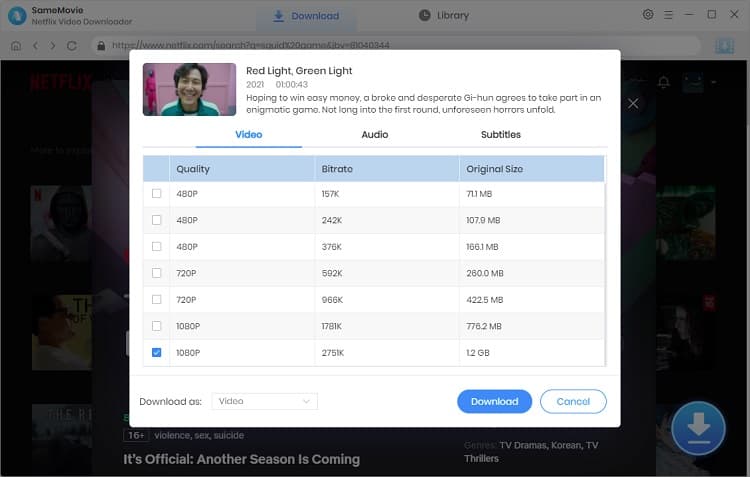
Select episodes or choose video quality, audio tracks, and subtitle options in the pop-up window, then click the Download button again.
STEP 4 Locate Downloaded Netflix Movies
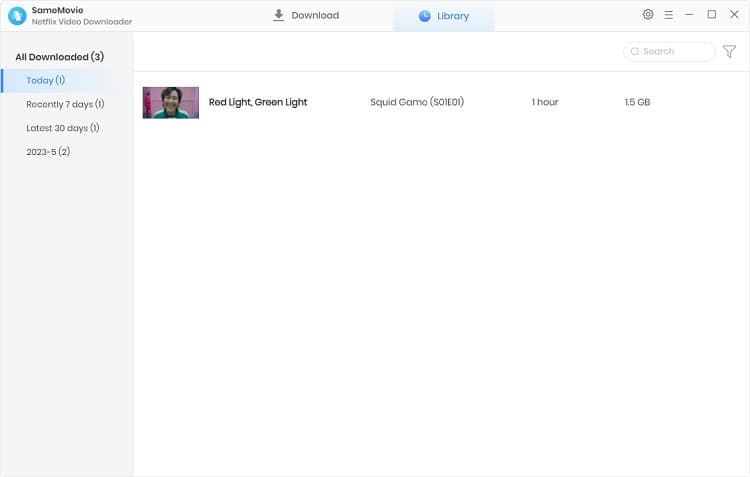
All downloading processes will run in the background. Once done, go to the Library tab to locate all downloaded Netflix movies.
Now, even though Netflix has no download option on laptops and for some titles, you can freely download what you like and watch them offline.
Part 4: FAQs about Netflix Has No Download Option
Where is the download button on Netflix?
The download button often appears next to Netflix movies or shows. If the content is available for download, you can easily find it and click it to download Netflix movies and shows for offline viewing.
How to fix Netflix download stuck at 0?
When downloading in the Netflix app, if you encounter Netflix download stuck at 0, try the following solutions:
- Stop and delete the downloads immediately.
- If your mobile device is stuck and can't cancel the downloads, force close the Netflix app and restart it.
- After restarting, go to Settings > Apps > Netflix > Storage & Cache, and clear the cache first.
You may also want to know 👉: How to Fix Netflix Download Not Working
Is it legal to download Netflix Movies with SameMovie?
Yes. Downloading Netflix movies with SameMovie for personal offline viewing is generally considered acceptable. However, if you distribute these downloaded files without permission or sell them without copyright, it will violate Netflix's terms of service and possibly your local laws.
Final Words
In this guide, we introduced the reasons why Netflix has no download option on laptops, iPhone, iPad, and Android. If you want to fix the Netflix no download option issue, you can use a third-party tool like SameMovie to easily download Netflix movies and shows as MP4/MKV files, and watch them offline anytime and anywhere.
Claire Green, a content writer specializing in blogs. With a passion for streaming video, Claire explores the latest trends, reviews popular platforms, and provides insightful tips for optimizing your streaming experience.

What You'll Need
Recommend