


How to Rip Movies from Netflix for Offline Viewing

Claire Green May 19, 2026 Category: Netflix Tips
Since Netflix formally removed the downloading feature for Windows, users can no longer download Netflix movies and shows on laptops and watch them offline anymore. Therefore, more and more people are asking "How to Rip Movies from Netflix?"
Luckily, in this guide, we will walk you through why you should rip movies from Netflix, and how to rip movies from Netflix with subtitles with a safe and reliable tool. Keep reading!
You may also want to know 👉: How to Download Netflix Movies to MP4 [Full Guide]

Part 1: Why Should You Rip Movies from Netflix
1.1 The Benefits of Ripping Movies from Netflix
Ripping Netflix movies means extracting the movies from Netflix into a regular video file, such as MP4/MKV files, so you can watch these movies outside Netflix and play them anywhere.
Since Netflix doesn't support downloading movies on laptops and its official download feature comes with several limitations, ripping movies from Netflix offers more benefits:
- ✅ Get rid of Netflix download limits
- ✅ Save Netflix movies forever
- ✅ Transfer Neftlix videos to other devices
- ✅ Watch Netflix movies and shows any time
1.2 Ripping vs Screen Recording vs Netflix App Download
Ripping movies from Netflix is very different from screen recording or using the official Netflix app download feature. Each method comes with its own advantages and limitations. The comparison table below highlights the key differences between them.
| Features | Ripping Movies from Netflix | Screen Recording | Netflix App Download |
|---|---|---|---|
| Video Quality | 1080P | Depends on the screen resolution | 1080P |
| Audio Quality | Original | Only records the currently playing track (single language) |
Original |
| Never Expire | ✅ | ✅ | ❌ 48 hours to 7 days |
| Transferrable | ✅ | ✅ | ❌ |
| Playable on Any Device | ✅ | ✅ | ❌ |
| No Black Screen | ✅ | ❌ | ✅ |
If you need a Netflix recorder that can multiple speed record Netflix movies in full HD, without black screens, please check out SameMovie Streaming Video Recorder.
Part 2: The Best Way to Rip Movies from Netflix Safely
To rip movies from Netflix safely, you'll need a reliable tool. SameMovie Netflix Video Downloader is such a tested stable tool that I recommend most. It allows users to download Netflix content as MP4/MKV files, simply ripping movies from Netflix. After that, you can simply transfer Netflix movies to other devices you like, including Fire TV, PS4, Nintendo Switch, and more. While ripping, it also maintains high quality, supporting up to 1080p quality and Dolby Digital 5.1 Surround Sound.
Even better, SameMovie supports batch downloads, so you can rip multiple different movies and shows from Netflix with one click. With hardware acceleration, the downloading process can be completed very quickly.
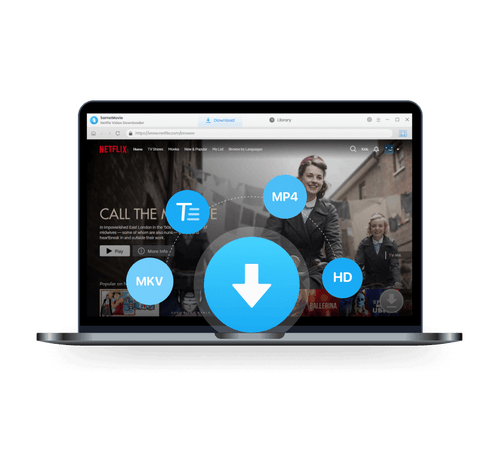
SameMovie Netflix Video Downloader:
- Download Netflix movies, TV shows, documentaries, and more
- Download Netflix videos with HD (1080p and 720p) quality kept
- Support downloading subtitles and audio tracks
- Support fast multi-stream and multi-video downloading
How to Rip Movies from Netflix with SameMovie?
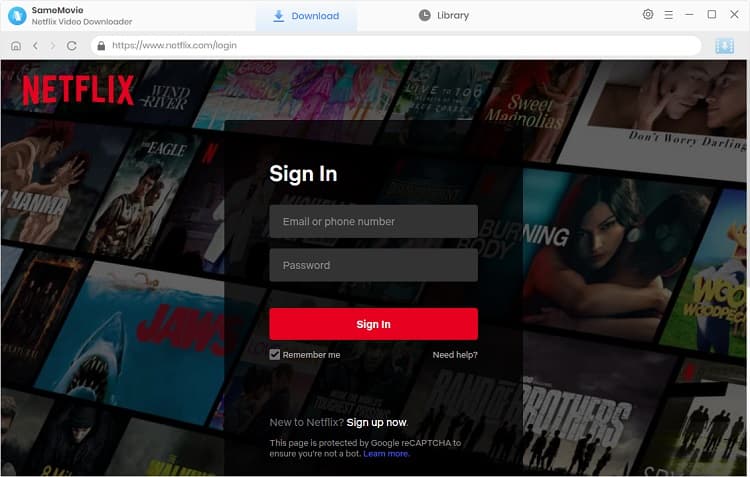
STEP 1 Install SameMovie Netflix Video Downloader
Install SameMovie Netflix Video Downloader on your Windows or Mac computer. Then, log in to your Netflix account.
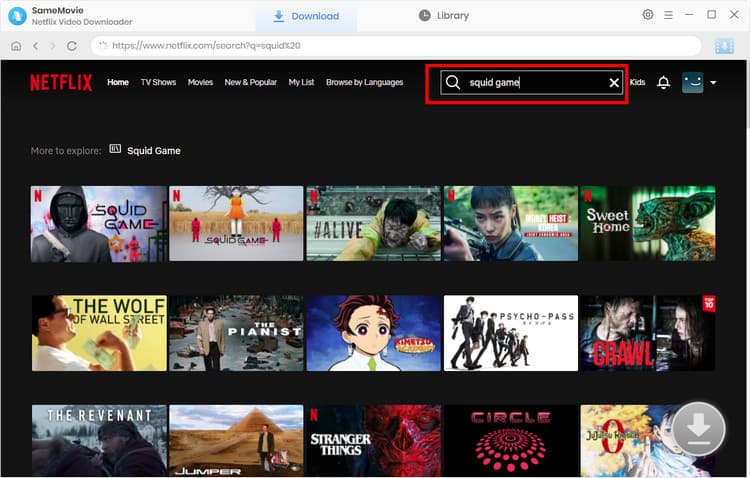
STEP 2 Search for Netflix Videos
Browse and find the Netflix movies you want to rip within the built-in web player, or simply copy and paste the Netflix movie link into the search bar. Once the Download button in the bottom-right corner lights up, click it.
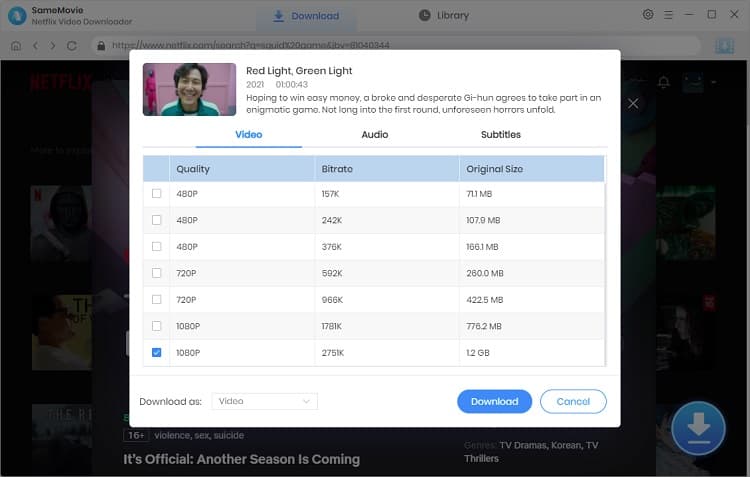
STEP 3 Customize Netflix Download Settings
In the new pop-up Advanced Download window, you can choose your desired video quality, audio tracks, and subtitle mode. After that, click Download again.
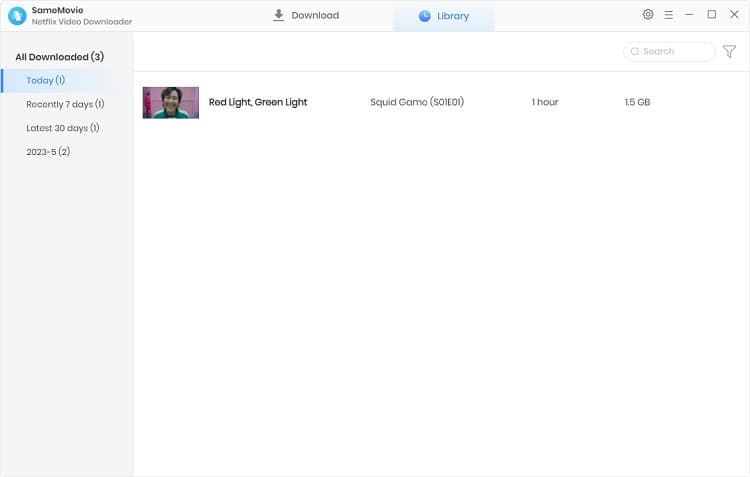
STEP 4 Find Downloaded Netflix Movies
Once the ripping is finished, head to the Library tab to locate all your ripped Netflix movies and shows.
Part 3: Is It Legal to Rip Movies from Netflix?
There is a concept called "Fair Use" in American law, which means that unless you are using copyrighted material for commercial purposes, you may use such material to a limited extent without obtaining permission from the copyright owner.
Therefore, as long as you rip movies from Netflix only for personal offline viewing, it is acceptable. SameMovie always supports each creator's copyrights. We do not support any behavior of ripping Netflix movies for commercial purposes.
Part 4: FAQs about Ripping Movies from Netflix
How to rip movies from Netflix for free?
To rip movies from Netflix for free, you can check out SameMovie's incentive review program. As long as you write a real and positive user experience on a review site, you can get a one-month free license of SameMovie.
Can I rip Netflix movies in 4K?
Yes! SameMovie supports ripping movies from Netflix at up to 1080p. After saving Netflix movies as MP4/MKV files, you can use AI Video Enhancer to upgrade your video quality to 4K and enjoy your 4K Netflix movies on big screens.
Tips: How to Improve the Resolution of Old Video to 4K?
Powered by algorithms and an AI engine, AVCLabs Video Enhancer AI can not only deblur each frame of a video, but also upscale the low-resolution videos to high-resolution (720p, 1080p, 4K, and up to 8K) with true details and motion consistency kept.
Learn MoreHow to download Netflix movies on laptop?
SameMovie supports Windows 10–11 and macOS 11–13, so you can simply download Netflix movies on laptops with SameMovie.
Will I get banned from Netflix for ripping videos?
The risk is very low. Since the launch of SameMovie, we have not received any reports from users regarding Netflix accounts being suspended. As long as you don't share your account with others indiscriminately, your account should not be suspended.
Final Words
In this guide, I introduced what ripping movies from Netflix is, the benefits of it, and a reliable tool to preserve your Netflix movies as MP4/MKV files.
If you want to get rid of Netflix download limitations, rip Netflix movies in high quality, and save them forever, SameMovie Netflix video downloader is worth considering.
Claire Green, a content writer specializing in blogs. With a passion for streaming video, Claire explores the latest trends, reviews popular platforms, and provides insightful tips for optimizing your streaming experience.
What You'll Need
Recommend