


Top Netflix to MP4 Downloader in 2026: Fast, Free & Reliable

Claire Green September 25, 2026 Category: Netflix Tips
Are you looking for a Netflix to MP4 Downloader? You are in the right place.
Whether you want to watch your favorite Netflix movies offline on a plane, save them for future viewing, or enjoy them on different devices, converting Netflix videos to MP4 is a smart solution.
In this guide, I'll explain whether you can really convert Netflix files to MP4, and the best tested Netflix to MP4 Downloader in 2026. Keep reading!
You may also want to know 👉: Best Netflix Downloaders for Mac in 2026 (Tested & Compared)
Part 1: Can You Convert Netflix Files to MP4?
To be honest, it is hard to directly convert Netflix downloads to MP4. This is because Netflix official downloaded files using a specific encrypted format, like .nfv. This kind of Netflix download can only be played in the Netflix app, saved between 15-30 days, and can't be transferred to other devices (Check out How to transfer Netflix downloads to other devices >>).
That's why many normal MP4 converters often fail to turn Netflix downloads into MP4 files, resulting in either poor video quality or loss of content.
So, is it possible to get MP4 files from Netflix? The answer is yes. But you need to use a professional Netflix to MP4 Downloader.
Part 2: Best Tested Netflix to MP4 Downloader Recommendations in 2026
Currently, there are plenty of Netflix to MP4 downloaders on the market. For those who want to convert Netflix downloads to MP4 on PC or Mac, I recently tested 4-5 tools, and SameMovie Netflix Downloader impressed me a lot.
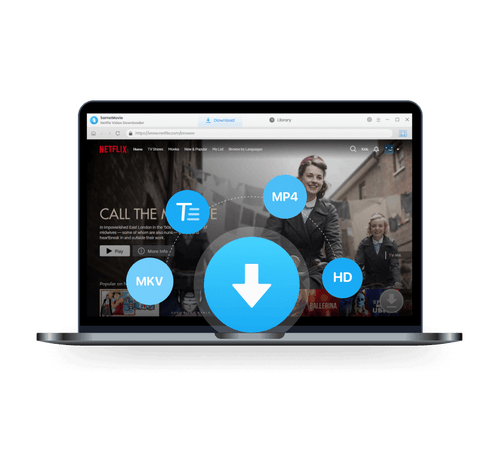
As a professional Netflix to MP4 Downloader, SameMovie Netflix video downloader support to directly download Netflix movies and shows on laptops as standard MP4 or MKV files, in high quality (up to 1080P). After downloading, I can play Netflix movies on any player and devices, such as TVs, Android, iPhone, PS4, Nintendo Switch, etc.
In addition, I found the batch download feature very useful. I can download an entire series or multiple Netflix movies at once while keeping the original subtitles and audio tracks. SameMovie Netflix Downloader is really fast and easy to use. It helps me get rid of expiration or format limits like what's in the Netflix app at all.
Key Features of SameMovie Netflix Video Downloader:
- Download Netflix movies, TV shows, documentaries, and more
- Save Netflix as MP4/MKV files, transfer them to any device
- Download Netflix videos with HD (1080p and 720p) quality kept
- Support downloading subtitles and audio tracks
- Support fast multi-stream and multi-video downloading
Is SameMovie Worth it? Check out SameMovie Netflix Video Downloader Review 2026
Free Trial Free TrialHow to Convert Netflix Downloads to MP4 with SameMovie
STEP 1 Install SameMovie Netflix Video Downloader
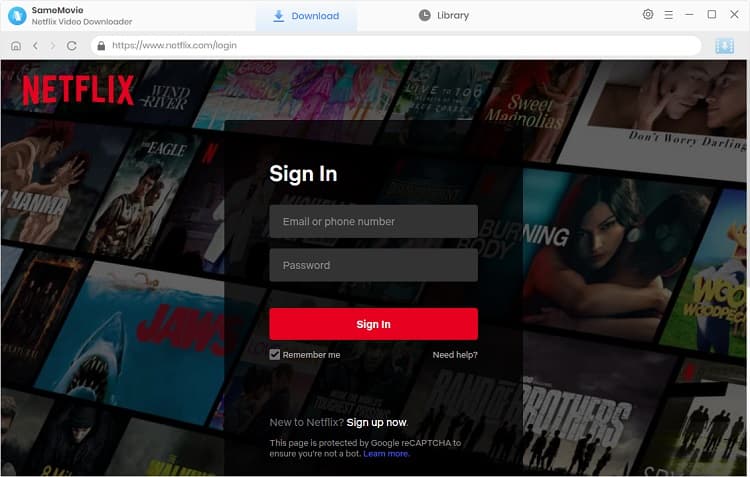
Download and install SameMovie Netflix Video Downloader from the official website, then log in to your Netflix account.
STEP 2 Set MP4 as the Output Format
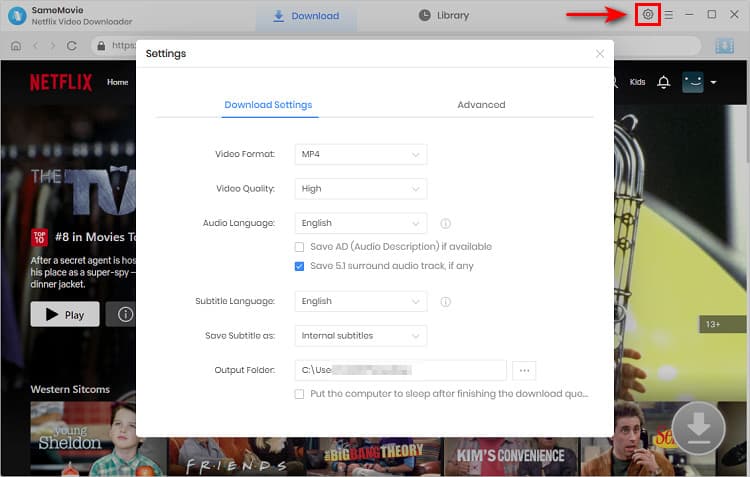
Click the Settings button in the upper-right corner and go to the Download tab. Choose MP4 as the output format.
STEP 3 Search for Netflix Movies or Shows
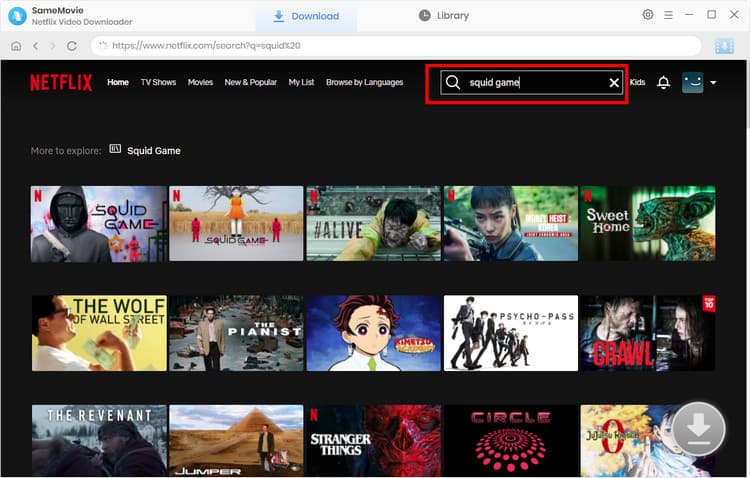
Search for the Netflix movies or shows you want to download in the program, type the name of simple paste the video link in the search bar. Once the video loaded, click Download button in the bottom-right corner.
STEP 4 Advance Settings for Netflix Downloads
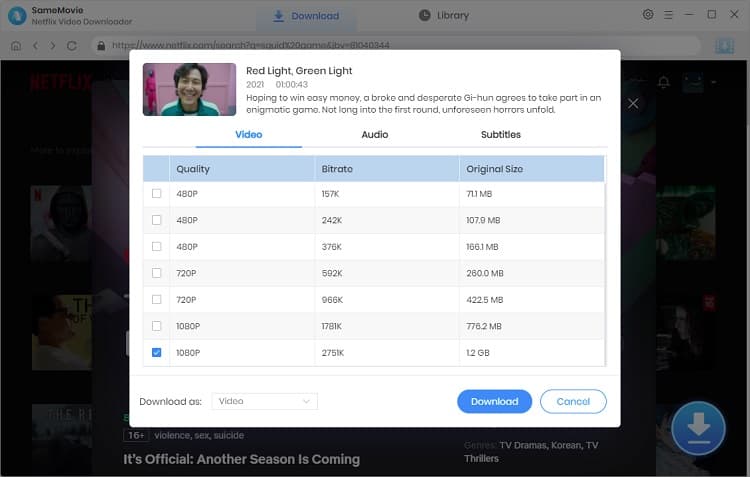
In Advance Download window, select the video quality, audio tracks, and subtitle mode you want, then click Download again.
STEP 5 Convert Netflix to MP4
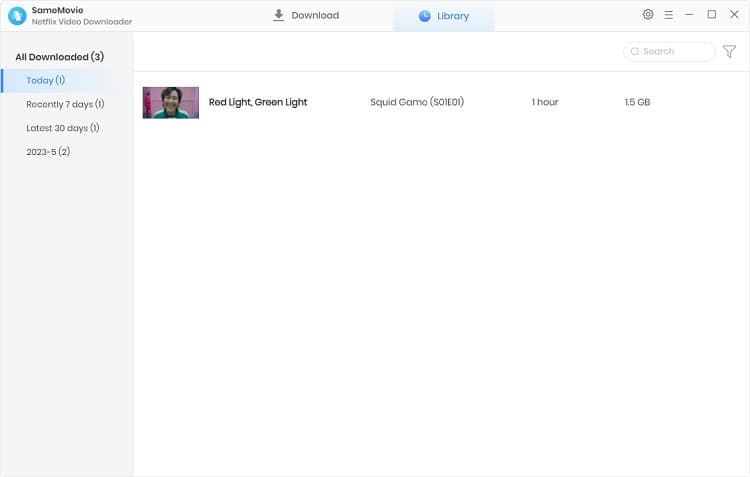
SameMovie will finish downloading and converting Netflix to MP4 in the background. Once finished, you can head to the Library to locate all your downloaded MP4 Netflix files.
Part 3: Convert Netflix Downloads to MP4 on Android
To achieve converting Netflix downloads to MP4, many users immediately think of the most straightforward method: downloading movies in the Netflix app first, then converting them to MP4 with other tools.
However, sicne Netflix downloads use a special encrypted format, they often fail during conversion. The right method is downloading Netflix as MP4 with SameMovie, then transfer the downoaded files to your Android dvice.
- Install and launch SameMovie Netflix Downloader, then log in to your Netflix account.
- Set the output video format to MP4 in the Settings window.
- Search for the Netflix movies or shows you want to download, and click the Download button.
- Locate the downloaded files in your local folder, then transfer them to your Android device or SD card.
Part 4: FAQs about Netflix to MP4 Downloader
Is there a free MP4 converter?
Yes, there are some free Netflix to MP4 converters on the market, such as Video Format Factory on Android or HandBrake on PC. However, these free tools often comes witn limitations like poor video quality, missing subtitles, or complete conversion failure.
If you want to convert Netflix to MP4 stably, I recommend SameMovie Netflix Video Downloader, which allows you to download Netflix movies as MP4/MKV files on laptops, with high success rate.
Can I download a movie from Netflix and put it on a USB?
Yes, with the tool like SameMovie Netflix Downloader, you can simply convert Netflix downloads to MP4, then transfer the MP4 files to a USB drive, or any device you want.
Is it legal to convert Netflix to MP4 with SameMovie?
Generally, converting Netflix videos to MP4 for personal offline viewing is acceptable. However, sharing, distributing, or using Netflix MP4 files for commercial purposes may violate Netflix’s terms of service or even local laws. Please respect copyright and use the downloaded content in a legal way.
Final Words
This guide introduces why you can't directly download Netflix movies as MP4 in the app and several smart ways to convert Netflix to MP4 on PC, Mac, and Android. With the tested Netflix to MP4 downloader, SameMovie, it is easy, fast and safe to convert Netflix downloads to MP4 and save them forever.
Claire Green, a content writer specializing in blogs. With a passion for streaming video, Claire explores the latest trends, reviews popular platforms, and provides insightful tips for optimizing your streaming experience.
What You'll Need
Recommend