


Best Netflix Downloaders for Mac in 2026 (Tested & Compared)

Claire Green June 16, 2026 Category: Netflix Tips
Can I download the Netflix app on my MacBook? How can I download movies to watch offline on my Mac? This has become a common question among many Mac users.
Don't worry! To help you figure out how to watch Netflix on a MacBook on a plane or anywhere without internet, we spent several weeks testing 5 top Netflix downloaders for Mac in 2026.
You may also want to know 👉: How to Keep Netflix Videos Playable after Unsubscribing

Part 1: Can you Have Netflix Downloads on A Mac?
Quick Answer: Yes, you can download Netflix movies on a MacBook, but not through an official Netflix app.
If you are a Mac user, you might have already noticed a frustrating fact: Netflix does not offer an official app for macOS. The only way you can access Netflix content is through web browser like Google, Safari, etc. which has no Netflix download option.
Why is there still no Netflix app for Mac in 2026?
There is no official explanation, but some people claim that there is no strong agreement between Netflix and Apple. If Netflix makes an app for Mac, Apple takes a percentage cut from them, which would obviously reduce Netflix's profit. Meanwhile, some people believe watching Netflix through a browser is enough.
However, in my opinion, although watching Netflix through a browser works well, it is far from ideal for offline viewing. The good news is, there are still workarounds to make you watch Netflix offline on MacBook.
Part 2: Best Netflix Downloader for Mac in 2026 (Comparison & Review)
To find out the best Netflix downloader for Mac in 2026, we used a MacBook Air M3 and a MacBook Pro 16 and tested many popular Netflix downloaders in real-life scenarios. The testing covered download speed, output quality, compatibility, batch download capabilities, safety, and pricing.
After several rounds of testing, including trending series and classic movies of different lengths, we found five of the best tools currently available on the market: SameMovie, StreamFab, KeepStreams, MovPilot, and CleverGet.
These tools can all save Netflix videos as MP4/MKV files, support 1080p quality, and keep original subtitles and audio tracks. The following is a detailed comparison table based on our real test data (all tests were conducted on the same Mac devices, network environment, and Netflix account).
| Features | SameMovie | StreamFab | KeepStreams | MovPilot | CleverGet |
|---|---|---|---|---|---|
| Rating | ⭐️⭐️⭐️⭐️⭐️ | ⭐️⭐️⭐️⭐️ | ⭐️⭐️⭐️⭐️ | ⭐️⭐️⭐️ | ⭐️⭐️⭐️ |
| Pricing | Single Products: $79.9 LFT All-In-One: $149.90 LFT |
Single Platform: $99.99 LFT All-In-One: $299.90 LFT |
Single Platform: $99.99 LFT All-In-One: $269.90 LFT |
Single Platform: $99.95 LFT All-In-One: $159.95 LFT |
Single Platform: $69.96 LFT All-In-One: $259.95 LFT |
| Mac Compatibility | macOS 11–26; Apple Silicon (M1/M2/M3/M4) |
macOS 12.0+ | macOS 12.0+ | macOS 10.15+ | macOS 11–26 |
| Maximum Quality | 1080P | 1080P HDR | 1080P | 1080P | 720P / 1080P |
| Download Speed (Real Test) | 8–12 MB/s | 6–10 MB/s | 5–8 MB/s | 3–6 MB/s | 6–9 MB/s |
| Subtitle Support | Internal, External (SRT/VTT), Hardcoded | Embedded, External (SRT) | Embedded, External (SRT) | Soft, Hard, External (SRT) | Remux, External (SRT/SUP) |
| Audio Support | Dolby Atmos / 5.1 | EAC3 5.1 / Atmos | AAC 2.0, EAC3 5.1 | Dolby Digital 5.1 | Normal |
| Multi-Language Support | ✅ | ✅ | ✅ | ✅ | ✅ |
| Batch Download | ✅ | ✅ | ✅ | ✅ | ✅ |
| Remove Netflix Ads | ✅ | ✅ | ✅ | ✅ | ✅ |
| Review | SameMovie Review | StreamFab Review | KeepStream Review | Movpilot Review | CleverGet Review |
From the table above, we can see that the five tools are quite similar in terms of their core features, and all of them can meet Mac users' needs for watching Netflix offline.
However, when it comes to value for money, SameMovie has a clear advantage: The SameMovie All-In-One Lifetime plan is only $149.90 (win on-month free license of SameMovie), while a similar product from StreamFab costs $299.90 (nearly twice as much), and KeepStreams and CleverGet are also significantly more expensive.
If you want to spend less money while getting a better and more stable Netflix downloading experience, SameMovie is currently the best choice for Mac users.
Part 3: How to Download Netflix Movies on MacBook
In the last chapter, we compared different tools, and SameMovie becomes our top recommendation due to its excellent Mac compatibility, reliable download performance, and most importantly, value for money.
SameMovie Netflix Downloader not only supports downloading Netflix movies and shows on laptops as MP4/MKV files, but also keeps high quality up to 1080p. Next, we will show you how to download Netflix movies with SameMovie, step-by-step.
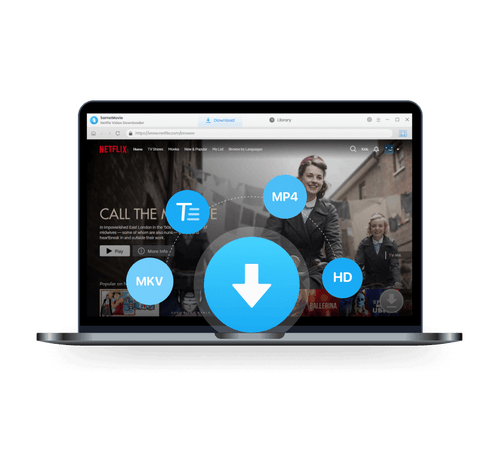
Key Features of SameMovie Netflix Video Downloader:
- Download Netflix movies, TV shows, documentaries, and more
- Save Netflix as MP4/MKV files, transfer them to any device
- Download Netflix videos with HD (1080p and 720p) quality kept
- Support downloading subtitles and audio tracks
- Remove Netflix ads, watch without interruption.
- Support fast multi-stream and multi-video downloading
How to Download Netflix movies with SameMovie
STEP 1 Install SameMovie Netflix Video Downloader
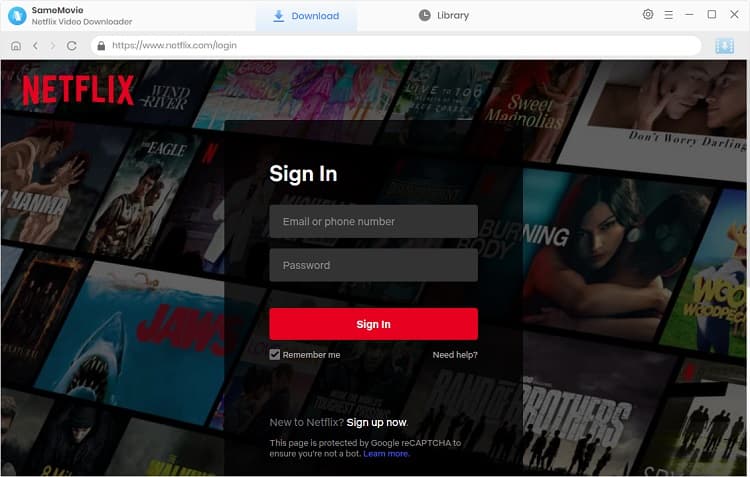
Install SameMovie Netflix Video Downloader on your MacBook. SameMovie supports macOS 11–26 and Apple Silicon (M1/M2/M3/M4). After installation, launch it and log in to your Netflix account.
STEP 2 Find Netflix Movies
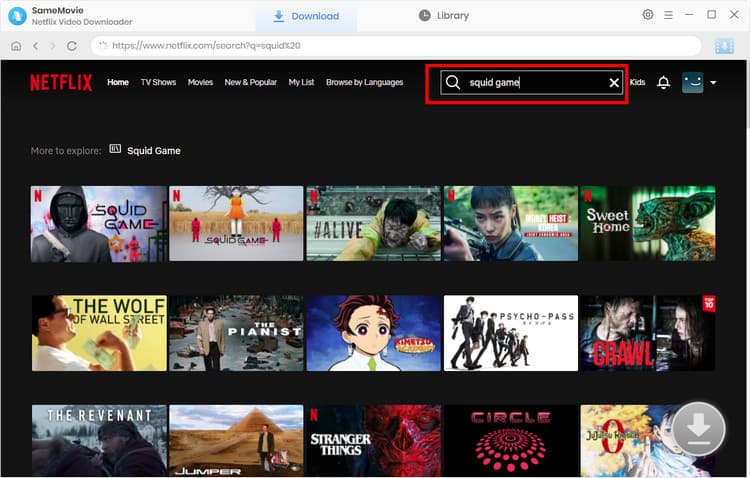
Within the built-in browser, you can simply browse and search for the Netflix movie you want. You can type the name or paste the video link into the search bar. After the video is successfully loaded, click the Download button in the bottom-right corner.
STEP 3 Advanced Netflix Download Settings
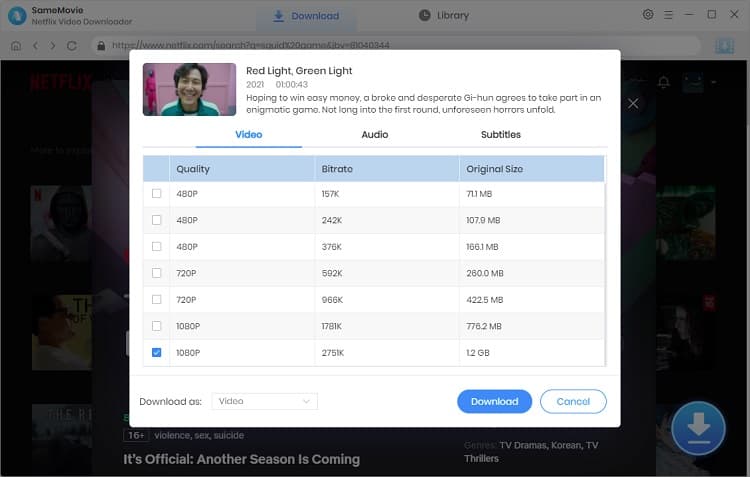
In the new pop-up window, choose your desired episodes, video quality, audio tracks, and subtitle mode, then click the Download button again.
STEP 5 Locate Downloaded Netflix Movies
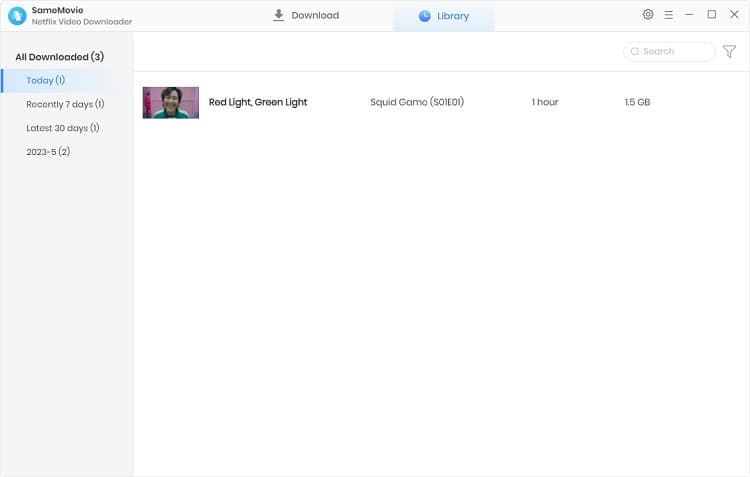
After all Netflix downloads are finished, go to the Library at the top, and you will find all your downloaded Netflix movies listed there.
Part 4: FAQs about Netflix Downloader for Mac
Is it legal to download Netflix movies with SameMovie?
Yes, as long as you don't resell, distribute, or upload it online, and only watch it on your own Mac, using SameMovie to download Netflix videos for personal offline viewing is generally considered safe and legal.
Can I Download Netflix on Laptop?
Yes, but only under specific conditions. Netflix official app doesn't support downloads on Windows laptop, and there is never a Netflix app for Mac. If you want to download Netflix on laptops, you can use SameMovie Netflix Downloader.
Can I download the Netflix app on my MacBook?
Netflix doesn't offer an official app for Mac, so you can't download the Netflix app on your MacBook. But there is a alternative way:
- Open Google Chrome to visit netflix.com
- Click the three-dot menu (top right) > Save and share > Create shortcut.
- Drag the new Netflix icon to your Dock.
This will create a shortcut that behaves like a standalone app. But if you want to enjoy the offline viewing on Mac, you'll still need a third-party tool like SameMovie.
Final Words
This article compared several reliable Netflix downloaders for Mac in 2026. Each tool has its own strengths and limitations.
If you are looking for a simple and cost-effective way to download Netflix movies on Mac, SameMovie is a good choice to start with.
Claire Green, a content writer specializing in blogs. With a passion for streaming video, Claire explores the latest trends, reviews popular platforms, and provides insightful tips for optimizing your streaming experience.

What You'll Need
Recommend