


Best Free Netflix Downloaders in 2026 (Tested & Reviewed Options)

Claire Green September 25, 2026 Category: Netflix Tips
Do you want to download Netflix movies and shows to watch offline? Unfortunately, Netflix has stopped supporting official downloads on PC and Mac, and most free Netflix downloaders either contain malware, have low quality, or stop working after Netflix updates.
I personally tested 20+ Netflix downloaders over the past 3 weeks, including both free and paid options. After hundreds of download attempts, I have selected several best truly free Netflix Downloaders that still work in 2026.
You may also want to know 👉: 7 Best Netflix Ad Blockers and Alternatives in 2026
- Part 1: Quick Comparison of the Best Free Netflix Downloaders
- Part 2: 3 Best Free ways to Download Netflix Video in 2026
- 1. Official Netflix App Download (Best Free & Safe Option)
- 2. FreeGrabApp Netflix Downloader – Real Free Option
- 3. FlixGrab Free Version – Powerful Free Netflix Downloader
- Part 3: Best Alternative to Free Netflix Downloaders – SameMovie ✨
- Part 4: FAQs about Free Netflix Downloaders
Part 1: Quick Comparison of the Best Free Netflix Downloaders
To pick a safe, easy-to-use, and free Netflix downloader, I tested 20+ Netflix downloaders on the market. To evaluate their download performance, I used them to download ten hit movies and five TV series.
After evaluating, I picked the four best ways to download Netflix movies and shows, and summarized their supported devices, download speed, video quality, output formats, and other key aspects in the table below.
| Features | SameMovie | Netflix Official App | FreeGrabApp | FlixGrab |
|---|---|---|---|---|
| Recommended Rating | ✨✨✨✨✨ | ✨✨✨✨ | ✨✨✨ | ✨✨✨✨ |
| Supported Devices | Windows & Mac | iPhone & Android | Windows | Windows |
| Downloaded Video Quality | 1080P | 1080P | Free: 240P Paid: 1080P |
Free: 240P Paid: 1080P |
| Download Speed | 10X Faster | Normal | Slow | Slow |
| Batch Download | ✅ | ❌ | Free: ❌ Paid: ✅ |
Free: ❌ Paid: ✅ |
| Audio/Subtitle Extracting | ✅ | ❌ | Free: ❌ Paid: ✅ |
Free: ❌ Paid: ✅ |
| Output Format | MP4|MKV | Netflix-exclusive format (cannot be transferred) |
MP4 | MP4 |
| Pricing | $79.9 lifetime (One-month free available) |
Free | Free / Premium (19.99/year) | Free / Premium (19.99/year) |
Part 2: Best Free Netflix Downloaders in 2026
1. Official Netflix App Download (Best Free & Safe Option)
After testing, I still believe the official Netflix app is the safest and most convenient way to download Netflix movies and shows, especially for those who prefer not to install third-party tools. It's officially supported, no malware, no ads, no risk of being banned - these make it the best and free method to download Netflix movies and shows for iOS and Android users.
You may also want to know 👉: How to Transfer Netflix Videos to USB for Offline Viewing
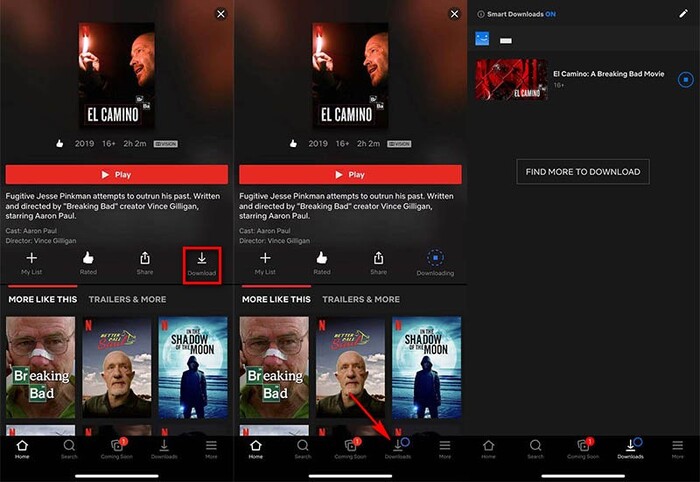
How to download Netflix for free with the official app?
- Download and open the Netflix app on your phone.
- Find the movie or TV show you want to watch, then tap the Download button in the bottom-right corner.
- Once the download is complete, you can watch it offline in "My Downloads."
What are the pros and cons of Netflix official app?
| ✅Pros |
|
|---|---|
| ❌Cons |
|
2. FreeGrabApp Free Netflix Downloader – Real Free Option
If you are looking for a real free Netflix downloader that doesn't require a subscription and has no hidden fees, FreeGrabApp is definitely the top choice on the list. Unlike most commercial Netflix downloaders, FreeGrabApp offers users free services for downloading Netflix movies and shows.
However, if you are using the free version of FreeGrabApp, you can only download Netflix videos in 240P. If you want to save them in 1080P, you have to upgrade to its premium version, which is $19.99 per year. Another downside is that it only supports Windows, and Mac or other mobile device users are not able to use it.
You may also want to know 👉: How to Transfer Netflix Videos to USB for Offline Viewing
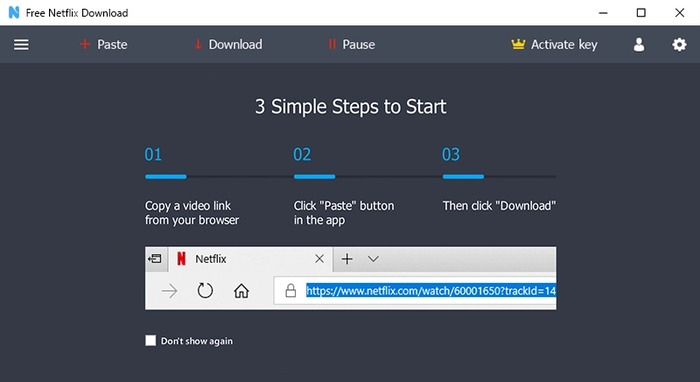
How to download Netflix for free with FreeGrabApp?
- Download and launch FreeGrabApp on your Windows PC.
- Copy and paste the Netflix link you want to download into the search bar.
- Click the Download button and wait for the downloading process to finish.
What are the pros and cons of FreeGrabApp Free Netflix Downloader?
| ✅Pros |
|
|---|---|
| ❌Cons |
|
3. FlixGrab Free Version – Powerful Free Netflix Downloader
As another product from the same company, FlixGrab is likely an upgraded version of FreeGrabApp Free Netflix Downloader. Besides downloading from Netflix for free, it also supports downloads from YouTube, Amazon Prime, Disney+, and more. For users who want an all-in-one tool, it is a relatively powerful free downloader for streaming services.
However, just like FreeGrabApp Free Netflix Downloader, FlixGrab is a Windows-only downloader, and you can only download Netflix movies and shows in 240P in the free version.
From my point of view, although it pops up upgrade ads during use, if you want to download from Disney+, Netflix, and more for free, its download feature is still reliable in 2026.
You may also want to know 👉: How to Watch Netflix Movies in 4K UHD
How to download Netflix for free with FlixGrab?
- Download FlixGrab on your Windows PC and open it.
- Find the video you want to download on Netflix, then copy and paste the link into FlixGrab.
- Click the Download button and wait for it to finish.
What are the pros and cons of FlixGrab Free Netflix Downloader?
| ✅Pros |
|
|---|---|
| ❌Cons |
|
Part 3: Best Alternative to Free Netflix Downloaders – SameMovie
Above are 3 real free methods to download Netflix movies and shows. However, each of them have some limitations, either can't be tansferred from the Netflix app, expire, or has low video quality. But luckily, after keeping searching and testing, I found a powerful tool - SameMovie that can let you get rid of all these restrictions.
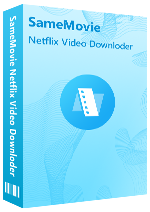
SameMovie Netflix Video downloader allows you to download Netflix movies and shows on a laptop (Windows & Mac). The downloaded fiels can be downlaoded in up to 1080P, and are saved as MP4/MKV file. This means you can transfer your favorite Netflix shows to any device, watch them offline on any device, and in Full HD.
What surprised me the most was its download speed and batch download feature. I remember downloading an entire season of Stranger Things, and it was basically done in half an hour.
Although SameMovie is a paid tool, it offers a trial version — you can download the first five minutes of any video. Plus, there is a way to obtain a free license key.
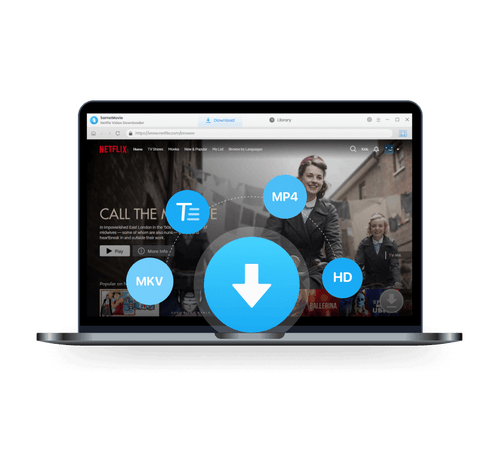
SameMovie Netflix Video Downloader:
- Download Netflix movies, TV shows, documentaries, and more
- Download Netflix videos with HD (1080p and 720p) quality kept
- Support downloading subtitles and audio tracks
- Support fast multi-stream and multi-video downloading
How to download Netflix for Free with SameMovie
STEP 1 Obtain SameMovie Free License Key
Obtain a 1-month SameMovie free license key by particpating the activity.
STEP 2 Download and Register SameMovie
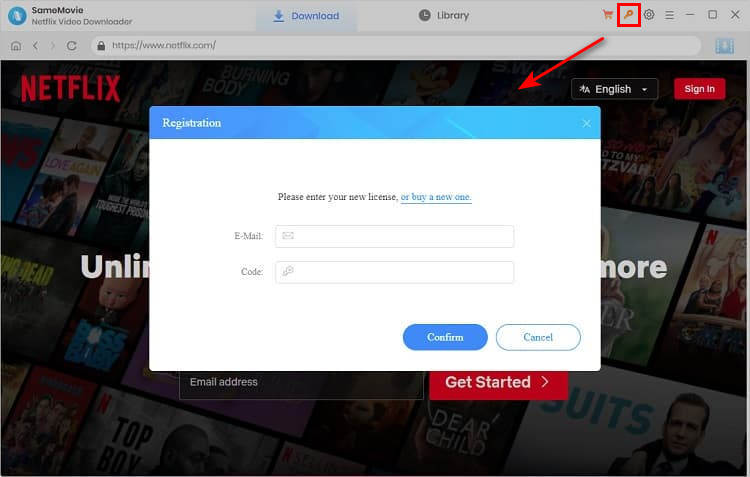
Download SameMovie Netflix Video Downloader from its website and launch it. Then click the "Key" icon in the top-right corner to open the registration window. Copy and paste the registration email and code you received.
STEP 3 Search Netflix Video
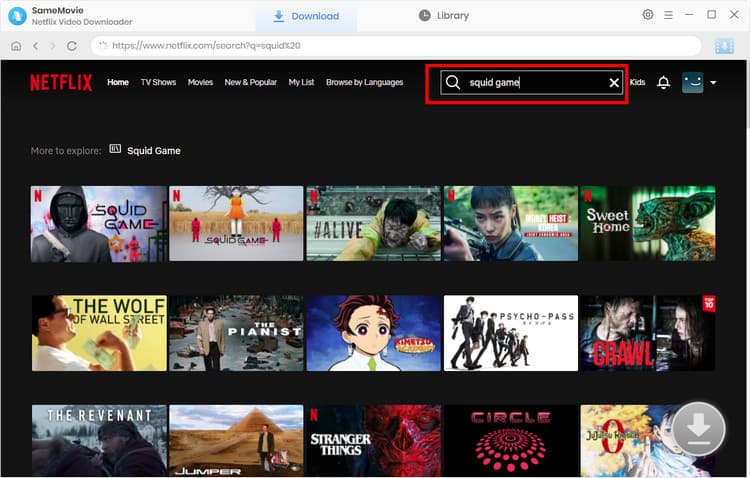
Log in to your Netflix account and search for your desired movies or shows within the built-in browser. Or simply paste the video link into the search bar. Once the video is loaded, click the Download button in the bottom-right corner.
STEP 4 Customize Netflix Downloading Settings
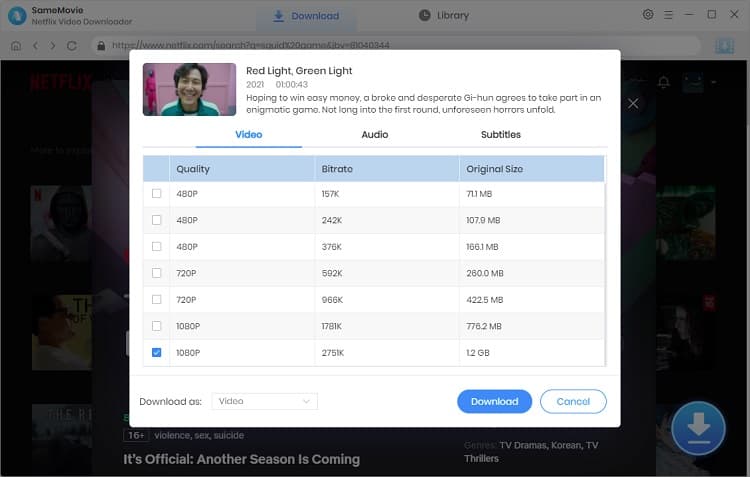
Select the episodes you want to download in the new pop-up window, and then click Advanced Download to set the video quality, audio tracks, and subtitle mode. When you are ready, click Download again.
STEP 5 Find Downloaded Netflix Movies
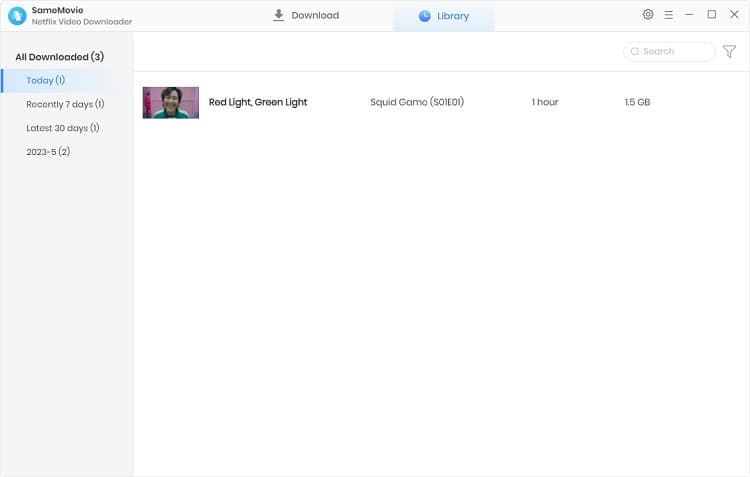
Once it's finished, go to the Library tab to locate all your downloaded Netflix movies or shows.
Part 4: FAQs about Free Netflix Downloaders
How can I get Netflix for free without paying?
Netflix is a paid streaming service, but you can still get Netflix for free through some methods, such as telecom operators' bundle plans, redeeming points for subscriptions, and more. (Check out more details about how to get Netflix for free >>)
Is it legal to download Netflix movies?
Downloading Netflix movies or shows for personal use only is generally considered legal. However, distributing them without permission may violate Netflix's Terms of Service or even your local laws. Please respect Netflix's copyright and only use Netflix downloaders for personal offline viewing.
Final Words
The three free ways to download Netflix movies and shows give budget-limited users great options. But if you want more stable download performance, want to save Netflix movies forever, and watch them on any device in 1080P, I highly recommend giving SameMovie Netflix Downloader a try.
Note: SameMovie is designed to help users enjoy content safely and responsibly. We always recommend using the program for private, non-commercial purposes. The information on this page is provided for informational purposes only and does not support any illegal redistribution of the copyrighted content.
Claire Green, a content writer specializing in blogs. With a passion for streaming video, Claire explores the latest trends, reviews popular platforms, and provides insightful tips for optimizing your streaming experience.

What You'll Need
Recommend