


How to Download Netflix Movies Without App on Laptop

Claire Green May 21, 2026 Category: Netflix Tips
Netflix allows offline downloads on mobile devices, but downloading Netflix movies and shows on a laptop is still limited in 2026. There is still no Netflix app for Mac, and Netflix doesn't offer a download feature for Windows 11. This has led many users to explore downloading Netflix movies without an app.
So, is it possible?
Yes. With the right tool, you can download Netflix movies and shows on laptops without an app and save them forever. Keep reading.
You may also want to know 👉: How to Download Netflix Movies to MP4 [Full Guide]
Part 1: Why Can't I Download Movies on Netflix on My Laptop
Many people ask, "Where is the download button on Netflix on laptop?" or "Why can't I download Netflix movies on laptop?"
The fact is, there has never been a Netflix app for Mac. Mac users can only access Netflix content through browsers, which do not support Netflix downloads. (Check out How to download Netflix on Mac >>)
As for Windows users, older versions of the Netflix app for Windows had a download feature. However, since Netflix released the new Netflix app for Windows, the download feature is no longer available.
So, users can no longer download Netflix movies and shows on laptops using the Netflix app. However, there is still a workaround.
Part 2: Download Netflix Movie on Laptops without App
To download Netflix movies on laptops without an app, you'll need a third-party tool.
SameMovie Netflix Video Downloader is a reliable tool that allows you to browse, play, and download Netflix without an app, all within the tool. It supports 1080P quality and Dolby 5.1, so you don't have to worry that the downloaded files will be blurry. Besides, the downloaded files are saved as MP4/MKV files on your Windows or Mac computer, so you can transfer them to any device you like and watch them offline anytime.
One of the standout features of SameMovie is batch downloading and hardware acceleration. With these features, you can download multiple Netflix movies and shows in one click at up to 10X faster speed. Even if you only have the Standard with ads plan, SameMovie can help remove Netflix ads and download videos completely ad-free.
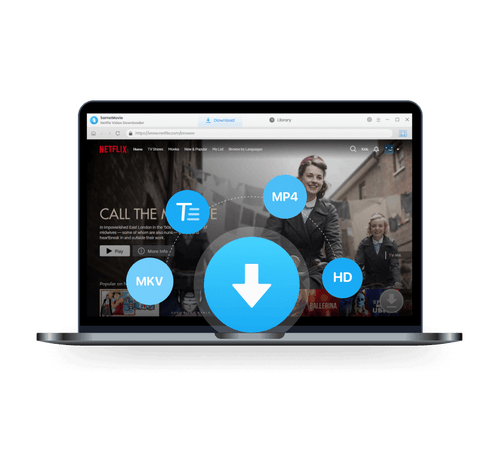
SameMovie Netflix Video Downloader:
- Download Netflix movies, TV shows, documentaries, and more
- Download Netflix videos with HD (1080p and 720p) quality kept
- Support downloading subtitles and audio tracks
- Support fast multi-stream and multi-video downloading
How to Download Netflix Movie on Laptops without App with SameMovie
STEP 1 Launch SameMovie Netflix Video Downloader
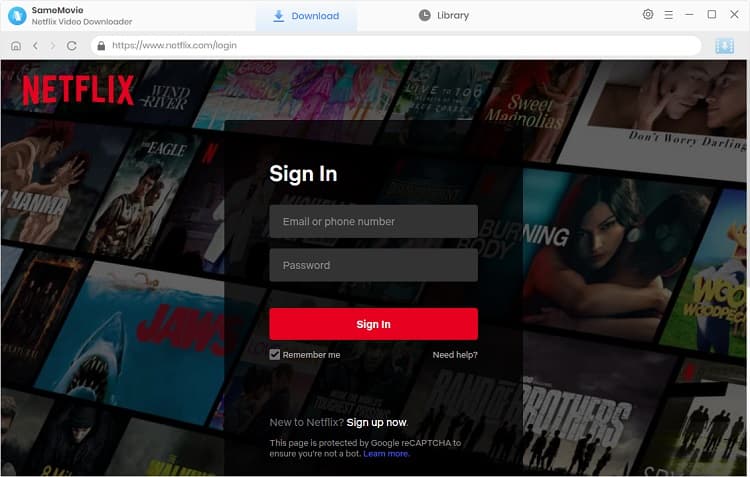
To download Netflix movies without an app, you'll need to install SameMovie on your Windows 11 or macOS 11-26 device first. After installation, launch it and log in to your Netflix account.
STEP 2 Search for Netflix Movies
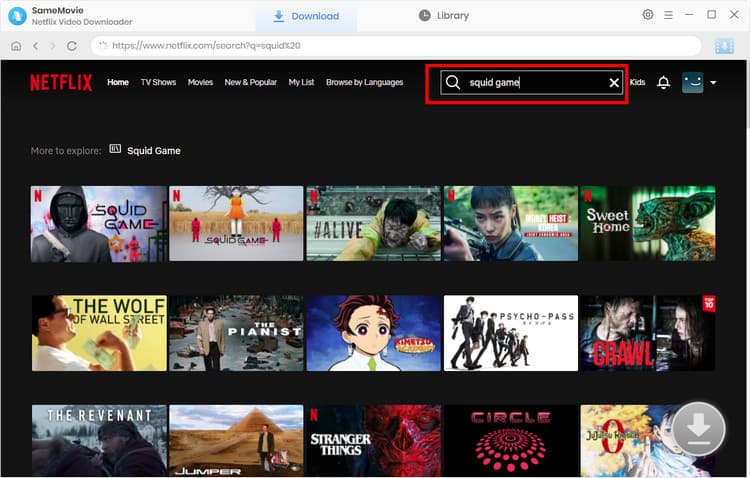
SameMovie has an embedded browser, so you can freely browse and play Netflix movies within the program, all without an app. Once you find the movies or shows you like, simply click the Download button in the bottom-right corner.
STEP 3 Customize Netflix Download Settings
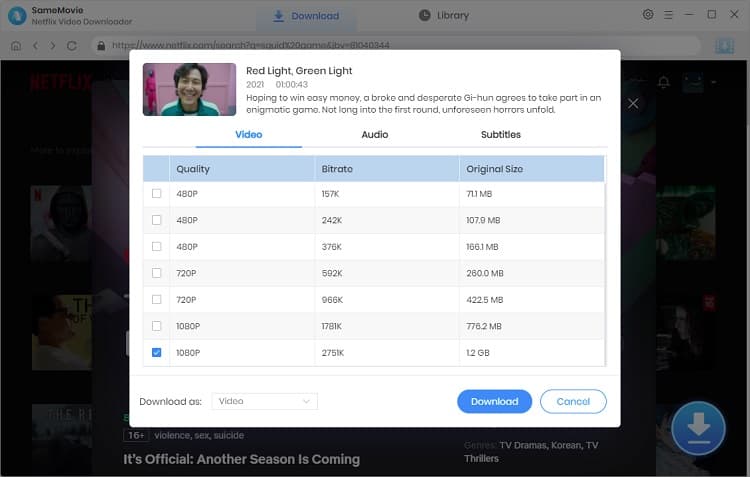
In the new pop-up window, you can customize your desired video quality, audio tracks, and subtitle modes. Once done, click Download again to proceed to the next step.
STEP 4 Locate Downloaded Netflix Movies
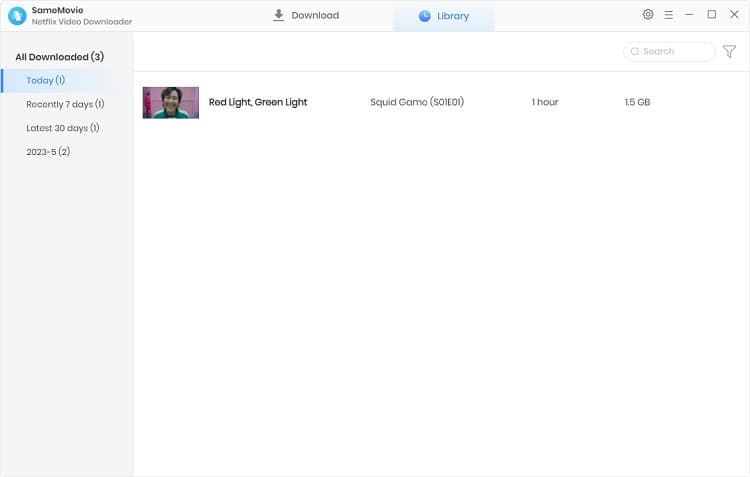
After all Netflix downloads are finished, you can go to the Library tab to locate all your downloaded movies and shows and watch them anytime, anywhere.
Part 3: Downloading Netflix Movies With App vs Without App
Although downloading Netflix movies with app offers a lot convenience for Netflix users and is the safest way to watch Netflix offline, it also comes with many limitations. The following is a table comparing benefits and drawbacks of downloading Netflix movies with app and without app.
| Features | Downloading Netflix Movies With App | Downloading Netflix Movies Without App |
|---|---|---|
| Compatibility | Android, iOS, Amazon Fire Tablet, Google Chromebook |
Windows 10-11 & macOS 11-26 |
| Downloaded Video Quality | 1080P | 1080P |
| Batch Download | ❌ | ✅ |
| Transferable | ❌ | ✅ |
| Play on Any Device | ❌ | ✅ |
| Unlimited Netflix Downloads | ❌ | ✅ |
| Accessible After Subscription Ends | ❌ | ✅ |
| Save Netflix Downloads Forever | ❌ | ✅ |
Part 4: FAQs about Downloading Netflix Movies without App
Can I download Netflix movies without an app for Android?
No. There is no method to download Netflix movies without an app on Android. Users can only download Netflix movies within the app, and the downloaded files can only be played in the app and can't be transferred to other devices.
Is there a Netflix app for Windows?
Yes, there is a Netflix app for Windows. You can go to the Microsoft Store and type "Netflix" to install it. However, please note that there is no download feature in the Netflix app for Windows.
If you want to download Netflix movies on your Windows 11 or Windows 10 device, you may need a third-party tool like SameMovie.
Is it legal to download Netflix movies with SameMovie?
Downloading Netflix movies on laptops with SameMovie is acceptable if you only use these files for personal offline viewing. However, distributing these downloaded Netflix movies without permission might be against Netflix's terms of service or even your local laws.
Final Words
In this guide, we introduced a safe and reliable tool that allows you to download Netflix movies without an app. While downloading Netflix movies in the official app comes with many restrictions, using a third-party tool like SameMovie can make your offline viewing experience smoother and more flexible.
Claire Green, a content writer specializing in blogs. With a passion for streaming video, Claire explores the latest trends, reviews popular platforms, and provides insightful tips for optimizing your streaming experience.

What You'll Need
Recommend