


Best YouTube Movie Downloader in 2026 (MP4 & FHD)

Nina Prescott September 25, 2026 Category: Topics
YouTube Movies is a streaming section within YouTube which offers a rich library of free classic movies and newly released trending titles. Thanks to its large free library and relatively lower rental or purchase costs, it has become a popular choice for many users.
But if you want to download YouTube movies, keep them on your device permanently, and watch anytime, there are some unavoidable limits on YouTube official. No worries, to help you better stream offline, we tested and found a reliable YouTube Movie Downloader. Dive in to check the full review process.
 You May Also Like: Top 9 Safe & Free YouTube Video Downloaders [PC/Online/Android]
Reading Guide
Part 1: Can I Download Movies from YouTube Officially?
It depends on the situation. For movies that are free with ads, they are usually not allowed to be downloaded, even if you have YouTube Premium. In terms of YouTube movies requiring payment or rent, these are the only types of movies that can be downloaded from YouTube. But you need to buy or rent these movies, or have YouTube Premium (Check out How to download YouTube videos without premium >>).
How to Download YouTube Videos with Premium?
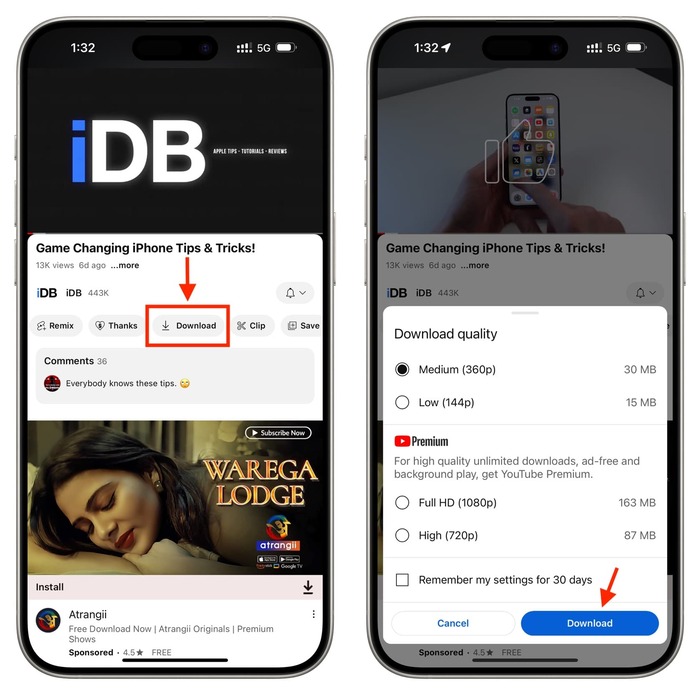
- Open the YouTube app on your phone or tablet.
- Head to the YouTube Movies channel, choose the movie you want to download (make sure you have YouTube Premium or have bought the movie).
- Click the "Download" button below the video player. After finishing, find the downloaded videos in your "Library" tab.
Part 2: Why People Want a YouTube Movie Downloader
Although you can download movies from YouTube officially, you might often encounter many challenges and limitations. A YouTube Movie Downloader can save you a lot of trouble, and make your streaming smoother, with more freedom, and without interruption.
| ❌ Limitations of YouTube Movies | ✅ What a YouTube Movie Downloader Can Do |
|---|---|
| Free YouTube movies have ads and cannot be downloaded | Download free movies ad-free and watch offline anytime |
| Rented movies expire after 30 days or 24–48 hours after first play | Save rented movies permanently and watch anytime |
| Downloaded movies only play in the official YouTube app | Save movies as MP4/MKV and watch on any device |
| Some movies are restricted to specific countries | Remove regional restrictions and watch anywhere |
| Rented movies can only be downloaded to one device | Download to multiple devices without restrictions |
| Purchased movies require internet re-authentication after 30 days | Keep movies permanently offline without re-authentication |
Part 3: Best YouTube Movie Downloader in 2026 (Recommended Tool)
To download YouTube movies, safety is what I care about most. Therefore, during testing YouTube movie downloaders, I focus both on download performance and reliability.
SameMovie YouTube Movie Downloader is one of the best tools that offers stable downloading performance and ensures secure usage. During tests, I found SameMovie can easily download YouTube movies as MP4/MKV files in 1080P with just a few steps. Besides, even YouTube movies with ads, the downloaded files are clean and ad-free. Before downloading, I can even choose different audio tracks and subtitle modes.
One feature I like about SameMovie is the batch downloading. I can add a double of different movies into the downloading list at the same time. Using the hardware acceleration, the downloads often finish very fast. One more notable feature: I surprisingly found SameMovie is free to download YouTube videos and shorts, and the downloaded files can go up to 8K with no quality loss. It is really worthy to try as a YouTube video downloader.
Check out the Comprehensive Review of SameMovie Video One >>

Key Features of YouTube Movie Downloader:
- Download and watch free YouTube movies without ads.
- Keep rented YouTube movies forever and watch anytime.
- Save YouTube movies in MP4/MKV with HD quality, watch on any device.
- Save multiple YouTube movies at once.
- Keep audio and subtitles with multiple languages.

How to Download YouTube Movies with SameMovie
STEP 1 Install & Launch SameMovie
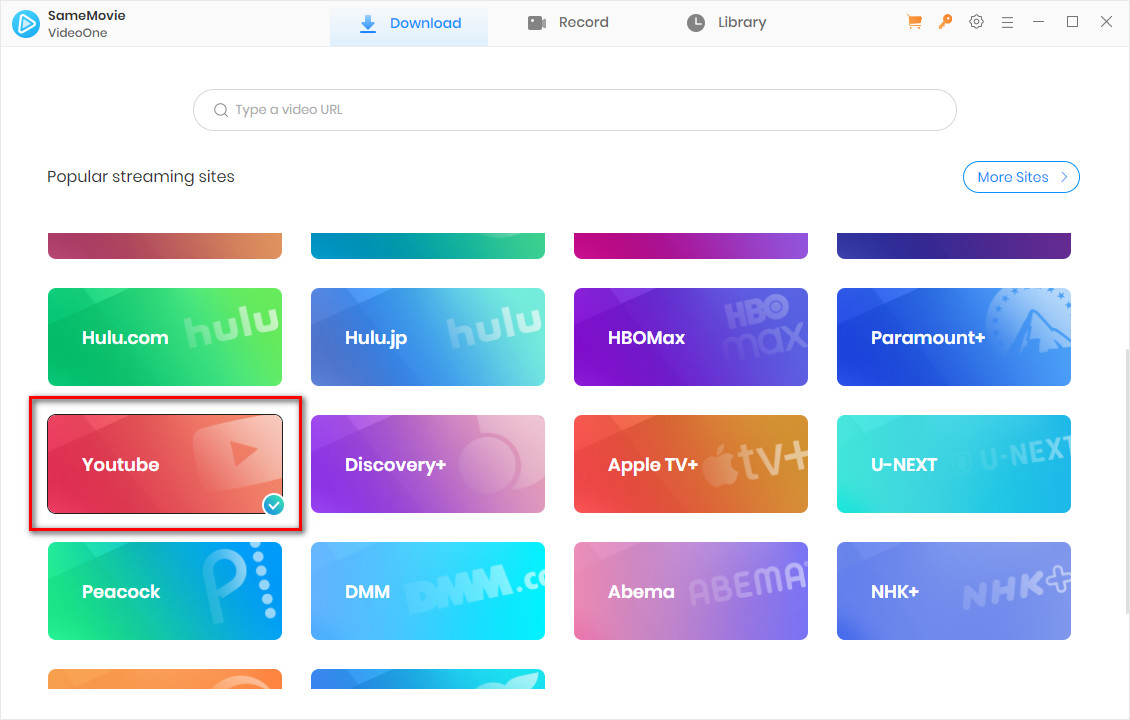
Download and launch SameMovie Video One on your laptop (Windows/Mac). Select YouTube and log in to your account.
STEP 2 Find Your YouTube Movie
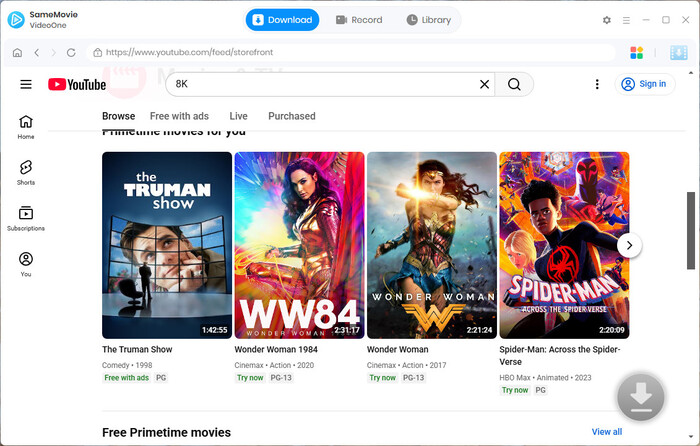
Browse and find the movie you like within the web player, or simply paste the video link in the search bar. You can directly download YouTube movies that are free with ads, but for paid movies, you have to buy or rent them first. Once the movies are loaded, click "Download" in the bottom-right corner.
STEP 3 Advanced YouTube Movie Download
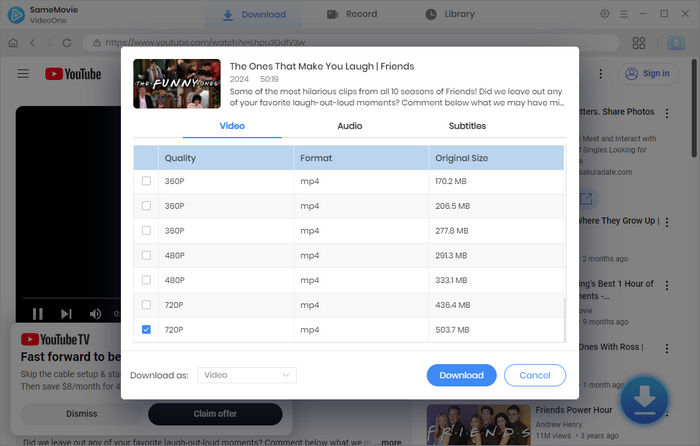
In the Advanced Download window, select your desired video quality, audio tracks, and subtitles. After you finish setting up, click the "Download" button again.
STEP 4 Locate Downloaded YouTube Movies
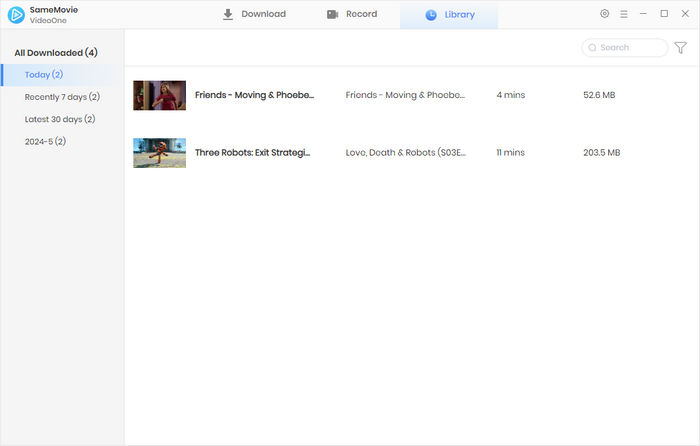
Once finished, head to the Library tab to access all your downloaded YouTube movies. Now you can watch YouTube movies offline without ads, anytime, and anywhere.
Part 4: FAQs about YouTube Movie Downloader
How to save a video on YouTube to your phone?
You can directly download videos to your phone through the YouTube official app. But similar to downloading YouTube movies, there are many limitations, like expiration and quality compression. If you want to keep YouTube videos on your phone forever, in high quality, you can use SameMovie to download YouTube videos to your Windows and Mac, then transfer them to your phone using a USB cable.
You May Also Like: How to Download YouTube Videos to USB Drive - 3 Easy Ways in 2026
Is it legal to download YouTube Movies with SameMovie?
SameMovie is designed to make your offline viewing experience smoother. We recommend using SameMovie only for personal use. If you distribute the downloaded movies without permission, it might violate YouTube's terms of service or even your local policies.
Final Words
This article introduces how to download YouTube videos with Premium through the official app. While there are many download limitations in the YouTube official app, SameMovie YouTube Movie Downloader offers more freedom. It allows you to download YouTube movies as MP4/MKV files in 1080P, without ads, and save them forever. It is really worth trying.
Note: This article is for informational purposes only. The download methods mentioned are intended for personal use only. We strongly oppose any illegal sharing, distribution, or commercial use of copyrighted content. Please respect YouTube's terms of service and local copyright laws.
Nina Prescott is a senior writer renowned for her expertise in resolving streaming platform download errors. Her concise writing style and practical methods have earned her a stellar reputation among readers and peers alike. Whether you're facing a technical glitch or seeking streaming tips, Nina's guidance ensures a smooth and enjoyable reading experience.
What You'll Need
Recommend