


4 Easy Methods to Download YouTube Videos on Mac in 2026

Nina Prescott October 13, 2026 Category: Topics
Want to download YouTube videos on Mac to watch your favorite videos offline? Although YouTube offers an official download feature, it has certain limitations.
In this article, we'll introduce 4 easy and safe methods to download YouTube videos on Mac, including using YouTube Premium, SameMovie, an online downloader, or a screen recorder. After reading this article, you'll be able to find the best way to download YouTube videos on Mac for your needs.
 You May Also Like: Top 9 Safe & Free YouTube Video Downloaders [PC/Online/Android]

Reading Guide
- Quick Comparison: Best Ways to Download YouTube Videos on Mac
- Method 1: Download YouTube Videos on Mac with YouTube Premium
- Method 2. Download YouTube Videos on Mac with SameMovie
- Method 3: Download YouTube Videos on Mac Without Installing Software
- Method 4: Record YouTube Videos on Mac for Free
- FAQs about Downloading YouTube Videos on Mac
Quick Comparison: Best Ways to Download YouTube Videos on Mac
There are several ways to download YouTube videos on Mac, and each method has its own advantages and limitations. To help you find a better method that suits your needs, we compare four methods based on pricing, download quality, output format, and other features in the following table.
| Features | SameMovie | YouTube Premium | Y2Mate | macOS Screen Recording |
|---|---|---|---|---|
| Free to Use | ✓ | ✗ | ✓ | ✓ |
| No Installation Required | ✗ | ✓ | ✓ | ✓ |
| Maximum Quality | Up to 8K | Up to 1080p | Up to 1080p | Depends on settings |
| Save Videos as MP4 Files | ✓ | ✗ | ✓ | ✓ |
| Save Videos as MKV Files | ✓ | ✗ | ✗ | ✗ |
| Extract Audio as MP3 | ✓ | ✗ | ✓ | ✗ |
| Batch Downloading | ✓ | ✗ | ✗ | ✗ |
| Download Playlists | ✓ | ✓ | ✗ | ✗ |
| Preserve Multiple Audio Tracks and Subtitles | ✓ | ✗ | ✗ | ✗ |
| Watch Videos Offline | ✓ | ✓ Within YouTube | ✓ | ✓ |
Method 1: Download YouTube Videos on Mac with YouTube Premium
Downloading YouTube videos on Mac with YouTube Premium is the most legitimate and official method. As long as you have a YouTube Premium subscription ($15.99/month), you can download YouTube videos and watch them offline through the website.
How to Download YouTube Videos on Mac with YouTube Premium
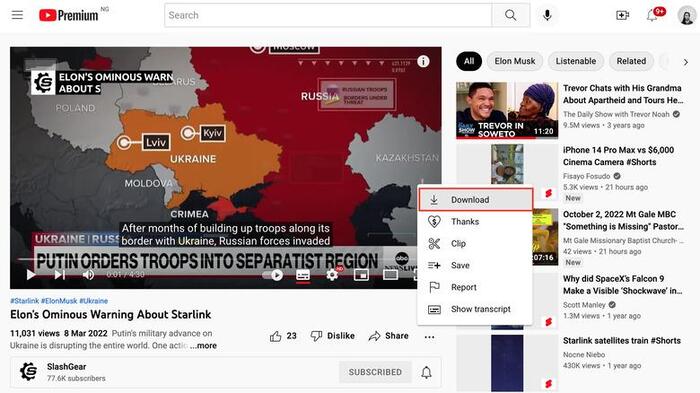
- Open a supported browser on your Mac (Chrome, Edge, Firefox, or Opera is recommended). Visit YouTube and log in to your account.
- Find the video you want to download and click to open it.
- Find the Download button below the video player and click it.
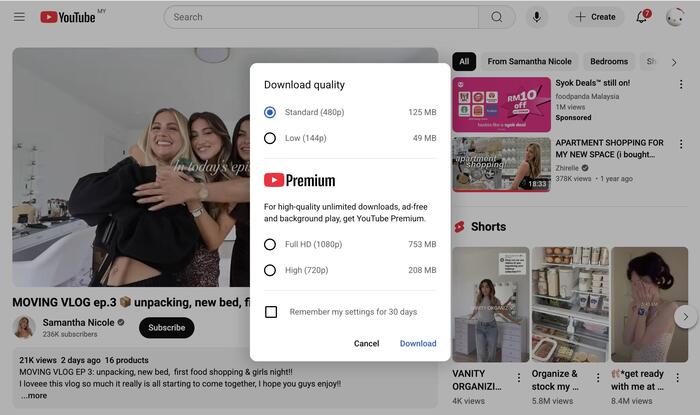
- Select your preferred video quality and wait for the download to finish.
- Once the download is complete, you can find the downloaded videos in the Downloads tab in the left sidebar.
❌ Limitations of Downloading YouTube Videos on Mac with YouTube Premium
- ❌ The downloaded videos aren't actual local MP4 files. They can only be played within YouTube and cannot be transferred to and played on other devices.
- ❌ You must connect to the internet periodically (usually at least once every 30 days) to keep your downloaded videos available for offline viewing. Otherwise, they may become unavailable.
- ❌ Currently, only Chrome, Edge, Firefox, and Opera support this download feature. Safari is not supported.
- ❌ The maximum download quality is 1080p.
- ❌ A YouTube Premium subscription is required to use this feature.
Method 2. Download YouTube Videos on Mac with SameMovie
For downloading YouTube videos on Mac as actual MP4 files, SameMovie YouTube Video Downloader is a fairly convenient option. It allows you to download YouTube without preimum, and supports downloading YouTube videos on Mac for free in up to 8K quality. In addition, it can preserve multiple audio tracks and subtitles in different languages. It also supports batch downloading if you want to download multiple YouTube videos at once.
How to Download YouTube Videos on Mac with SameMovie
STEP 1 Install SameMovie YouTube Video Downloader
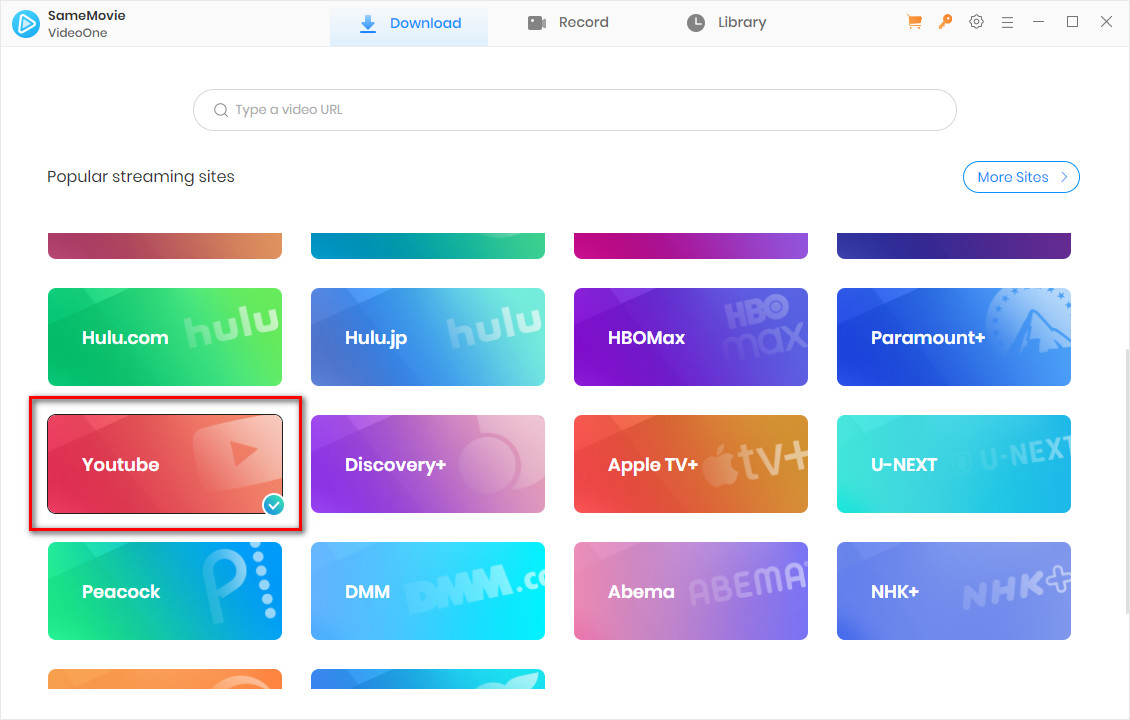
Download and launch SameMovie YouTube Video Downloader on your Mac (compatible with macOS 11–26). Select YouTube as the website and log in to your account.
STEP 2 Find the YouTube Videos You Want to Download
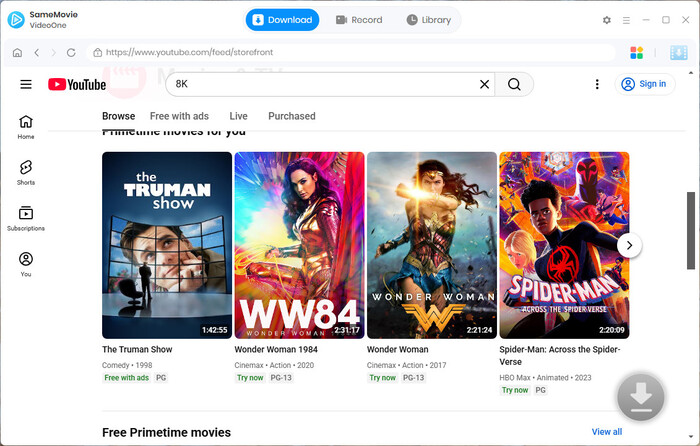
Search for the YouTube videos you want to download in the built-in web player, or simply paste a video link into the search bar. Once the videos are loaded, click "Download" in the bottom-right corner.
STEP 3 Customize Your YouTube Downloads
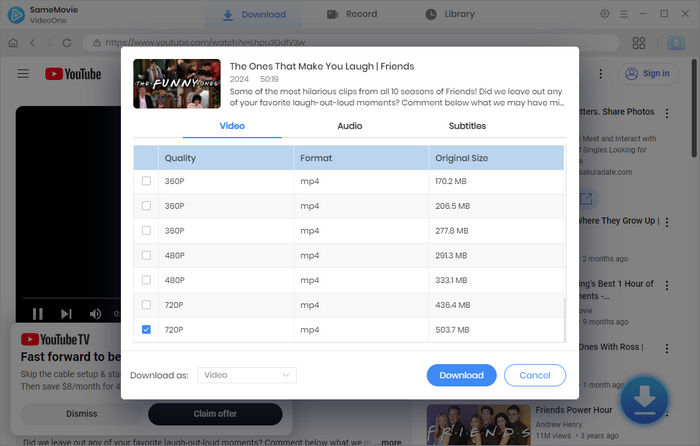
Next, you can select your desired video quality, audio tracks, and subtitles in the Advanced Download window, then click the "Download" button again.
STEP 4 Locate Downloaded YouTube Videos on Your Mac
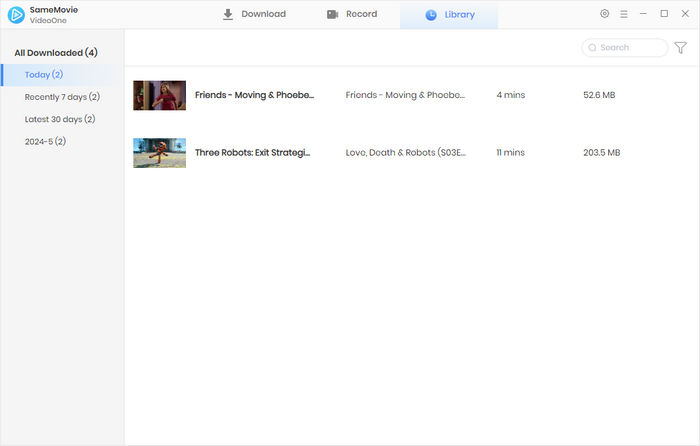
Once the downloads are complete, head to the Library tab, where all your downloaded YouTube videos are listed by date. Click the file icon on the right to locate the downloaded videos on your Mac.
Pros and Cons of SameMovie
😊 Pros
- Download YouTube videos, Shorts, and playlists for free without restrictions.
- Preserve crystal-clear YouTube video quality in up to 8K.
- Download YouTube videos as MP4, MKV, or MP3 files, so you can transfer them to other devices.
- Download multiple videos at once with hardware acceleration.
- Preserve YouTube dubbed audio (5.1) and multi-language subtitles.
😣 Cons
- Only supports Windows 10–11 and macOS 11–26.
- Downloading YouTube movies requires an upgrade.
Method 3: Download YouTube Videos on Mac Without Installing Software
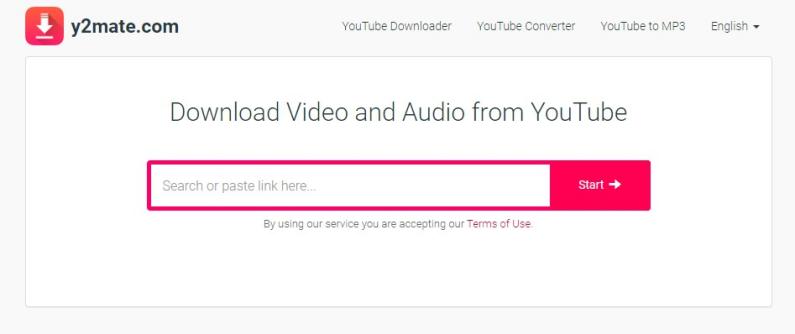
Prefer not to install additional software? Online downloaders offer a browser-based alternative. Currently, one of the common online YouTube video downloaders is Y2Mate. It supports downloading YouTube videos as MP4 files or extracting audio as MP3 files, with no login or installation required.
How to Download YouTube Videos on Mac with Y2Mate
- Open your browser and visit Y2Mate.
- Copy the YouTube video link you want to download and paste it into the input bar in the center.
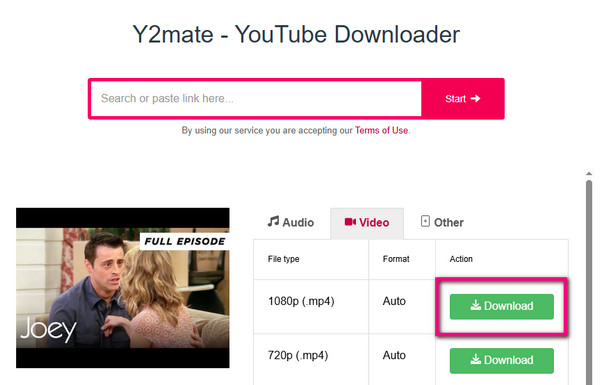
- Click "Start" and wait for it to process the video. Then, select your desired video quality (up to 1080p).
- Click "Download", and the video will be saved to your Mac.
Pros and Cons of Y2Mate
😊 Pros
- Completely free and requires no installation.
- Supports downloading YouTube videos and extracting audio separately.
- Supports selecting different video qualities before downloading.
- Supports downloading YouTube Shorts.
😣 Cons
- Some redirects and pop-ups.
- Only supports resolutions up to 1080p.
- Unreliable; the domain name changes frequently.
- Processing sometimes fails, download speeds can be slow, or the website may be inaccessible.
Method 4: Record YouTube Videos on Mac for Free
If you don't want to install software or don't trust the safety of online tools, you can consider using macOS's built-in screen recording feature to save YouTube videos on your Mac. This is a completely free and safe method that requires no additional installation.
How to Record YouTube Videos on Mac
- Open the YouTube video you want to save.
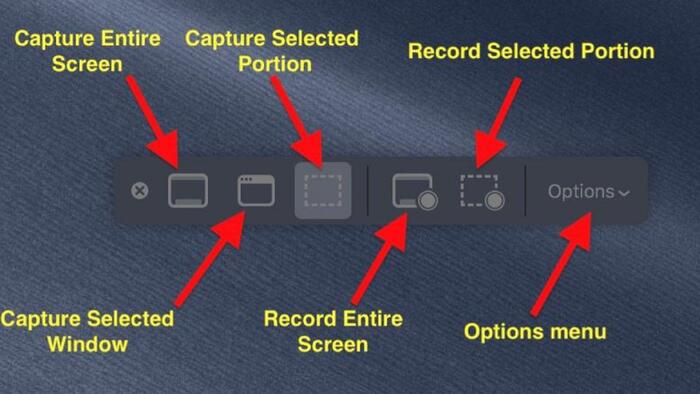
- Press Command + Shift + 5 on your keyboard.
- Select "Record Entire Screen" or "Record Selected Portion."
- Click the Record button to start recording.
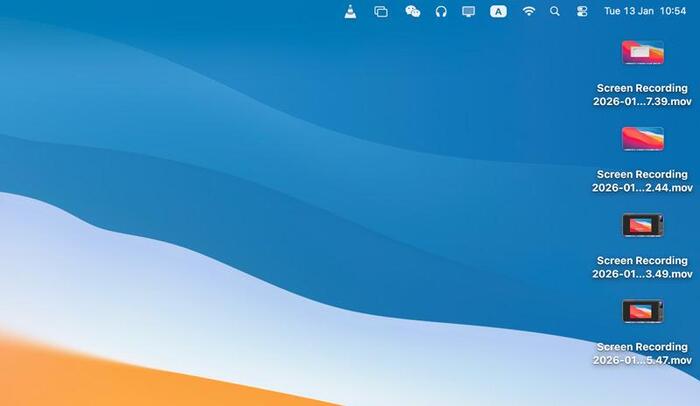
- When finished, click the Stop button in the menu bar, and the video will be saved to your desktop.
Pros and Cons of macOS Screen Recording
😊 Pros
- Totally free to use.
- Built into macOS, safe, and ad-free.
- No need to install additional software.
- Easy to operate.
😣 Cons
- Requires recording in real time, making it less suitable for long videos.
- You can't fast-forward or turn off the video while recording.
- The recorded files are often large.
- Video quality depends on your screen resolution and recording settings.
FAQs about Downloading YouTube Videos on Mac
How to Download YouTube Videos on Mac in Safari?
Unfortunately, YouTube doesn’t support downloading videos directly through Safari. If you want to download YouTube videos in Safari, you can consider using a third-party online tool like Y2Mate. Visit Y2Mate in Safari, then copy and paste the YouTube video link to download it.
Is It Leagal to Download YouTube Videos on Mac?
It depends on what you use the downloaded videos for. If you use the downloaded videos only for personal offline viewing, it is generally considered acceptable. However, you might violate YouTube's Terms of Service or local laws if you distribute or sell the downloaded files without permission.
Final Words
There are several ways to download YouTube videos on Mac. The best YouTube video downloader for Mac depends on your needs. YouTube Premium suits those who prefer an official way to watch YouTube videos offline. Online downloaders like Y2Mate are better for those who don't want to install software, and screen recording can be a free alternative.
If you want to download YouTube videos on Mac as MP4 files and require higher video quality, batch downloading, and multiple audio tracks and subtitles, you can consider SameMovie YouTube Video Downloader. Choose the method that best suits your needs, and please remember to respect copyright laws.
Disclaimer: This article is for educational and informational purposes only. It covers methods for downloading YouTube videos for lawful purposes. Please respect copyright laws and the rights of content creators.
Nina Prescott is a senior writer renowned for her expertise in resolving streaming platform download errors. Her concise writing style and practical methods have earned her a stellar reputation among readers and peers alike. Whether you're facing a technical glitch or seeking streaming tips, Nina's guidance ensures a smooth and enjoyable reading experience.

What You'll Need

Recommend