


3 MKV Movie Download Methods That Still Work in 2026

Nina Prescott October 9, 2026 Category: Topics
Many of you may want to find MKV movie download sites because MKV can preserve good video quality while supporting multiple audio tracks and subtitles. However, in reality, most free movie download sites are filled with ads, unstable links, and pirated content, and finding an authentic, reliable MKV download site is almost impossible.
No worries! We’ve collected 3 methods to download movies as MKV files that still work in 2026, including a free MKV movie download site and more stable downloading solutions. Let's have a look.
 You May Also Like: 10 Best Safe & Legal 4K Movie Download Sites in 2026
Reading Guide
- Part 1: Why Choose MKV Over MP4
- Part 2: 3 Legal & Safe Ways to Download MKV Movies
- 2.1 Download Popular Movies as MKV with SameMovie
- 2.2 Download Public Domain Movies as MKV from Internet Archive
- 2.3 Rip Your Own DVDs, Blu-rays & 4K Discs to MKV with MakeMKV
- Part 3: How to Build Your Own MKV Library on Plex
- Part 4: FAQs about MKV Movies Download
Part 1: Why Choose MKV Over MP4
MKV and MP4 are 2 common video files. Both of them can save high quality video but there are some migrate difference between them:
| Features | MKV | MP4 |
|---|---|---|
| Video Quality | High Quality | High Quality |
| Multiple Audio Tracks | √ | × Limited Support |
| Multiple Subtitles | √ | × Limited Support |
| File Size | Larger | Smaller |
| Recommended For | Movie Storage | Everyday Playback |
From the table, MKV is more suitable for preserving movies with multiple audio tracks and subtitles, while MP4 offers better compatibility for everyday playback. That's why many users are looking for MKV movie download methods.
Part 2: 3 Legal & Safe Ways to Download MKV Movies
2.1 Download Popular Movies as MKV with SameMovie
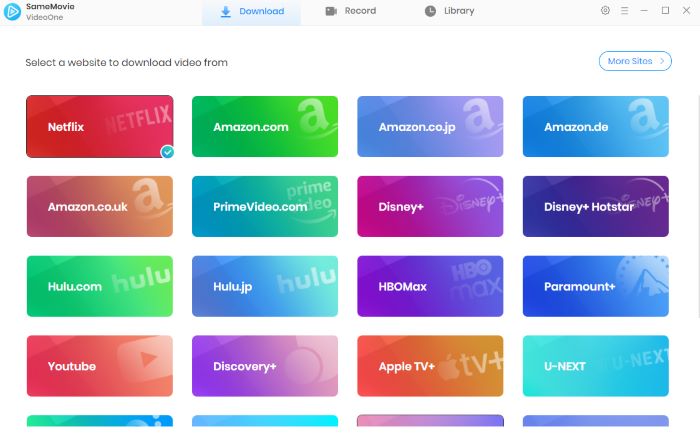
The first tool to download movies as MKV files that I want to recommend is SameMovie Video One, which supports over 1,000 streaming sites, including Netflix, Amazon Prime Video, Disney+, HBO Max, Tubi, Plex, Pluto TV, The Roku Channel, YouTube, and more.
With SameMovie, you can download movies from streaming sites as MKV or MP4 files with multiple audio tracks and subtitles. SameMovie supports batch download and hardware acceleration, so you can download multiple different movies as MKV at once. Once downloaded, you can save those MKV files forever, or transfer them to any device you like.
How to Download MKV Files with SameMovie?
STEP 1 Install SameMovie Video One
Download and install SameMovie Video One on your Windows or Mac. Launch the program and find a movie site you want to download from. Here, we use Tubi as an example.
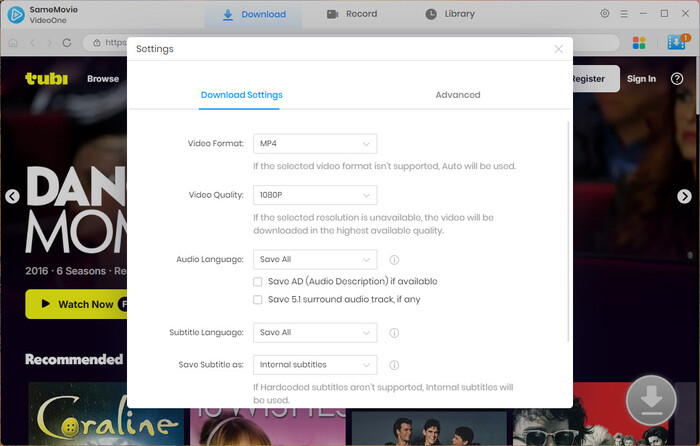
STEP 2 Set Up Output Format as MKV
Click Menu > Settings, find the Download tab, and choose Video Format as MKV in the first setting option. After that, close the Settings window.
STEP 3 Search for Preferred Movies
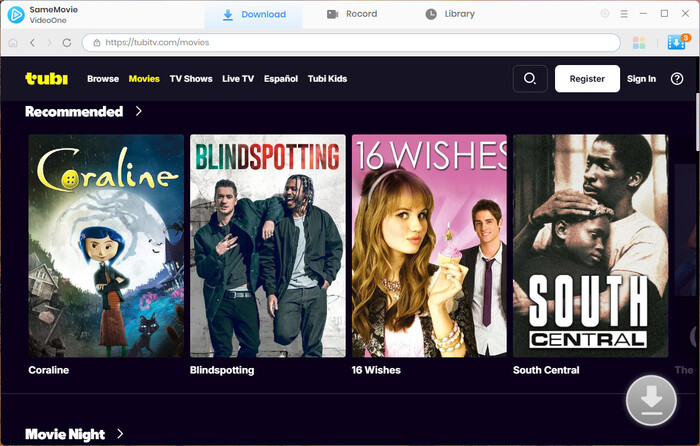
Click into the Tubi website, and you can freely browse and search for the movies you want to download within the built-in browser. Once the movie is successfully loaded and detected, click the Download button in the bottom-right corner.
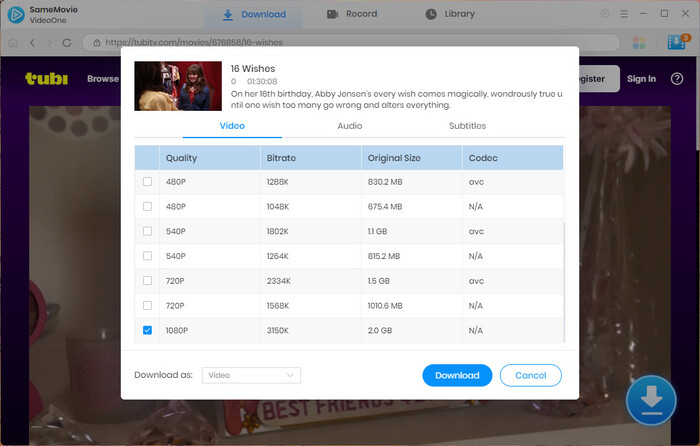
STEP 4 Advanced Download Settings
Next, select video quality, audio tracks, and subtitles before downloading. Also, you can download multiple movies at once with batch download.
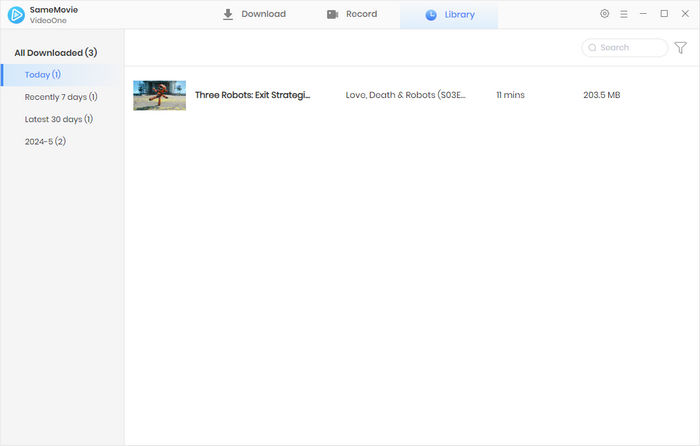
STEP 5 Locate Downloaded MKV Movies
Once done, head to the Library tab to find all your downloaded MKV movies and start watching them offline anytime, anywhere.
Pros and Cons of SameMovie
😊 Pros
- Download MKV movies from 1000+ sites.
- Keeps videos in high quality(up to 8K) and supports MP4/MKV output formats.
- Removes ads from downloaded videos for a cleaner offline viewing experience.
- Supports batch downloads and hardware acceleration.
- Preserves available subtitles and audio tracks when downloading.
😣 Cons
- It’s not a free tool; a paid subscription is required.
- Only supports Windows and Mac.
2.2 Download Public Domain Movies as MKV from Internet Archive
Internet Archive is a non-profit digital library that preserves a wide range of public content, including public domain movies. Some movies offer multiple download formats, including MP4 and MKV.
However, it is worth noting that due to the nature of the website, most movies provided by the site are older and less-known titles. It is more suitable for users who are interested in classic movies or film studies, rather than those who want to download trending movies as MKV files for offline viewing.
How to Download MKV Files on Internet Archive?
Visit Internet Archive in your browser and head to the Movies section.
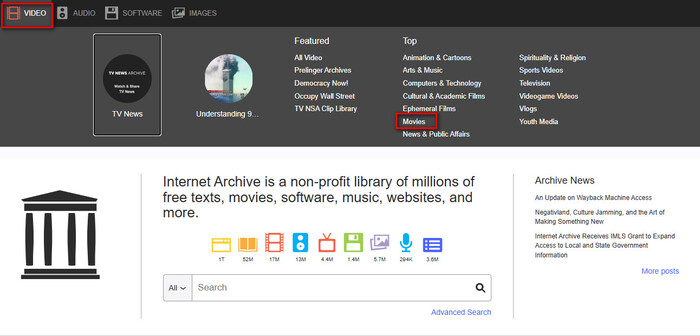
Browse and find the movie you want to download, then click on it.
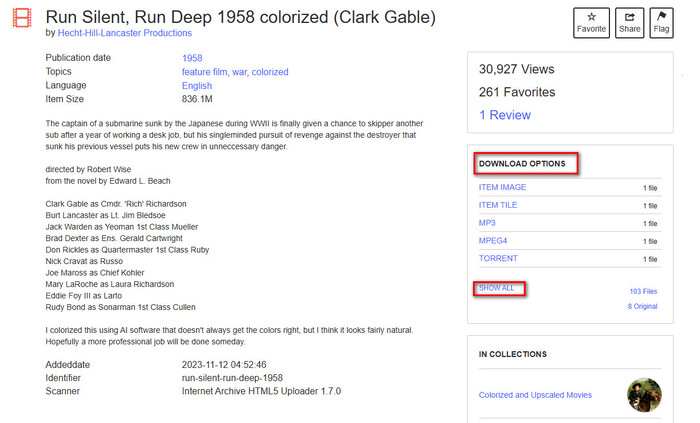
Find the MKV download option on the right side. If you cannot find it, click Show All to view all available files in the list. (Note: Only a few movies are available for download as MKV files.)
Pros and Cons of Internet Archive
😊 Pros
- Free to download.
- Legal public domain resources.
- No registration required for many files.
- Multiple download formats available.
😣 Cons
- Movie sources are primarily old and less-known movies.
- Only a few movies can be downloaded as MKV files.
- Video quality is low and depends on the uploader.
- Not suitable for downloading new movies from mainstream platforms.
2.3 Rip Your Own DVDs, Blu-rays & 4K Discs to MKV with MakeMKV
MakeMKV is not an MKV download site, but a dedicated tool for converting content from DVDs. It can convert DVD, Blu-ray, and 4K UHD Blu-ray movies into MKV files while keeping the original audio tracks and subtitles.
How to Convert Movies from DVD with MakeMKV?
Install MakeMKV on your computer. It supports Windows XP or later and Mac OS X 10.7 or later.
Insert a DVD/Blu-ray disc, launch MakeMKV, and select the corresponding disc.
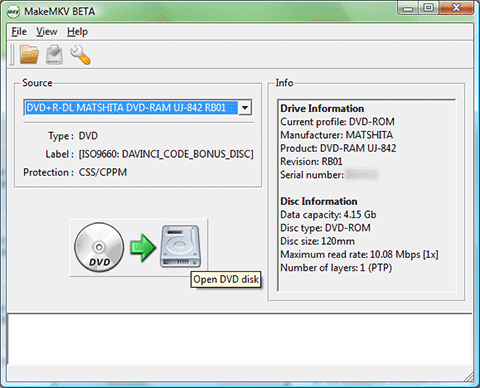
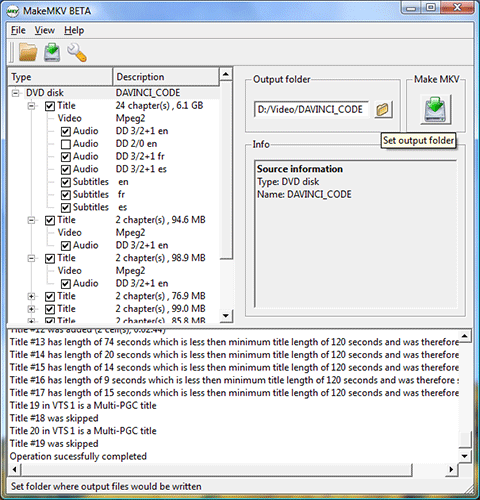
Select the titles, audio tracks, and subtitles you want to keep, click the "Make MKV" button, and wait for the process to finish.
Pros and Cons of MakeMKV
😊 Pros
- Converts DVD, Blu-ray, and 4K UHD Blu-ray movies to MKV.
- Keeps original video quality, audio tracks, and subtitles.
- Great for building a personal movie library from physical discs.
😣 Cons
- Requires users to own physical discs.
- Needs a compatible disc drive.
- Not suitable for downloading movies from streaming platforms.
Part 3: How to Build Your Own MKV Library on Plex
After you download more and more MKV files, it can become troublesome to manage these disorganized files. Plex is a practical tool that can help you organize and manage local MKV files, turning normal movie files into a movie library with covers, introductions, and clear categories.
How to Set Up Plex MKV Library
Install Plex Media Server on your computer.
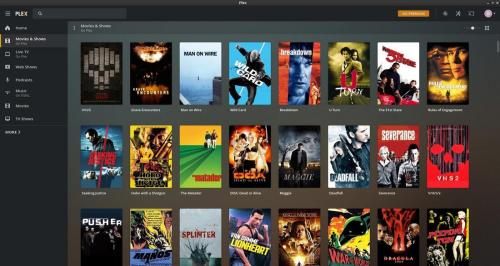
Create a specific MKV folder on your local device. Name it as "Movies" or any name you prefer, add your MKV movies into this folder, and make sure the file names match the actual movie titles because Plex uses file names to identify and analyze movie information.
Open Plex Media Server, click Add Library, and add the MKV movie folder you just created.
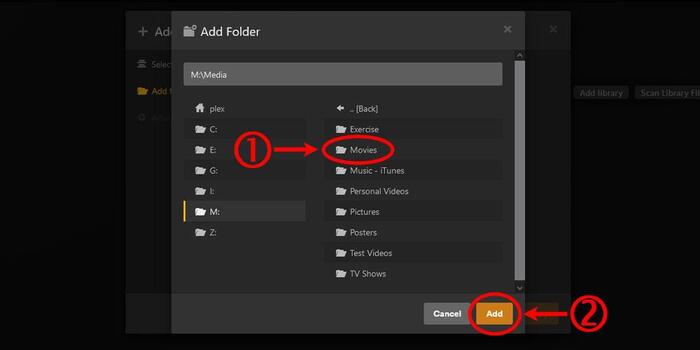
After that, you can watch your MKV files anywhere through Plex Web.
Part 4: FAQs about MKV Movies Download
Is It Legal to Download Movies as MKV Files?
It depends on what you use these MKV files for. If you only use these files for personal offline viewing, it is considered acceptable. However, if you use them for commercial purposes, such as selling or distributing them, it may violate your local laws.
Why can't my TV or phone play downloaded MKV movie files?
This may be due to the system lacking a built-in encoder for MKV video playback. You can install a professional player like VLC or PotPlayer. Alternatively, you can convert MKV files to MP4.
You may also like 👉: 3 Best Popular MP4 Movies Download Sites >>
How do I select or change subtitle languages in an MKV movie?
MKV files can have multiple built-in subtitle and audio tracks. You can switch to different tracks by clicking the Subtitle icon at the bottom of the playback window.
Final Words
It's not easy to find a reliable MKV movie download method. Many so-called free MKV download sites are actually full of issues like pop-up ads, unstable URLs, and unknown sources of content.
We introduced 3 practical MKV movies download tools in this article. Each tool has its own benefits and drawbacks. Internet Archive suits those who are looking for free and old movies to download. MakeMKV is better for converting DVDs and Blu-rays to MKV. If you are looking for a more powerful way to download trending movies as MKV files from mainstream sites like Netflix, Amazon, and Disney+, SameMovie is a more practical option.
Nina Prescott is a senior writer renowned for her expertise in resolving streaming platform download errors. Her concise writing style and practical methods have earned her a stellar reputation among readers and peers alike. Whether you're facing a technical glitch or seeking streaming tips, Nina's guidance ensures a smooth and enjoyable reading experience.

What You'll Need

Recommend